Claude Code is powerful out of the box, but without structure, it jumps straight into coding: no planning, no tests, no systematic approach. The Superpowers plugin fixes this issue by enforcing proven development workflows that prevent the chaos.
Superpowers is a skills framework that intercepts Claude Code at key moments. Instead of immediately writing code when you ask for something, it stops and asks questions first. Then it enforces TDD, creates implementation plans, and reviews its own work before moving on.
The core workflow:
- Brainstorm: refines your idea through Socratic questioning
- Plan: creates bite-sized tasks (2-5 minutes each) with exact file paths
- Execute: dispatches subagents per task with two-stage review
- Finish: verifies tests, offers PR/merge options, cleans up
# Open the plugin menu
/plugin

# Navigate to "Discover" tab
# Search for "superpowers"
# Select and install
After installation, restart Claude Code. You'll see "SessionStart:startup hook succeeded: Success" confirming the plugin is active.
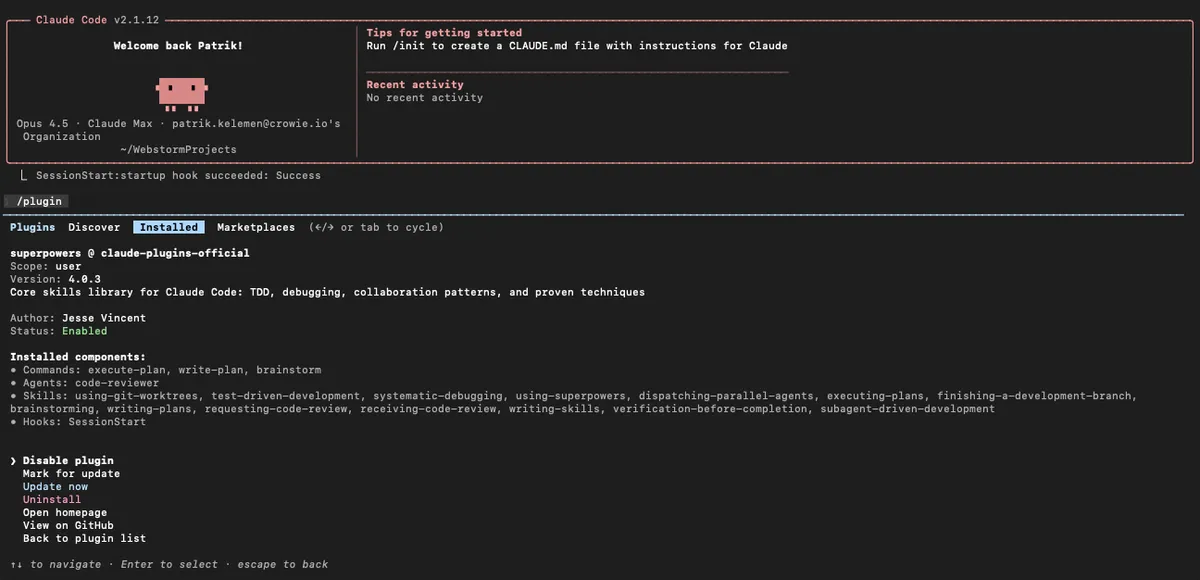
The plugin bundles everything you need:
| Component | Included |
|---|---|
| Commands | execute-plan, write-plan, brainstorm |
| Agents | code-reviewer |
| Skills | 14 skills including TDD, debugging, git worktrees, code review |
| Hooks | SessionStart (auto-bootstraps the workflow) |
Use this before ANY new feature. Claude will:
- ask clarifying questions about your goal
- explore alternatives you haven't considered
- present the design in digestible chunks for validation
- save a design document for reference
When to trigger: Start of any feature, refactor, or migration.
After brainstorming, this creates an implementation plan where:
- each task takes 2-5 minutes maximum
- every task has exact file paths and complete code snippets
- verification steps are built into each task
- the plan assumes an "enthusiastic junior engineer with no context" will execute it
Runs the plan using subagent-driven development:
- fresh subagent spawned per task (clean context)
- two-stage review: spec compliance, then code quality
- human checkpoints between batches
- critical issues block progress automatically
| Skill | What it does |
|---|---|
| test-driven-development | Enforces RED-GREEN-REFACTOR. Deletes code written before tests. |
| systematic-debugging | 4-phase root cause process with defense-in-depth |
| using-git-worktrees | Creates isolated branch, runs setup, verifies clean baseline |
| using-superpowers | Introduction to the skills system |
| dispatching-parallel-agents | Concurrent subagent workflows |
| executing-plans | Batch execution with checkpoints |
| finishing-a-development-branch | Merge/PR/keep/discard options, cleanup |
| brainstorming | Socratic design refinement |
| writing-plans | Detailed implementation planning |
| requesting-code-review | Pre-review checklist, blocks on critical issues |
| receiving-code-review | Responding to feedback systematically |
| writing-skills | Meta-skill for creating new skills |
| verification-before-completion | Ensures fixes actually work |
| subagent-driven-development | Two-stage review per task |
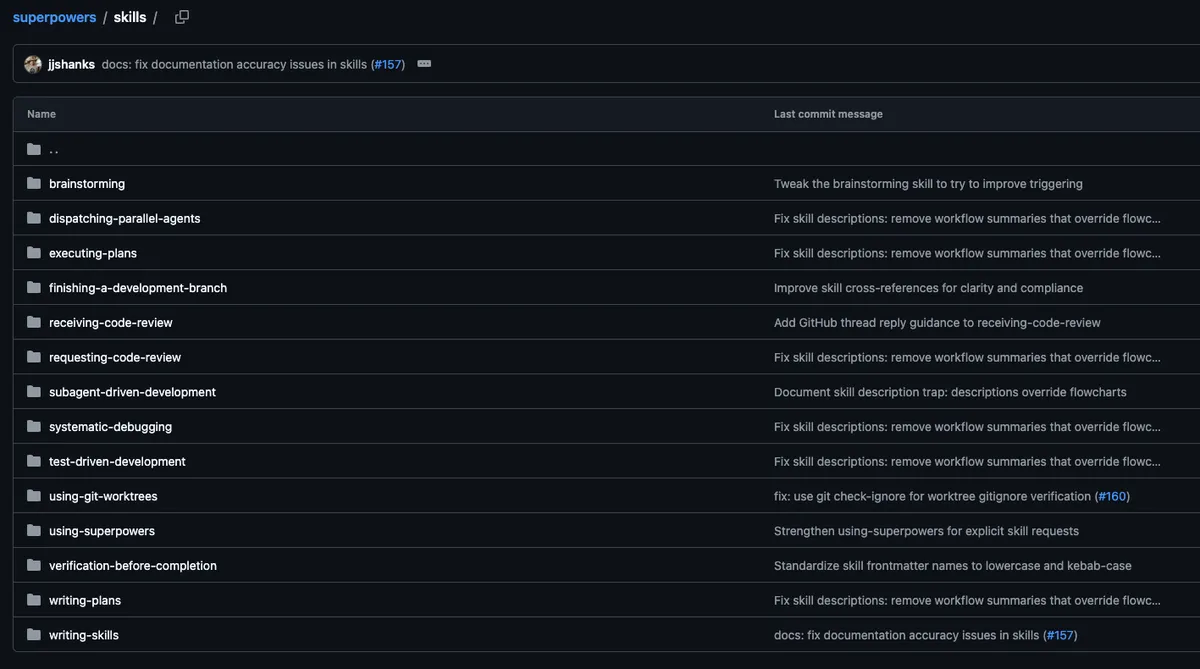
Skills aren't commands you call - they activate based on context:
- start discussing a new feature → brainstorming activates
- design approved → using-git-worktrees activates
- implementation begins → test-driven-development activates
- task completed → requesting-code-review activates
- all tasks done → finishing-a-development-branch activates
Claude checks for relevant skills before any task. These are mandatory workflows, not suggestions.
Superpowers uses git worktrees for isolated development:
# What happens behind the scenes:
git worktree add ../project-feature feature-branch
cd ../project-feature
# Claude works here, main branch stays clean
Benefits:
- run multiple Claude instances on different features
- keep main branch stable during experimentation
- easy cleanup if things go wrong
The most powerful pattern. Instead of one long Claude session:
- Main agent creates the plan
- Fresh subagent executes each task
- Review agent (code-reviewer) checks the work
- Main agent continues or requests fixes
Why this works: each subagent starts with clean context focused on ONE task. No accumulated confusion from long sessions.
Superpowers takes TDD seriously. The skill:
- requires failing test BEFORE implementation
- watches the test fail (proves it tests something)
- implements minimal code to pass
- commits at green
- refactors only after green
If Claude writes code before tests, the skill instructs it to delete that code and start over.
You: I need user authentication for my Express app Claude (with Superpowers): → Activates brainstorming skill → Asks: OAuth or passwords? Session or JWT? What providers? → Explores: Rate limiting? Account lockout? Password requirements? → Presents design in sections for your approval You: Looks good, let's plan it Claude: → Activates writing-plans skill → Creates 12 tasks, each 2-5 minutes → Task 1: Create failing test for /signup endpoint → Task 2: Implement signup handler to pass test → Each task has exact file paths and code You: Execute Claude: → Spawns subagent for Task 1 → code-reviewer agent validates output → Spawns subagent for Task 2 → Reports progress, asks for approval to continue
From the /plugin menu you can:
- Disable plugin: temporarily turn off
- Mark for update: flag for next update cycle
- Update now: get latest version immediately
- Uninstall: remove completely
- View on GitHub: see source code
- quick one-off questions
- simple file edits
- tasks under 5 minutes
For these, the overhead isn't worth it. Superpowers shines on multi-file features, refactors, and migrations requiring systematic execution.
| Action | How |
|---|---|
| Install | /plugin → Discover → superpowers |
| Start design | /superpowers:brainstorm |
| Create plan | /superpowers:write-plan |
| Execute plan | /superpowers:execute-plan |
| Update | /plugin → select superpowers → Update now |
Superpowers transforms Claude Code from "helpful assistant that sometimes goes off the rails" into "systematic development partner that follows proven processes." The structured workflow prevents the most common failure modes: skipped tests, missing edge cases, and features that drift from requirements.
关联了自己的github之后的界面

claude                         # 进入交互式 Claude Code
claude "解释这个项目"           # 带初始提示进入会话
claude -p "解释这个函数"         # 非交互查询,输出后退出
cat logs.txt | claude -p "解释" # 管道输入
claude -c                      # 继续当前目录最近会话
claude -r "session-name"        # 按 ID 或名称恢复会话
claude update                  # 更新
claude install stable          # 安装/重装指定版本或稳定版
claude auth login              # 登录
claude auth status             # 查看登录状态
claude agents                  # 打开后台会话/agent view
claude attach <id>             # 进入某个后台会话
claude logs <id>               # 查看后台会话日志
claude stop <id>               # 停止后台会话
claude project purge --dry-run # 预览清理项目本地 Claude Code 状态
claude mcp                     # 管理 MCP
claude plugin                  # 管理插件
claude ultrareview 1234 --json # 非交互深度审查 PR
这些命令来自官方 CLI reference 的命令表。(Claude API Docs)
项目初始化 / 上下文 / 记忆
/init
/memory
/add-dir <path>
/context [all]
/compact [instructions]
/clear [name]
/resume [session]
/branch [name]
/rewind
/init 生成 CLAUDE.md,/memory 编辑记忆文件,/context 看上下文占用,/compact 压缩长会话,/clear 开新上下文,/resume 恢复会话,/rewind 回滚代码或对话检查点。(Claude Code)
模型 / 推理 / 模式
/model [model]
/effort [low|medium|high|xhigh|max|auto]
/fast [on|off]
/plan [description]
/permissions
/config
/status
/model 切模型,/effort 调 reasoning 强度,/fast 切快速模式,/plan 进入计划模式,/permissions 管理工具权限,/config 打开设置。(Claude Code)
代码审查 / 变更检查 / 发布前
/diff
/code-review [low|medium|high|xhigh|max|ultra] [--fix] [--comment] [target]
/simplify [target]
/review [PR]
/security-review
/ultrareview [PR]
/verify
/run
/diff 看改动,/code-review 查 bug 和清理建议,/simplify 做清理型修复,/security-review 查安全问题,/verify 和 /run 更偏“运行应用并验证变更”。/run、/verify 要求 Claude Code v2.1.145 或更高。(Claude Code)
后台任务 / 并行 agent / 大任务
/agents
/background [prompt]   # /bg
/tasks                 # /bashes
/goal [condition|clear]
/batch <instruction>
/workflows
/loop [interval] [prompt]
/background 把当前会话分离到后台,/tasks 看后台任务,/goal 让 Claude 持续推进直到条件满足,/batch 拆大任务到多个 worktree,/workflows 管理动态工作流。(Claude Code)
插件 / Skills / MCP / Hooks
/skills
/reload-skills
/plugin
/reload-plugins
/mcp
/hooks
/claude-api [migrate|managed-agents-onboard]
Skills 是新版自定义命令体系;官方内置 bundled skills 包括 /code-review、/batch、/debug、/loop、/claude-api,并且可以用 /skill-name 直接调用。(Claude Code)
远程 / Web / PR 自动修复
/remote-control        # /rc
/remote-env
/teleport              # /tp
/desktop               # /app
/web-setup
/autofix-pr [prompt]
/install-github-app
这些用于 Claude Code on the web、远程控制、把 web 会话拉回终端、自动修复 PR、GitHub App 配置等。(Claude Code)
UI / 终端 / 体验
/theme
/color [color|default]
/copy [N]
/export [filename]
/focus
/tui [default|fullscreen]
/terminal-setup
/keybindings
/voice [hold|tap|off]
/recap
/theme 切主题,/copy 复制回复,/export 导出会话,/tui 切终端渲染模式,/recap 生成会话摘要,/voice 控制语音输入。(Claude Code)
账号 / 诊断 / 反馈
/login
/logout
/doctor
/debug [description]
/feedback [report]
/release-notes
/usage
/usage-credits
/upgrade
/privacy-settings
/doctor 诊断安装和设置,/debug 排查日志,/feedback 反馈问题,/usage 看使用量和限制,/usage-credits 配置额外用量。(Claude Code)
- 想查命令怎么用:看官方 Commands。
- 想查
claude --xxx参数:看官方 CLI reference。 - 想跟上最近三个月变化:看中文 最新动态,尤其第 17–22 周。(Claude Code)
/mcp 是 Claude Code 会话内用来查看、连接、认证和管理 MCP 服务器状态的命令。
MCP 可以理解成“给 Claude Code 接外部工具/数据源的接口”。接上后,Claude 不只看你粘贴的内容,还可以通过 MCP 访问 GitHub、Jira、Sentry、Postgres、Notion、Slack、Gmail、自定义 API 等工具或数据源。官方说明 MCP servers 会给 Claude Code 访问工具、数据库和 API 的能力。(Claude Code)
| 用途 | 说明 |
|---|---|
| 查看已配置的 MCP 服务器 | 看当前项目/用户配置里有哪些 MCP server,哪些已连接、失败、等待认证。 |
| 检查连接状态 | 官方文档里把 /mcp 标为“within Claude Code: Check server status”。(Claude Code) |
| OAuth 登录/授权 | 很多远程 MCP 需要浏览器登录。流程通常是先 claude mcp add ... 添加服务,然后进入 Claude Code 输入 /mcp,按提示打开浏览器授权。(Claude Code) |
| 清除认证 | /mcp 菜单里有 “Clear authentication”,可撤销某个 MCP 的登录授权。(Claude Code) |
| 发现 MCP 提供的工具和命令 | MCP 服务器可以暴露工具,也可以暴露 prompt,这些 prompt 会变成 /mcp__<server>__<prompt> 形式的动态命令。(Claude Code) |
先在终端添加一个 MCP server:
claude mcp add --transport http sentry https://mcp.sentry.dev/mcp然后进入 Claude Code:
claude在会话里输入:
/mcp
它会显示 MCP 连接状态;如果需要登录,会引导你走浏览器 OAuth 授权。官方 Sentry 示例也是先添加 server,再运行 /mcp 认证,然后就能问 Claude “最近 24 小时最常见的错误是什么?”这类问题。(Claude Code)
/mcp 是 Claude Code 里面的斜杠命令,偏“查看状态、登录、授权、清认证”。
claude mcp ... 是 终端命令,偏“添加、删除、查看配置”:
claude mcp list              # 列出配置的 MCP server
claude mcp get github        # 查看某个 server 详情
claude mcp remove github     # 删除某个 server
claude mcp add ...           # 添加 server
claude mcp add-json ...      # 用 JSON 配置添加 server
官方文档也把这些管理命令和 /mcp 区分开:claude mcp list/get/remove 管配置,/mcp 在 Claude Code 内检查 server 状态。(Claude Code)
一句话:/mcp 就是 Claude Code 里的 MCP 控制面板入口,用来确认外部工具是否接好了、是否要登录、能暴露哪些能力。
PKU-YuanGroup/OpenAI4S
1G内存跑Agent:nullclaw
1.SFT数据构建中,日志挖掘Embedding聚类怎么做的,目的是什么? 2.数据筛选怎么做的? 3.为什么SFT数据中有完整轨迹数据,还有额外构建子任务数据? 4.SFT做到什么程度才进行RL? 5.讲下rubric是如何设计的? 6.你认为模型效果提升来自与SFT还是RL?SFT阶段起什么作用? 7.如果不做SFT,仅作RL会有什么问题? 8.DAG和workflow的区别?为什么不用agent loop而是DAG? 9.多智能体并发怎么做的? 10.你认为workflow和agent loop分别适合什么场景? 12.Openclaw和Hermes的区别 13.当Skill特别多时,应该如何管理上下文?(比如200个skill) 14.对AI+游戏有什么想法? 15.NPC和多个用户的记忆如何设计和检索? 16.游戏对话场景通常目标不明确,如何设计reward信号?RM用判别式还是生成式?除了奖励模型的reward外,还能想到其他训练方法吗?规则会不会导致reward hacking? 17.游戏NPC对时延要求高,如何将agent loop更好落地到游戏场景中? 岗位是做AI玩法在游戏落地,最简单场景比如NPC聊天#面经 #秋招提前批
harness存在的意义是兜住模型的下限比如规范化函数调用、沙盒防止越权、失败重试,和提升模型的上限,比如都在搞的记忆就是典型的长文痛点要根据场景定制化设计。兜下限的几乎无法被模型吃掉,提上限的最后都要跟着场景应用走了。