
Mobile web video, actually usable. Control playback, volume, brightness and zoom with touch gestures instead of fumbling for buttons built for a mouse.


Same code, two ways to run it. Pick one — don't install both, or you get two overlays.
Needs Tampermonkey or Violentmonkey. Works on any browser that supports extensions: Microsoft Edge, Firefox, Vivaldi, Helium, Orion, Cromite, Safari.
To turn it off for one site, use GlideVideo: Disable on <site> in your userscript manager's menu.
No userscript manager needed. Build it with bun run build:extension, then load dist-extension/ — permanently via about:addons → gear → Install Add-on From File, or for a quick try via about:debugging → Load Temporary Add-on → pick manifest.json.
To turn it off for one site, click the toolbar button; the page reloads without it. Click again to bring it back.
It asks for two permissions and no more: storage for your settings, and activeTab so the toolbar button can tell which site you're on. It collects nothing and talks to no server — everything stays in local storage on your device.
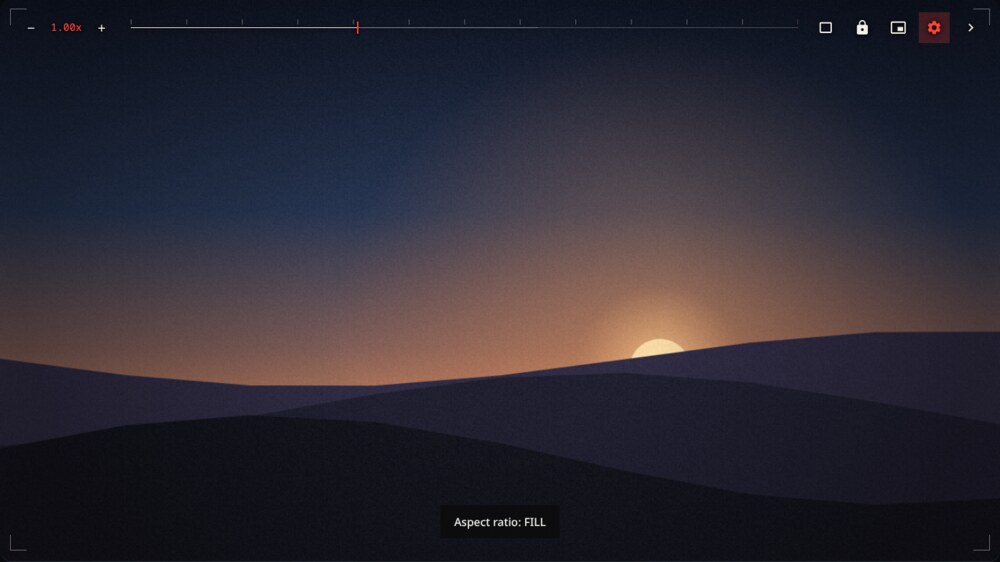
Five overlay themes, each answering the same question a different way — how do controls stay readable over footage you don't control? High Contrast and Frame draw zero blurred layers: every backdrop-filter forces a readback of a video surface that repaints every frame, which is what actually costs frames on mobile. Ember, Abyss, and Volt accept that cost for a frosted/translucent look — pick them when you value feel over battery.
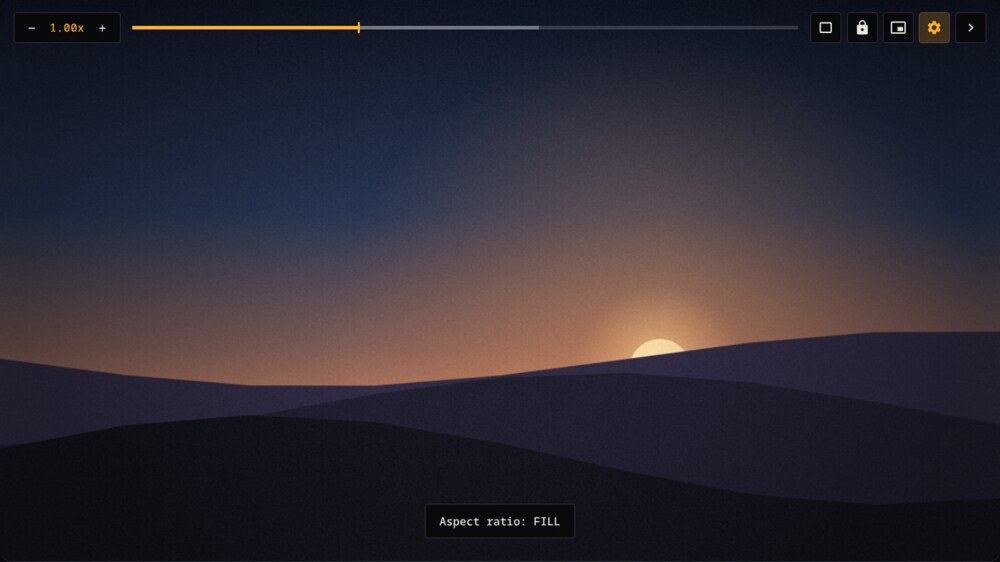
High Contrast · default — amber on near-opaque black; the only theme fully readable in direct sunlight or on a washed-out panel. Squared speed button.
Frame — hairline corner brackets, a 1px scrub line with frame ticks, one red playhead. The brackets fade with the rest of the controls, so nothing sits on the picture while you watch. Sharp-edged speed button.
Ember — warm-night cinema: bark-brown translucent surfaces with backdrop blur and an ember-orange glow. Squircle speed button.
Abyss — Ember's cold counterpart: deep-teal translucent surfaces with an ice-mint accent. Wavy-blob speed button.
Volt — brutalist signal: acid lime on near-black olive, monospace type, chunky 6px rail. Circular speed button.
The top bar holds the controls; the rest of the video is left clear for your thumbs.
| Gesture | Where | What it does |
|---|---|---|
| Double-tap | Left / right half | Skip back or forward. Keep tapping to stack — 10s, 20s, 30s |
| Swipe sideways | Anywhere | Scrub, with a live timestamp and offset |
| Swipe up / down | Right half | Volume |
| Swipe up / down | Left half | Brightness |
| Press and hold | Anywhere | 2× speed while held; release to restore |
| Pinch | Anywhere | Zoom, snapping to 50 / 100 / 125 / 150 / 200 / 300% |
In portrait, vertical swipes are handed back to the page so feeds still scroll. Gestures starting within 18px of a screen edge are ignored, so they don't collide with browser back-swipe.
| Speed | − / + steps by 0.10×, hold to fine-tune by 0.05×. Tap the number to play/pause, long-press to reset to 1.00× |
| Scrubber | Optional seek bar (off by default, enable in Settings). Drag to seek or navigate with keyboard (ArrowLeft/Right, Home/End). Shows buffered range and a timestamp preview |
| Aspect ratio | Tap cycles Fit → Fill → Stretch. Hold to rotate 90° at a time — turns a portrait clip to fill a landscape screen, scaled to fit rather than just tipped on its side |
| Lock | Blocks every gesture, so a stray palm does nothing |
| Picture-in-Picture | Where the browser supports it |
| Settings | Below |
Prefer something smaller? Minimal Speed FAB swaps the speed pill for a single compact badge that cycles 0.5× → 2.0× on tap. It takes the active theme's button shape.
| Theme | High Contrast (default), Frame, Ember, Abyss, or Volt |
| Rotate | 0° / 90° / 180° / 270°, also on a long-press of the aspect-ratio button |
| Default speed | Fallback speed for new videos |
| Skip duration | Seconds per double-tap skip, 5–300 |
| Speed FAB | Compact speed badge instead of the pill |
| Left hand | Mirrors controls and swaps volume/brightness rails for left thumb use |
| Progress bar | Show or hide the scrubber (disabled by default) |
| Gestures | Master switch |
| Remember | Restores position and speed when you come back |
| Page scroll | Keeps vertical page scrolling in portrait |
| Reset all | Back to defaults |
Toggles sit two to a line, so the whole sheet fits without scrolling on a phone.
Speed is remembered per domain, while the selected theme applies globally. Playback position is remembered per video, for the last 100. Zoom and rotation are per-video and reset on the next one, so a stray 90° never follows you around.
If a site keeps overriding your speed, GlideVideo pushes back three times, then says so in a toast and lets the site win rather than fighting in a loop.
Every overlay control is fully navigable without touch:
- Buttons & Toggles: Tab through controls; toggle switches with
SpaceorEnter(role="switch",aria-checked). - Scrubber Bar: Seek with
ArrowLeft/ArrowRight(5s),Home(start),End(finish) with accessiblerole="slider". - Vector UI & Motion: Crisp inline SVG icons throughout (no font emoji dependencies) and full
prefers-reduced-motioncompliance.
TypeScript, Vite and Bun. Both targets build from the same src/ — only the entry file differs. Architecture notes live in AGENT.md.
bun install
bun run dev                # live-reloading userscript, installs into your manager
bun run build              # both targets
bun run build:userscript   # → dist/glidevideo.user.js
bun run build:extension    # → dist-extension/  (Firefox MV3)
bun run tsc                # type check
bun run test               # vitest
bun run test:e2e           # Chromium touch/CSS smoke test
bun run lint               # biome
bun run lint:extension     # web-ext, validates the built extension
The extension is Manifest V3 with a background.scripts event page — Firefox does not run extension service workers. Its content script runs in an isolated world, which costs one thing the userscript has: videos inside closed shadow roots aren't reachable. Open shadow roots work in both.
GPL-3.0-or-later