


One workspace. One truth. Humans and AI aligned.
Workspai is an open-source CLI that brings related software projects together, so people and AI tools can understand and work with the same system.
- See the system: projects, runtimes, APIs, dependencies, infrastructure, documentation, tests, policies, and release state.
- Ask with proof: search relationships and trace them back to source files.
- Act with confidence: understand impact, verify changes, and prepare focused context for AI tools.
Quickstart · Everyday workflows · How it works · Documentation
Open the project and adopt it:
cd /absolute/path/to/project
npx workspai adopt .
The project stays where it is. Workspai creates or reuses a minimal workspace in the default system location and records a validated local link.
Stay in the same project directory and run the complete intelligence loop:
npx workspai workspace intelligence run --for-agent generic --strict --jsonWorkspai now knows which workspace owns the project. You only need
--workspace <path> when a moved or ambiguous binding cannot be resolved.
Use the guided flow:
npx workspai createChoose whether to create a workspace, scaffold a project, or add existing software. Project starters are grouped as Backend, Frontend, Desktop, and Extension.
Global installation is optional:
npm install -g workspai
workspai --help
wspai is an optional short alias for the same CLI.
Workspai saves reusable results under .workspai/:
workspace-model.json— the canonical description of the system.workspace-knowledge-graph.json— searchable relationships with proof.workspace-verify-last-run.json— the latest verification decision.workspace-context-agent.json— bounded context for agents and IDEs.INDEX.json— the current evidence inventory and recommended read order.
It also prepares AGENTS.md and supported agent/IDE surfaces. Developers, CI,
IDEs, MCP clients, and AI agents can therefore read the same current evidence.
A blocked result is useful evidence, not a crashed command. Workspai names what is missing or failing and keeps the generated reports available for inspection.
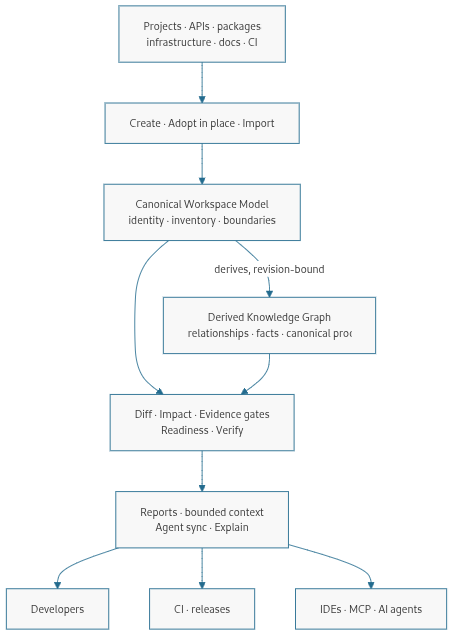
Workspace sources
       │
       ▼
Canonical Workspace Model
       │
       ▼
Evidence-backed Knowledge Graph
       │
       ▼
Impact · Doctor · Verify · Context · Explain
       │
       ▼
Humans · CI · IDEs · MCP · AI agents
The Workspace Model is the canonical source of truth. The Knowledge Graph is a derived, revision-bound representation of that model. It can add proof-backed detail without becoming a second source of truth or mutating the model that authorized the run.
A missing relationship means not proven by current evidence, not "these projects are independent."
The full contract-backed chain is:
Model → Diff → Impact → Doctor + Contract Verify + Analyze → Readiness
      → Verify → Context → Agent Sync → Explain
Run it with:
npx workspai workspace intelligence run --for-agent generic --strict --jsonpipeline --json --strict is the broader release and governance workflow. It
complements this chain; it does not replace it.
The deterministic model, graph, and checks do not require an AI API key.
| Goal | Command |
|---|---|
| Use guided setup | npx workspai create |
| Link a project without moving it | npx workspai adopt . |
| Copy or clone a project into a workspace | npx workspai import <path-or-git-url> --workspace <path> |
| Check the current project | npx workspai doctor project |
| Check the whole workspace | npx workspai doctor workspace |
| Refresh Model and Graph | npx workspai workspace model --write --json |
| Ask a focused architecture question | npx workspai workspace graph search "authentication service" --limit 12 --json |
| Verify current evidence | npx workspai workspace verify --strict --json |
| Refresh agent and IDE context | npx workspai workspace agent-sync --write --preset enterprise --json |
For every command and flag, use the Command Reference.
Workspai exposes the same governed data through several stable surfaces:
- human-readable terminal summaries;
- JSON output for scripts and CI;
- versioned artifacts under
.workspai/reports/; - focused context and instructions for AI agents;
- MCP tools for read-oriented workspace queries;
- watch events and reports for IDEs and dashboards;
- JSON, JSON-LD, Mermaid, DOT, GraphML, and GEXF graph exports.
The Workspai VS Code extension uses this CLI, so visual and terminal workflows share the same contracts and artifacts.
- Node.js
>=20.19.0 - npm
Python, Go, Java, .NET, Rust, or PHP are needed only for workflows that use those runtimes. Python is not required for Python-free workspaces or npm-owned project generators.
RapidKit Core is the optional Python engine for Python/Core-dependent kits and modules; Workspai remains the workspace-level CLI.
| Goal | Guide |
|---|---|
| Learn the main terms | Glossary |
| Create, adopt, import, or connect software | Creating workspaces and projects |
| Query Graph and inspect proof | Workspace Knowledge Graph |
| Understand the exact decision loop | Workspace Intelligence runner |
| Set a release, security, or coverage outcome | Verified engineering goals |
| Integrate CI | CI workflows |
| Find generated files and schemas | Artifact Catalog |
| Browse all documentation | Documentation index |
| Problem | Next step |
|---|---|
| The workspace is not detected | Run from the project/workspace or inspect npx workspai project workspace status --json |
| A check reports stale evidence | Re-run the complete Workspace Intelligence command |
| A runtime is missing | Install only the runtime required by that project |
| An agent cannot find current context | Run npx workspai workspace agent-sync --write --refresh-context --json |
| You need a specific flag | Open the Command Reference |
Workspai is developed in the open by Chistiq, the intelligence infrastructure company behind RapidKit and Workspai.
npm ci
npm run build
npm test
Read CONTRIBUTING.md, the Development Guide, and the Security Policy.
MIT. See LICENSE.