A Simple, Header-Only, Object-Oriented Extention to the SDL2 library for drawing primitives and complex polygons. Outlines and Filled Algorithms are provided. This "Library" takes an "include what you need" approach. Please check out the Shapes.h file to understand how all other classes work. Everything, except for Vertice.h builds on top of it.
Since this is a Header-Only Library, the installation is pretty simple. You can either clone the repository or copy-paste all header files into your project. Then it's just a matter of including them locally. Example of installation & usage on Unix (Debian):
git clone https://github.com/3rd-Party-Guy/JustDrawLib#include <stdio.h> // actually irrelevant
#include <SDL.h> // needed
#include "JustDrawLib/circle.h" // only include what you need!(Please notice that only the "circle.h" is part of the JDLib.
#include <stdio.h>
#include <SDL.h>

#include "JustDrawLib/circle.h"

SDL_Renderer* renderer;
SDL_Window* window;

unsigned height = 100, width = 100;

Circle c = Circle(
                Vertice(width/2, height/2),
                50);

int main(int argc, const char* argv[])
{
    // SDL Initialization
    SDL_Init(SDL_INIT_VIDEO);
    window = SDL_CreateWindow("DEMO",
            SDL_WINDOWPOS_UNDEFINED,
            SDL_WINDOWPOS_UNDEFINED,
            width, height,
            SDL_WINDOW_SHOWN);
    renderer = SDL_CreateRenderer(window, 0, SDL_RENDERER_SOFTWARE);

    // ACTUAL DRAWING
    SDL_RenderClear(renderer);
    SDL_SetRenderDrawColor(renderer, 255, 255, 255, SDL_ALPHA_OPAQUE);
    c.DrawFilled(renderer, window);
    SDL_SetRenderDrawColor(renderer, 0, 0, 0, SDL_ALPHA_OPAQUE);

    SDL_RenderPresent(renderer);

    // SDL Deactivation
    getchar();
    SDL_DestroyRenderer(renderer);
    SDL_DestroyWindow(window);
    SDL_Quit();
    return 0;
}
DISCLAIMER: This is not clean code! Please be more careful with your projects. (SDL speaking, the JDLib code is perfectly fine. ;))
First we have to include our Circle class, which is done at the top:
#include "JustDrawLib/circle.h"Then we have to create our Circle object:
Circle c = Circle(
              Vertice(width/2, height/2),   // center position
              50);                          // radius
And then we can draw it using the c.DrawFilled(renderer, window) function:
SDL_SetRenderDrawColor(renderer, 255, 255, 255, SDL_ALPHA_OPAQUE);
c.DrawFilled(renderer, window);
SDL_SetRenderDrawColor(renderer, 0, 0, 0, SDL_ALPHA_OPAQUE);
After compiling this is what we get:
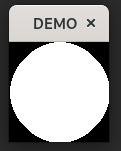
Since setting the color before each shape can become quite tedious, you can just pass in an optional SDL_Color as an argument:
SDL_Color circleColor = { 255, 255, 255 };

c.DrawFilled(circleColor, renderer, window);
SDL_SetRenderDrawColor(renderer, 0, 0, 0, SDL_ALPHA_OPAQUE);
Depending on your setup, compiling on Linux would look something like this:
gcc main.cpp -o OUTPUT.a `sdl2-config --cflags --libs
or
g++ main.cpp -o OUTPUT.a -w -lSDL2