

Content Machine is a local-first short-form video toolkit for coding agents.
It helps Claude Code, Codex CLI, and similar agents create TikTok videos, Instagram Reels, and YouTube Shorts by calling repo-local skills, flows, and deterministic media scripts.
The goal is simple: turn a topic or source video into a high-quality vertical short with inspectable artifacts at every step.
- What it is: a skill pack plus deterministic runtime for making short-form videos from coding-agent CLIs.
- How it works: agents read
skills/, pick or runflows/, then call JSON-stdio scripts only when execution is needed. - Why it matters: every stage writes files you can inspect: script, audio, timestamps, visuals, captions, render metadata, and review.
Content Machine is moving away from a monolithic "AI video agent" and
toward repo-local skills and 45ck/prompt-language flows for building
short-form video well. Runtime scripts still exist, but they are support
surfaces behind the skill pack rather than the product story.
source or topic
  -> script / highlight selection
  -> audio + timestamps
  -> visuals
  -> captions + render
  -> quality-gated MP4
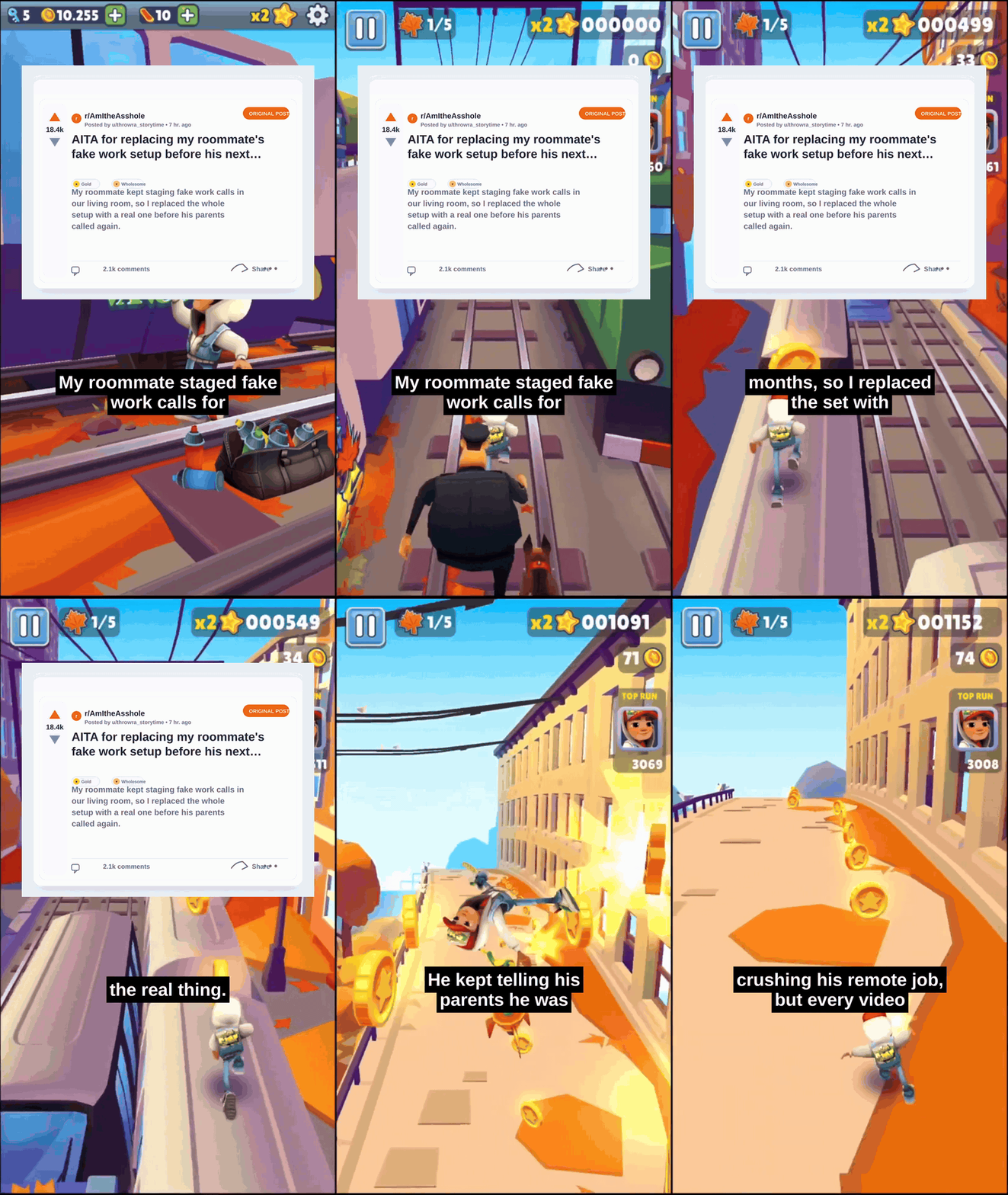
The main tracked showcase in this repo is the Reddit post over gameplay short. This is the default Reddit story mode: full-screen gameplay, a Reddit post card opener, then captions over gameplay with no random support clips.
Current showcase shape:
- full-screen Subway Surfers-style gameplay from frame one
- Reddit screenshot-style opener for the first
3sto5s - captions continue directly over gameplay after the opener
- no stock B-roll, no generated story clips, no split-screen top lane
Named bread-and-butter story archetypes:
reddit-post-over-gameplay: Reddit card over full-screen gameplay, then captions continue over gameplay.reddit-story-split-screen: Reddit card opener, then top story footage plus bottom gameplay.gameplay-confession-split: non-Reddit storytime with top support footage plus bottom gameplay.
Useful next links:
- Agent Harness Install
- Agent Quickstart
- Archetype Guide
- Showcase Gallery
- Creative Sources
- Reddit Post Over Gameplay
- Reddit Story Split-Screen (workflow lane; public demo is being rebuilt after gutter detection)
- reddit-story-short skill
- reddit-post-over-gameplay-short skill
- reddit-card-overlay skill
The README embeds only the flagship preview, but the fastest orientation path is three clips:
| Need | Watch | Inspect | Reproduce |
|---|---|---|---|
| Story/default gameplay format | demo-9 |
provenance |
example |
| Low-attention OSS repo explainer | demo-18 |
provenance |
example |
| Cleaner educational motion-card explainer | demo-19 |
provenance |
example |
Open the Showcase Gallery for every lane and the Demo Gallery for the generated demo manifest, preview status, source docs, and review caveats.
Full gallery status guide:
golden showcase: a promoted example with passing review gatesshowcase candidate: real MP4 exists, but review or polish gaps remainsupporting showcase candidate: useful for onboarding or a secondary workflowproving candidate: real MP4 exists, but it is not a default yetexperimental preview: directionally useful, below the public promotion barworkflow: runnable technique walkthrough with explicit prerequisites
Content Machine is not trying to be a giant all-in-one video app. The active direction is a small, reliable local runtime that agents can use well:
- pick strong short-form moments from long videos
- approve highlights before expensive render work
- generate scripts, audio, visuals, captions, and MP4s as separate files
- compose lanes with optional visual treatments such as 3D/procedural gameplay backgrounds
- keep every step inspectable and repeatable
- use skills and flows as the main interface, with
cmkept thin
Read the current build plan: Short-Form Roadmap.
Archetype rollout plan: Archetype Rollout.
User-facing archetype guide: Archetypes.
Fast visual map of what the repo can make: Showcase Gallery.
Preview asset index: Demo Gallery.
Review and promotion rules: Quality And Review.
Graphics-heavy demos can also ship docs/demo/*.layout.json sidecars.
The demo audit uses 45ck/video-evaluator as the shared analyzer for
declared element overlap, caption safe-zone collisions, and reusable video
evidence. Content Machine keeps skills, archetype workflows, Remotion choices,
caption style guidance, and publish policy local; the evaluator owns generic
analysis that can be reused by other repos.
Tracked preview assets live in
docs/demo/. The root README features the
default Reddit/gameplay example as the first golden showcase. Supporting
and experimental clips stay in the gallery until review evidence says
they should move up.
Early development. Skills and flows are now the primary interface; runtime scripts are support surfaces behind those docs. The legacy CLI control plane has been moved into
archive/legacy-cli/; the remainingcmshell is intentionally thin.
The primary user path is Agent Quickstart, with Archetypes, Showcase Gallery, skills/, flows/, and scripts/harness/ as deeper surfaces.
Use this when you want Claude Code, Codex CLI, Cursor, or another repo-aware coding agent to use Content Machine inside your own project:
npm install --save-dev @45ck/content-machine

npx cm-install --target .content-machine --write-instructions
npx --no-install cm-agent list
The --write-instructions flag adds a managed root block that points
agents at .content-machine/. See
Agent Harness Install for Claude
Code and other harness-specific variants.
Installed-pack commands use npx --no-install cm-agent <tool>. The
repo-local node --import tsx scripts/harness/*.ts commands below are
for contributors working inside this checkout.
npm installNode.js 20.6+ is required.
First run order:
- Run
doctor-reportto check the environment. - Use the no-key smoke path in
content-machine-self-demoif you only want to prove the artifact chain. - Run
generate-shortorshowcase-content-machinewhen API keys and provider credentials are ready.
Content Machine assumes you already work inside Claude Code, Codex CLI, Cursor, or a similar agent harness. The human UX is to ask that harness for the outcome; the repo gives the harness skills, flows, and JSON-stdio tools it can read or execute.
Use these surfaces in this order:
skills/: decide what job the agent is doingflows/: coordinate multi-step workscripts/harness/: execute a repo-side JSON-stdio step when a skill or flow needs runtime support
If you are deciding where to start:
- Start with Archetypes when choosing what kind of short to make.
- Start with a skill when you want one capability.
- Start with a flow when you want a full multi-step path.
- Start with
scripts/harness/only when you need the exact repo-side executable. - For longform source videos, start with
longform-to-shortsto select and approve clips, then uselongform-clip-extractbefore render work. - Use Quality And Review before promoting a render as a showcase.
Discover what is shipped:
cat <<'JSON' | node --import tsx scripts/harness/skill-catalog.ts
{}
JSON

cat <<'JSON' | node --import tsx scripts/harness/flow-catalog.ts
{}
JSON
Current repo-side entrypoints are listed in
scripts/harness/.
If you want these skills inside another project, use
Agent Harness Install to
materialize a local .content-machine/ pack and root instruction block.
Use skills/ or the skill-catalog harness script
for the current shipped skill list.
npm run cm -- --helpOnly config, doctor, mcp, and render remain live under cm.
Everything else now lives in archive/legacy-cli/.
See full installation guide for optional
setup such as Whisper and ffmpeg.
Use these when you need more context:
- Reddit Story Split-Screen - hybrid Reddit/gameplay lane
- Archetypes - lane selection, maturity status, and backlog
- Quality And Review - review gates before a render is considered ready
- Creative Sources - external source scouting for animation, 3D, stock, audio, and AI generation
- Agent Harness Install - install Content Machine into Codex CLI, Claude Code, Cursor, or another repo-aware agent project
- Agent Quickstart - quickest user path
- Skills - all agent-facing capabilities
- Flows - orchestration patterns
- Harness Scripts - executable runtime entrypoints
- Short-Form Roadmap - what we are building next and why
- Archetype Rollout - which short-form lanes exist, which are proven, and what gets built next
- Direction - product boundaries and migration decisions
- User Guide - broader usage docs
- Developer Docs - architecture, registries, and internals
- Research - reference repo findings and experiments
- Reference - generated glossary, facts, and CLI reference
- Archive - frozen legacy code and notes
The primary user guide is now docs/user/AGENT-QUICKSTART.md. The archived CLI notes live under archive/legacy-cli/.
| Path | Role |
|---|---|
skills/ |
Agent-readable capability docs and examples |
flows/ |
Executable prompt-language workflow manifests |
scripts/harness/ |
JSON-stdio runtime entrypoints for repo checkouts |
agent/ |
Installed-package runner and cm-install bin |
docs/user/ |
Human-facing install, quickstart, gallery, and examples |
docs/demo/ |
Generated demo manifest, provenance, previews, and caveats |
src/harness/ |
Reusable logic behind JSON-stdio entrypoints |
src/ |
TypeScript media, render, scoring, validation, and providers |
assets/ |
Archetypes, fonts, templates, and lightweight README assets |
fixtures/ |
Small runnable examples and test fixtures |
experiments/ |
Tracked proving reports; generated outputs stay ignored |
evals/ / bench/ |
Promptfoo configs, scoring evals, and benchmark material |
registry/ |
Source YAML for generated glossary and repo facts |
archive/ |
Frozen legacy surfaces and old demos |
Run-scoped flows write under runs/<run-id>/ by default. Direct skills
can also write to explicit output paths.
- Generate a short-form video from a topic.
- Reverse-engineer a winning reference short from a local file or URL.
- Generate only scripts, audio, visuals, or renders when needed.
- Run structured diagnostics before expensive generation work.
- Use the thin
cmshell only for config, diagnostics, MCP, or render compatibility.

- Agent Quickstart — primary user path for Claude Code, Codex CLI, and similar tools
- Archetypes — choose the right short-form lane and see what is proven
- Quality And Review — review gates for captions, audio, motion, safe zones, and promotion
- Creative Sources — source scouting rules and the
1000-site candidate catalog - skills/ — agent-facing skill docs
- flows/ —
45ck/prompt-languagedocs and executable flows - scripts/harness/ — optional repo-side runners and execution model
- Direction — migration plan, cut lines, and archive policy
- User Guide — skill-pack docs
- Developer Docs — active architecture, registries, and legacy engineering docs
- Reference — generated references, environment variables, glossary, and CLI details
- Archive — frozen legacy control-plane code and notes
See CONTRIBUTING.md.
git clone https://github.com/45ck/content-machine.git
cd content-machine
npm install
npm run qualityMIT