
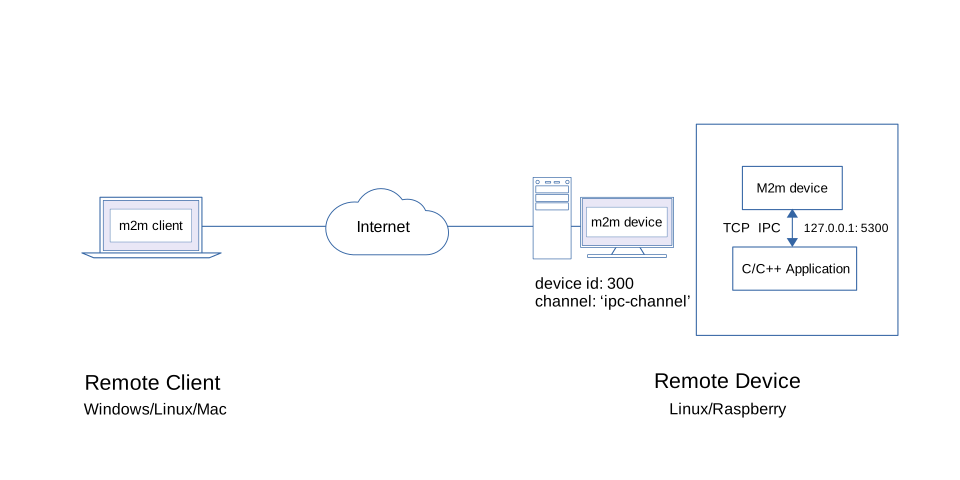
In this quick tour, the client will attempt to send and capture data from a C/C++ application through inter-process communication (ipc) using tcp with the remote device.
The remote device will send a json payload data { type:"random", source:"cpp-server" } to capture the random value from the C/C++ application.
We will use the nlohmann-json (https://github.com/nlohmann/json) library for json data interchange with C/C++ application.
$ npm install m2m'use strict';
const net = require('net');
const { Device } = require('m2m');
const device = new Device(300);
device.connect(() => {
device.setData('ipc-channel', (data) => {
let pl = JSON.stringify({type:'random', source:'cpp-server'});
TcpClient('127.0.0.1', 5300, pl, (err, d) => {
if(err) return console.error('TcpClient error:', err.message);
if(d){
data.send(d);
}
});
});
});
function TcpClient(ip, port, payload, cb){
const client = new net.Socket();
client.connect(port, ip);
client.setEncoding('utf8');
client.on("connect", () => {
if(payload){
client.write(payload);
}
});
client.on('error', (error) => {
console.log("Tcp client socket error:", error);
if(error && cb){
cb(error, null);
}
client.destroy();
});
client.on("data", (data) => {
if(cb){
setImmediate(cb, null, data);
}
client.end();
});
client.on("close", (error) => {
if(error && cb){
console.log("Tcp client socket is closed:", error);
cb(error, null);
}
});
client.on("end", (error) => {
if(error && cb){
console.log("Tcp client socket connection is terminated:", error);
cb(error, null);
}
client.unref();
});
};$ node device.js$ git clone https://github.com/EdAlegrid/cpp-ipc-application-demo.gitCheck the main.cpp source file inside the cpp-ipc-application-demo/app sub-directory as shown below.
/*
 * File:   main.ccp
 * Author: Ed Alegrid
 *
 * Use any Linux C++11 compliant compiler or IDE.
 *
 */

#include <string>
#include <memory>
#include <iostream>
#include <nlohmann/json.hpp>
#include "tcp/server.h"

using namespace std;
using json = nlohmann::json;

int main()
{
  cout << "\n*** Remote C/C++ Application ***\n" << endl;

  int port = 5300;
  auto server = make_shared<Tcp::Server>(port);

  for (;;)
  {
      // listen for new client connection
      // set socket listener to true for continous loop
      server->socketListen(true);

      // generate random number 1 ~ 100
      int rn = rand() % 100 + 1;

      // read data from client
      auto data = server->socketRead();
      cout << "rcvd client data: " << data << endl;

      // parse received json data
      try{
        auto j = json::parse(data);

        if(j["source"] == "cpp-server"){
          j["value"] = rn;
          cout << "send back json data: " << server->socketWrite(j.dump()) << endl;
        }
        else{
          cout << "send back invalid json data: " << server-> socketWrite("invalid json data") << endl;
        }
      }
      catch (json::parse_error& ex)
      {
        cerr << "parse error at byte " << ex.byte << endl;
        cout << "send back string data: " << server->socketWrite(data) << endl;
      }

      cout << "waiting for client data ...\n\n";
      server->socketClose();
  }
  return 0;
}$ sudo apt update$ sudo apt install nlohmann-json3-dev$ cd cpp-ipc-application-demo/appMake sure you are inside the app sub-directory.
$ g++ -Wall -g -o bin/main main.cpp -pthread$ ./bin/mainOnce the C/C++ Application is up and running, you should see a server output as shown below.
*** Remote C/C++ Application ***

Server listening on: 127.0.0.1:5300$ npm install m2mconst { Client } = require('m2m');
let client = new Client();
client.connect(() => {
client.watch({id:300, channel:'ipc-channel'}, (data) => {
try{
let jd = JSON.parse(data);
console.log('rcvd json data:', jd);
}
catch (e){
console.log('rcvd string data:', data);
}
});
});$ node client.jsThe client should receive a json data with a random value similar below.
rcvd json data: { type: 'random', source: 'cpp-server', value: 16 }