Important
Looking for the latest TgMusicBot? The project has been rewritten in Go and is actively developed here: https://github.com/AshokShau/TgMusicBot
This repository contains the original Python implementation, initially developed in AshokShau/TgMusicBot and later moved here.
The Python version is still working and maintained for compatibility, but it will not receive major updates. Only bug fixes and dependency-related changes will be applied if needed.

TgMusic is a high-performance Telegram music bot designed for seamless music streaming in voice chats. It leverages a powerful combination of libraries, using pytdbot for efficient interaction with the Telegram Bot API and a multi-assistant architecture powered by pyrogram and py-tgcalls for robust, low-latency audio and video playback.
It supports a wide range of music sources, including YouTube, Spotify, JioSaavn, Apple Music, and SoundCloud, making it a versatile solution for any Telegram community.





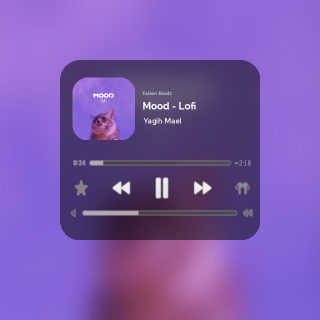
🔥 Live Bot: @FallenBeatzBot
| Feature | Description |
|---|---|
| 🎧 Multi-Platform Support | YouTube, Spotify, Apple Music, SoundCloud, JioSaavn |
| 📜 Playlist Management | Queue system with auto-play |
| 🎛️ Advanced Controls | Volume, loop, seek, skip, pause/resume |
| 🌐 Multi-Language | English, Hindi, Spanish, Arabic support |
| ⚡ Low Latency | Optimized with PyTgCalls |
| 🐳 Docker Ready | One-click deployment |
| 🔒 Anti-Ban | Cookie & API-based authentication |
A brief overview of the key directories in this project:
music-bot/
├── src/
│   ├── core/         # Core logic: call handling, database, API clients, config
│   ├── modules/      # Bot commands and feature modules
│   │   ├── utils/    # Utility functions for modules
│   │   └── ...
│   ├── __init__.py   # Main bot class and initialization
│   ├── __main__.py   # Entry point for running the bot
│   └── logger.py     # Logging configuration
├── .env            # Environment variables (create from sample.env)
├── Dockerfile        # For building the Docker image
├── README.md         # This file
└── ...
src/core: Contains the essential backend components. This is where the main logic for handling calls, database interactions, and communication with external music services resides.src/modules: Holds the individual command handlers. Each.pyfile typically corresponds to a specific bot command (e.g.,play.py,skip.py) or a feature set (e.g.,auth.py).

📌 Docker Installation (Recommended) (Click to expand)
- Install Docker:
- Clone the repository:
git clone https://github.com/FallenProjects/music-bot.git && cd music-bot
-
Prepare environment file:
cp sample.env .env
-
Edit configuration (choose one method):
-
Beginner-friendly (nano):
nano .env
- Edit values
- Save:
Ctrl+O→ Enter →Ctrl+X
-
Advanced (vim):
vi .env
- Press
ito edit - Save:
Esc→:wq→ Enter
- Press
-
-
Build Docker image:
docker build -t music-bot . -
Run container (auto-restarts on crash/reboot):
docker run -d --name music-bot --env-file .env --restart unless-stopped music-bot
- Check logs:
(Exit with
docker logs -f music-bot
Ctrl+C)
-
Stop container:
docker stop music-bot
-
Start container:
docker start music-bot
-
Update the bot:
docker stop music-bot
docker rm music-bot
git pull origin master
docker build -t music-bot .
docker run -d --name music-bot --env-file .env --restart unless-stopped music-bot
📌 Step-by-Step Installation Guide (Click to Expand)
-
Update your system (Recommended):
sudo apt-get update && sudo apt-get upgrade -y -
Install essential tools:
sudo apt-get install git python3-pip ffmpeg tmux -y
-
Install UV package manager:
pip3 install uv
-
Clone the repository:
git clone https://github.com/FallenProjects/music-bot.git && cd music-bot
-
Create virtual environment:
uv venv
-
Activate environment:
- Linux/Mac:
source .venv/bin/activate - Windows (PowerShell):
.\.venv\Scripts\activate
- Linux/Mac:
-
Install dependencies:
uv pip install -e .
-
Setup environment file:
cp sample.env .env
-
Edit configuration (Choose one method):
-
For beginners (nano editor):
nano .env
- Edit values
- Save:
Ctrl+O→ Enter →Ctrl+X
-
For advanced users (vim):
vi .env
- Press
ito edit - Save:
Esc→:wq→ Enter
- Press
-
-
Start in tmux session (keeps running after logout):
tmux new -s musicbot
start
Tmux Cheatsheet:
- Detach:
Ctrl+BthenD - Reattach:
tmux attach -t musicbot - Kill session:
tmux kill-session -t musicbot
- Detach:
To restart the bot:
tmux attach -t musicbot
# Kill with Ctrl+C
start🔑 Required Variables (Click to expand)
| Variable | Description | How to Get |
|---|---|---|
API_ID |
Telegram App ID | my.telegram.org |
API_HASH |
Telegram App Hash | my.telegram.org |
TOKEN |
Bot Token | @BotFather |
STRING1-10 |
Pyrogram Sessions (Only 1 Required) | @StringFatherBot |
MONGO_URI |
MongoDB Connection | MongoDB Atlas |
OWNER_ID |
User ID of the bot owner | @GuardxRobot and type /id |
LOGGER_ID |
Group ID of the bot logger | Add @GuardxRobot to the group and type /id |
🔧 Optional Variables (Click to expand)
| Variable | Description | How to Get |
|---|---|---|
API_URL |
API URL | Start @FallenApiBot |
API_KEY |
API Key | Start @FallenApiBot and type /apikey |
MIN_MEMBER_COUNT |
Minimum number of members required to use the bot | Default: 50 |
PROXY |
Proxy URL for the bot if you want to use it for yt-dlp (Optional) | Any online service |
COOKIES_URL |
Cookies URL for the bot |  |
DEFAULT_SERVICE |
Default search platform (Options: youtube, spotify, jiosaavn) | Default: youtube |
SUPPORT_GROUP |
Telegram Group Link | Default: https://t.me/GuardxSupport |
SUPPORT_CHANNEL |
Telegram Channel Link | Default: https://t.me/FallenProjects |
AUTO_LEAVE |
Leave all chats for all userbot clients | Default: False |
NO_UPDATES |
Disable updates | Default: False |
START_IMG |
Start Image URL | Default: IMG |
DEVS |
List of Developer User IDs (space-separated) | @GuardxRobot and type /id. Example: 5938660179 5956803759 |
| Command | Description |
|---|---|
/play [song/url] |
Plays a song from YouTube, Spotify, etc., or by search term. |
/vplay [video/url] |
Plays a video in the voice chat. |
/skip |
Skips the current track and plays the next in queue. |
/pause |
Pauses the current playback. |
/resume |
Resumes the paused playback. |
/stop or /end |
Stops playback, clears the queue, and leaves the voice chat. |
| Command | Description |
|---|---|
/queue |
Shows the current list of tracks in the queue. |
/loop [1-10] |
Sets the current song to repeat a number of times. Use /loop 0 to disable. |
/clear |
Empties the entire playback queue. |
/remove [number] |
Removes a specific track from the queue by its number. |
| Command | Description |
|---|---|
/volume [1-200] |
Adjusts the playback volume. |
/speed [0.5-4.0] |
Changes the playback speed. |
/seek [seconds] |
Seeks forward in the track by a number of seconds. |
/mute |
Mutes the bot in the voice chat. |
/unmute |
Unmutes the bot in the voice chat. |
| Command | Description |
|---|---|
/auth [reply] |
Authorizes a user to use admin commands. |
/unauth [reply] |
Revokes a user's authorization. |
/authlist |
Lists all authorized users in the chat. |
| Command | Description |
|---|---|
/buttons [on/off] |
Toggles the visibility of player control buttons. |
/thumb [on/off] |
Toggles the generation of "Now Playing" thumbnails. |
/playtype [0/1] |
Sets the play mode (0 for direct play, 1 for selection menu). |
- Fork the repository
- Create a feature branch (
git checkout -b feature/AmazingFeature) - Commit changes (
git commit -m 'Add some AmazingFeature') - Push to branch (
git push origin feature/AmazingFeature) - Open a Pull Request
Note: Minor typo fixes will be closed. Focus on meaningful contributions.
AGPL-3.0 © AshokShau.

Help keep this project alive!


