
Project site ·
crates.io ·
Binaries ·
What it cannot tell you


A Rust CLI and library that reads an LLM answer's token log probabilities and flags the words the model was unsure about, with the alternatives it was weighing at that point. Output as a colored terminal report, a self-contained HTML page, Markdown, or JSON.
Hallucinations often sit where the model's confidence drops: a name, a date, a city it half-remembers. If your API returns logprobs (OpenAI and many OpenAI-compatible servers do), this tool shows you those spots in one command. The project site lets you try it on the bundled samples with a threshold slider.
cargo install llm-token-visualizerOr download a prebuilt binary for Linux, macOS (Intel and Apple Silicon) or Windows from the latest release; each archive includes the sample responses under samples/.
git clone https://github.com/Mattbusel/LLM-Hallucination-Detection-Script
cd LLM-Hallucination-Detection-Script

# Offline: analyze a bundled real response, no API key needed
cargo run -- --logprobs-file examples/logprobs/cuyp.json --threshold 0.6

# Live: ask a model and analyze its answer (any OpenAI-compatible API)
export OPENAI_API_KEY=sk-...
cargo run -- --live "Who was the second person to walk on the Moon?" --save answer.json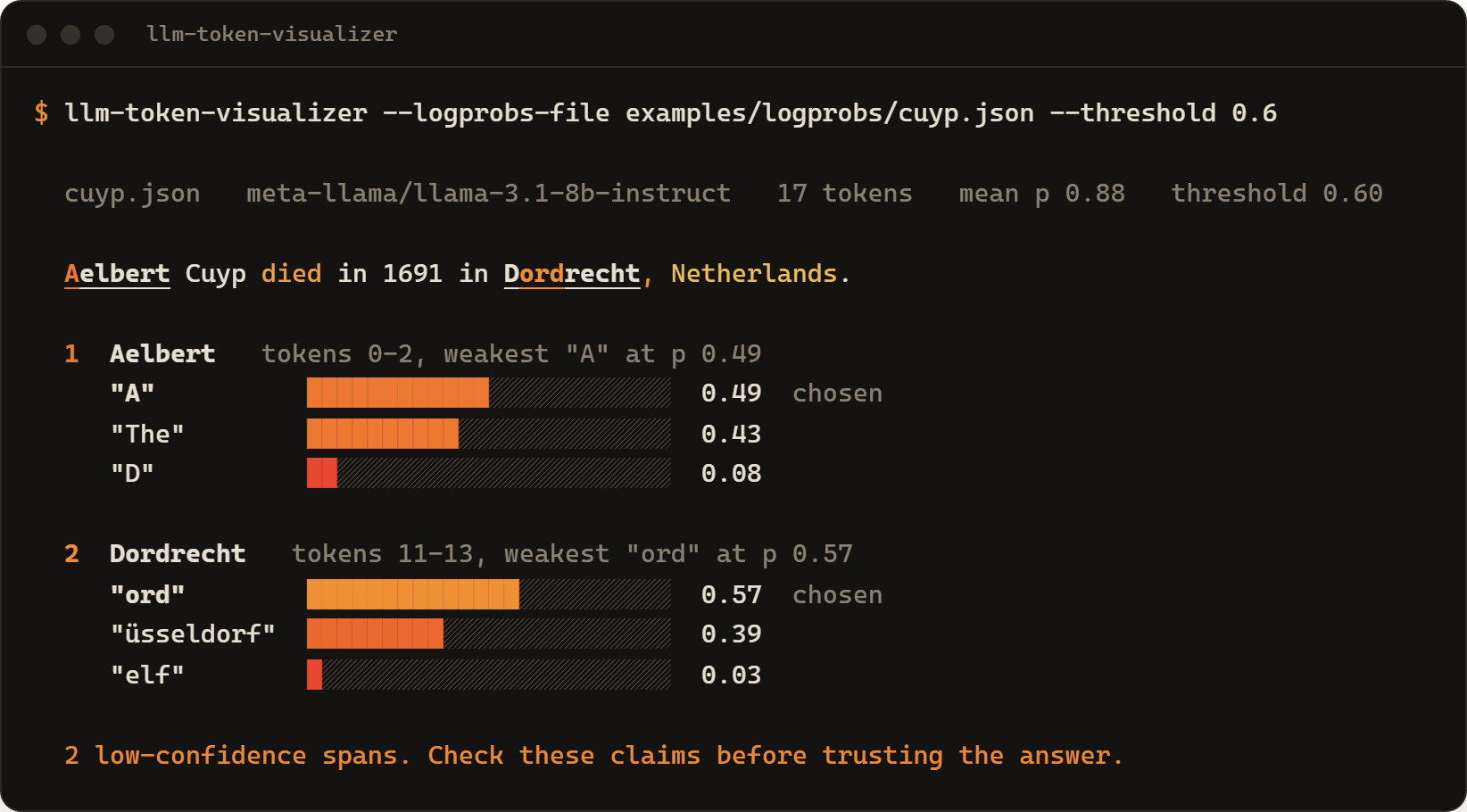
That is a real response from Llama 3.1 8B Instruct. The answer happens to be right, but the model gave Düsseldorf a 39% chance, which is exactly the kind of claim to double-check. The "Aelbert" flag is the model choosing between starting with the name or with "The": low probability can be about phrasing, not facts.
Output of cargo run --example detect (threshold 0.6), four real Llama 3.1 8B answers:
| Sample | Flagged | Weakest token and what the model also considered |
|---|---|---|
cuyp.json |
Aelbert | "A" 0.49; "The" 0.43, "D" 0.08 |
| Dordrecht | "ord" 0.57; "üsseldorf" 0.39, "elf" 0.03 |
|
tour-de-france.json |
Stephen | "Stephen" 0.49; "The" 0.43, "Steven" 0.03 |
| -Vagabond | "-V" 0.57; "–" 0.21, " -" 0.14 |
|
eiffel.json |
Gustave | " Gust" 0.57; " French" 0.39, " the" 0.03 |
| Compagnie | " Comp" 0.53; " and" 0.29, " E" 0.12 |
|
| on | " on" 0.49; " to" 0.49, " in" 0.01 |
|
| during | " during" 0.32; " for" 0.32, " at" 0.25 |
|
moonwalk.json |
was, which, during | phrasing words only; see below |

Low token probability is a useful signal, not a fact checker. The bundled moonwalk.json sample shows the failure mode: the model answers "Pete Conrad was the second person to walk on the Moon" (it was Buzz Aldrin) with at least 72% probability on every token of the name, so the wrong name is not flagged; only phrasing words like "which" are. Models can be confidently wrong. Use this to decide where to look first, not to certify an answer.
- Each token's probability is
exp(logprob). - Tokens are grouped into words (a subword like
ordinDordrechtbelongs to its word). - A word is flagged when any of its tokens with letters or digits has probability below
--threshold(default0.5, meaning the model put more weight on other options than on the one it picked). Pure punctuation and whitespace never trigger a flag. - Neighbouring flagged words merge into one span. Each span reports its weakest token and the
top_logprobsalternatives at that token.
Raise the threshold to catch more (and noisier) spans, lower it to see only the shakiest ones.
--format |
What you get |
|---|---|
terminal (default) |
The answer as a heatmap, each flagged span with bars for the alternatives. Honors NO_COLOR. |
html |
One self-contained page (no scripts, no external assets, light and dark). Hover or focus any word for its probability and alternatives. |
markdown |
A compact report for a pull request, an issue, or $GITHUB_STEP_SUMMARY. |
json |
The spans, probabilities and alternatives, for scripts. |
llm-token-visualizer --logprobs-file answer.json --format html -o report.html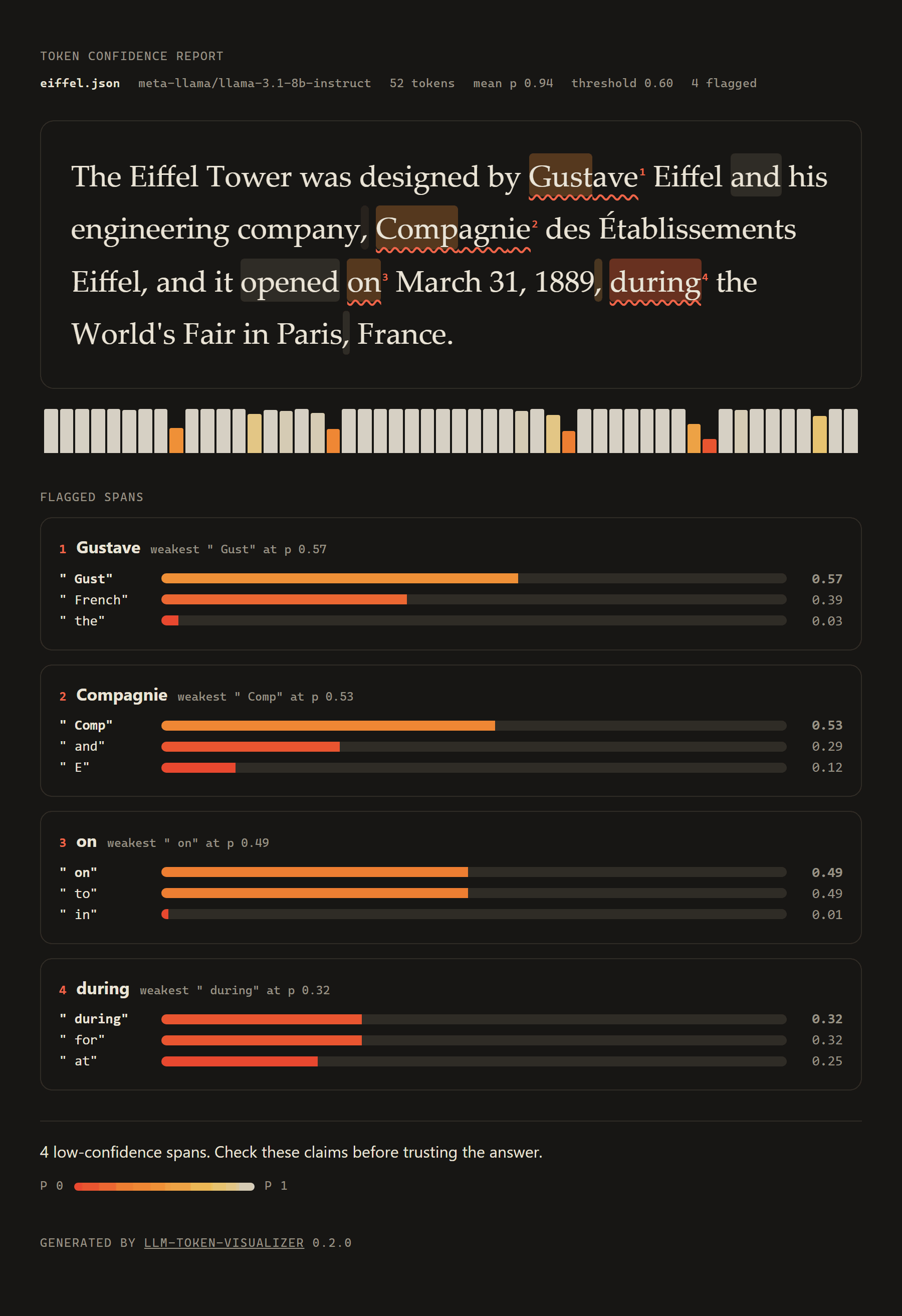
--fail-on-flag exits with status 2 when any span is flagged, so you can gate a pipeline on it or route flagged answers to review:
llm-token-visualizer --logprobs-file answer.json --fail-on-flag --format json -o report.json
llm-token-visualizer --logprobs-file answer.json --format markdown >> "$GITHUB_STEP_SUMMARY"
Input formats
--logprobs-file accepts a full Chat Completions response saved as JSON, just its logprobs object ({"content": [...]}), or a bare array of {"token", "logprob", "top_logprobs"} entries. Use - to read stdin. Request completions with "logprobs": true and, for alternatives, "top_logprobs": 3 or more. Special tokens such as <|eot_id|> are ignored.
Live mode
--live "<prompt>" sends the prompt with temperature 0, logprobs: true and top_logprobs: 3, then analyzes the answer.
| Variable | Default | Meaning |
|---|---|---|
OPENAI_API_KEY |
required | Bearer token for the API |
OPENAI_BASE_URL |
https://api.openai.com/v1 |
Any server with Chat Completions and logprobs, e.g. https://router.huggingface.co/v1 |
Flags: --model (default gpt-4o-mini), --max-tokens (default 200), and --save <path> to keep the raw response so you can re-run it offline with --logprobs-file. Anthropic's API does not return logprobs, so Claude models cannot be analyzed this way.
The bundled samples were fetched through the Hugging Face router (meta-llama/Llama-3.1-8B-Instruct:novita). Build with --no-default-features for an offline-only binary without an HTTP client.
Visualizing your own confidence scores
If you already have per-token scores from another source, the visualizer mode renders them with a five-band color scale (very low < 0.3, low < 0.5, medium < 0.7, high < 0.9, very high) and labeled spans (fact, uncertain, hallucination, or any label):
# Built-in demo (hand-written scores)
cargo run -- --demo

# A text file plus a confidence JSON file (samples included)
cargo run -- --text-file sample_text.txt --confidence-file demo_data.json

# HTML report
cargo run -- --text-file sample_text.txt --confidence-file demo_data.json --format html --output report.html

# Markdown, with stats
cargo run -- --text-file sample_text.txt --confidence-file demo_data.json --format markdown --verbose
Confidence file format:
{
  "tokens": [
    {"text": "The", "confidence": 0.95},
    {"text": " tower", "confidence": 0.88},
    {"text": " purple", "confidence": 0.15}
  ],
  "flags": [
    {"start": 2, "end": 3, "flag": "hallucination", "description": "Never painted purple"}
  ]
}
start is inclusive and end is exclusive, both as token indices.
Library use
The crate is named llm-token-visualizer.
use llm_token_visualizer::detect::{detect, parse_logprobs};
use llm_token_visualizer::report::{self, Meta};

let tokens = parse_logprobs(&response_json)?;
let report = detect(&tokens, 0.5);
for span in &report.spans {
    println!("{}: {}", span.text, span.describe());
}

// The same result as a standalone HTML page, Markdown, or colored terminal text
let meta = Meta::from_response("answer.json", &response_json);
let html = report::html(&tokens, &report, &meta);
let md = report::markdown(&tokens, &report, &meta);
detect::to_token_analysis plus visualize_tokens still render detections with the visualizer's renderers, and analyze_with_issues and quick_analyze are still available.
Repository layout
src/
  main.rs       CLI (clap)
  lib.rs        public API: visualize_tokens, quick_analyze, analyze_with_issues
  detect.rs     logprob parsing and low-confidence span detection
  report.rs     detect-mode reports: terminal heatmap, HTML page, Markdown
  live.rs       OpenAI-compatible API client for --live (feature "live")
  data.rs       TokenAnalysis, TokenInfo, TokenFlag, ConfidenceLevel
  renderer.rs   Terminal, HTML and Markdown renderers for the visualizer mode
  utils.rs      tokenizer for demos, metrics, issue detection
examples/logprobs/                real Llama 3.1 8B responses with logprobs
examples/detect.rs                library example over those samples
docs/                             project site (GitHub Pages) and README images
demo_data.json, sample_text.txt   example input for the visualizer
rust_mvps/                        design sketches, see below
real-time fact-checking DAG engine.cpp   standalone C++ sketch, see below
The Rust crate in src/ is the working part of this repo: it builds, has unit tests, and CI runs fmt, clippy, tests and detector smoke tests (JSON, HTML and Markdown) on every push.
The rest is exploratory and should be read as design notes, not shipped features:
rust_mvps/holds source sketches for a BERT-based detector (candle), multi-language phrase patterns, a streaming detector with a WebSocket server, and a web dashboard. They have no Cargo manifests and are not wired into the build. The neural detector expects model weights that are not published.real-time fact-checking DAG engine.cppis a single-file C++ sketch of a Boost Graph based fact graph. It is not part of any build here and needs Boost to compile.- Earlier versions of this README described a Python
hallucination_detector.pymodule. That file is not in the repository, so its documentation has been removed.
MIT, see LICENSE.