ImageControlView is imageview can rotate, resize and delete image
이미지를 회전, 확대 및 축소, 삭제 할 수 있는 ImageControlView를 만들었습니다.
this is example:
아래는 실제 구동 화면 입니다.
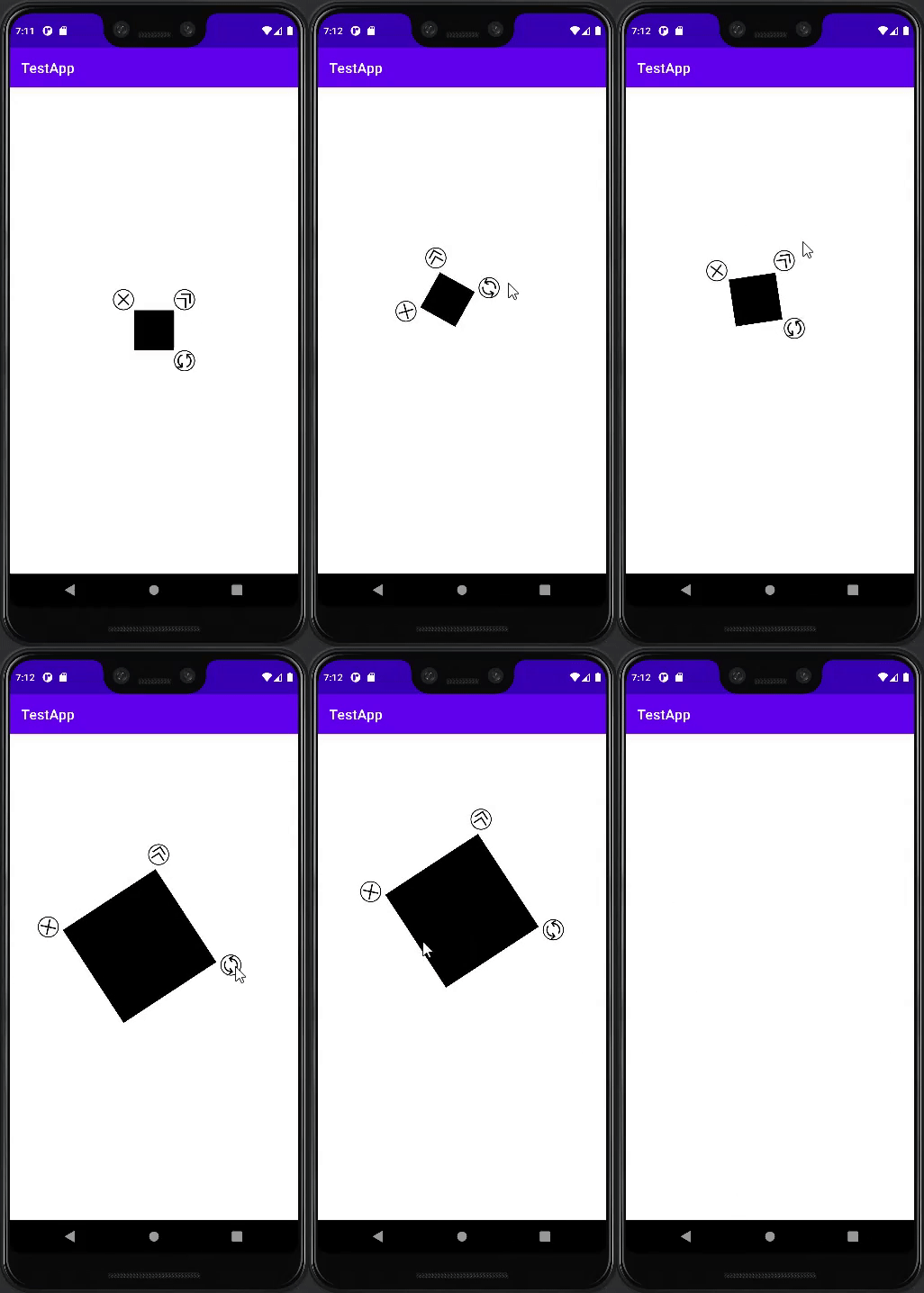
you can see how i made this view from wiki.
자세한 구현 방법은 Wiki에 정리해 놓았습니다.
this repository release to jitpack
이 Repository는 Jitpack에 배포되었습니다.
link: https://jitpack.io/#Moony-H/ImageControlView
Setting up ImageControlView requires to add this Gradle configuration:
build.gradle에 아래와 같이 추가 합니다.
dependencies {
	implementation 'com.github.Moony-H:ImageControlView:1.1'
}
than, u can use ImageControlView!
이로서 Android Studio에 설치하여 ImageControlView를 사용하실 수 있습니다.
To manage the Focus of ImageControlView (the view that now interacts with the user), ImageControlView must have ImageControlLayout as its parent view.
ImageControlView의 Focus(지금 사용자와 상호작용 하는 View)를 관리하기 위해서 ImageControlView는 ImageControlLayout을 부모 뷰로 가지고 있어야 합니다.
if you don't, ImageContorlView will thow the IllegalStateException("ImageControlView's parent must be ImageControlLayout")
그렇지 않으면 IllegalStateException("ImageControlView's parent must be ImageControlLayout")을 발생 시킵니다.
val p=this.parent

if(p is ImageControlLayout)
    parentLayout=p
else
throw IllegalStateException("ImageControlView's parent must be ImageControlLayout")ImageControllayout extends ConstraintLayout.
ImageControlLayout은 ConstraintLayout을 상속하여 만들었습니다.
so, you can use ImageControlView as ConstraintLayout.
따라서 ConstraintLayout처럼 사용할 수 있습니다.
<?xml version="1.0" encoding="utf-8"?>

<com.moony.routeen.ui.view.other.ImageControlLayout

    xmlns:android="http://schemas.android.com/apk/res/android"
    xmlns:app="http://schemas.android.com/apk/res-auto"
    xmlns:tools="http://schemas.android.com/tools"
    android:id="@+id/activity_main_parent"
    android:layout_width="match_parent"
    android:layout_height="match_parent"
    >
    <com.moony.routeen.ui.view.other.ImageControlView
        android:layout_width="100dp"
        android:layout_height="100dp"
        app:src="@color/yellow"
        />

    <Button
        app:layout_constraintTop_toTopOf="parent"
        app:layout_constraintBottom_toBottomOf="parent"
        app:layout_constraintLeft_toLeftOf="parent"
        app:layout_constraintRight_toRightOf="parent"
        android:layout_width="wrap_content"
        android:layout_height="wrap_content"/>

    <EditText
        android:layout_width="wrap_content"
        android:layout_height="wrap_content"
        app:layout_constraintTop_toTopOf="parent"
        app:layout_constraintBottom_toBottomOf="parent"
        app:layout_constraintLeft_toLeftOf="parent"
        />


</com.moony.routeen.ui.view.other.ImageControlLayout>