
Learn Vim in your browser — guided lessons, real Vim keybindings, and local progress tracking.


ridhsuki.github.io/vim-learning
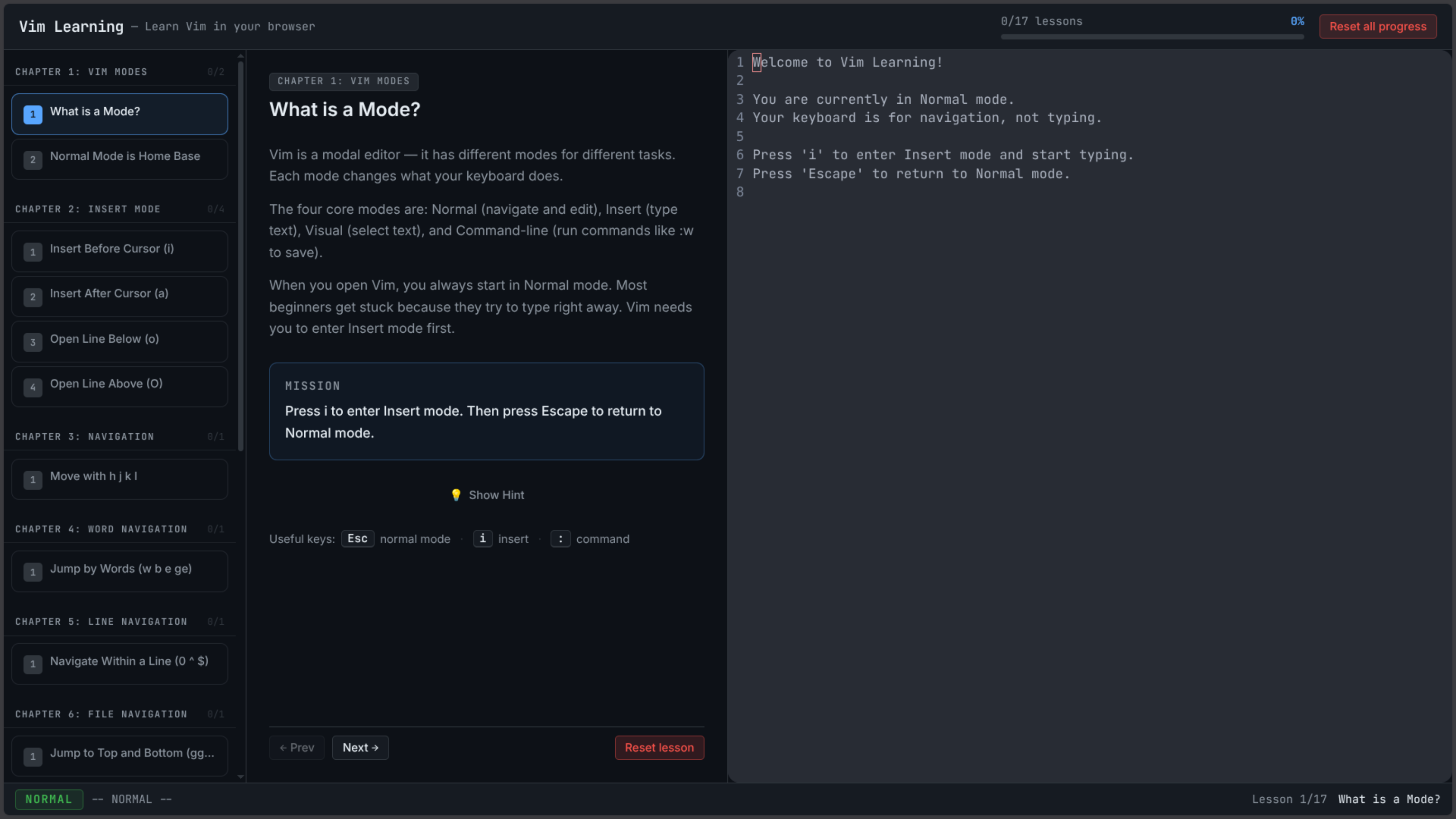
- Real Vim keybindings — powered by CodeMirror +
@replit/codemirror-vim - Guided lessons — structured lessons covering modes, navigation, editing, and more
- Practice missions — hands-on tasks with hints and completion tracking
- Manual completion — "I completed this mission" button for open-ended exercises
- Progress persistence — progress saved to
localStorage, survives page reload - URL-based deep linking — share or bookmark lessons via
/#lesson-idhash routes - Ex-command feedback —
:wacts as a "save" metaphor with status bar feedback - Mobile-first UX — responsive view switcher (Lessons / Lesson / Editor) on small screens
- PWA-ready — installable, service worker caching, offline support after first visit
- Reset controls — per-lesson reset and global "Reset all progress" with confirmation dialog
| Layer | Technology |
|---|---|
| Framework | React 18 + Vite |
| Language | TypeScript |
| Styling | Tailwind CSS (JIT) |
| Editor | CodeMirror 6 + @replit/codemirror-vim |
| State | React hooks + localStorage |
| Routing | URL hash routing (no external library) |
| Testing | Vitest + Playwright |
| Deployment | GitHub Pages via gh-pages |
# 1. Clone the repository
git clone https://github.com/Ridhsuki/vim-learning.git
cd vim-learning

# 2. Install dependencies
npm install

# 3. Start the development server
npm run dev
The app will be available at http://localhost:5173.
| Command | Description |
|---|---|
npm run dev |
Start local dev server with hot reload |
npm run build |
Build production bundle to dist/ |
npm run preview |
Preview production build locally |
npm run lint |
Run ESLint |
npm run typecheck |
Run TypeScript type checker |
npm run test |
Run unit tests in watch mode |
npm run test:run |
Run unit tests once (CI mode) |
npm run e2e |
Run Playwright end-to-end tests |
npm run deploy |
Build and deploy to GitHub Pages |
# Unit tests (Vitest)
npm run test:run

# End-to-end tests (Playwright)
npm run e2e

# Type checking
npm run typecheck

# Linting
npm run lintThe app is deployed to GitHub Pages using the gh-pages package.
npm run deployThe deploy script runs
vite buildfirst (predeploy), then pushesdist/to thegh-pagesbranch.Ensure
vite.config.tshasbase: '/vim-learning/'set correctly for GitHub Pages.
vim-learning/
├── e2e/                    # Playwright E2E tests
├── public/                 # Static assets (favicons, icons, sw.js, manifest)
├── specs/                  # Project specs and task tracking
│   └── vim-learning-tutor/
│       ├── tasks.md        # Sprint task tracker
│       └── validation-audit.md
├── src/
│   ├── app/                # App root (App.tsx)
│   ├── components/
│   │   ├── editor/         # VimEditor component
│   │   ├── layout/         # AppShell, StatusBar
│   │   ├── lessons/        # LessonPanel, LessonList, LessonCard, CompletionScreen
│   │   ├── progress/       # ProgressBar
│   │   └── ui/             # Button, Tooltip, ConfirmDialog
│   ├── data/               # Lesson data (lessons.ts)
│   ├── hooks/              # useLessonProgress, useVimEditor
│   ├── lib/                # lessonValidation
│   ├── styles/             # globals.css
│   └── types/              # lesson.ts
├── index.html
├── vite.config.ts
├── playwright.config.ts
└── package.json
See specs/vim-learning-tutor/tasks.md for the full sprint history.
Completed milestones:
- v1.0.0 — Initial release with 20+ guided Vim lessons
- v1.0.1 — Manual lesson completion validation hotfix
- v1.0.2 — Reset all progress button
- v1.0.3 — Responsive layout and scrollbar polish
- v1.0.4 — Custom confirmation modal
- v1.0.5 — Desktop column balance and overflow fix
- v1.0.6 — SEO, PWA, and service worker
- v1.0.7 — Repository documentation
Future ideas:
- More lesson modules (macros, registers, visual block, etc.)
- Configurable themes
- Keyboard sound effects (optional)
Contributions are welcome! Please read CONTRIBUTING.md before opening a PR.
This project is licensed under the MIT License.