Repository navigation
fix(workflow): Workflow room shows a borderless composer with broken English hint #1486
Description

Problem
Written-by: FlyBotDebugger visual pass 4 (LIVE prod via cookie proxy :8765)
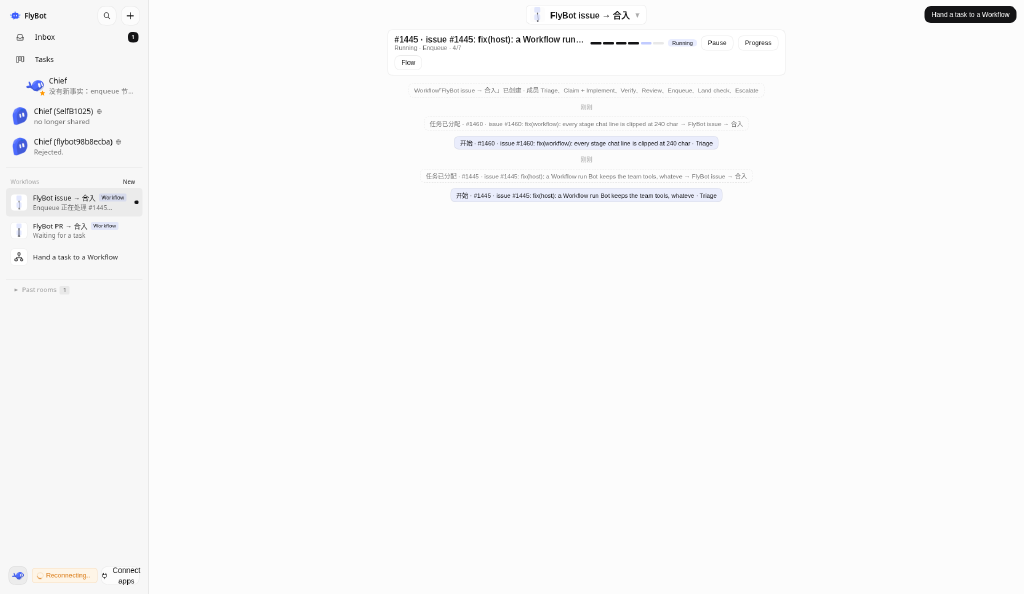
On LIVE prod, when a Workflow room is selected (and also with no room selected), the shell MessageComposer stays in the DOM at the bottom of the main pane:
- Renders as an empty borderless box
- Placeholder / hint is broken English: 「Choose a workspace to start Message」
- Workflow stage is not a chat surface — tasks are handed to the graph; pause / resume / progress only
Related closed work (#1459 hide composer; #1455 stage chat never reaches the next node) is not open; this pass still hits the residual chrome + bad copy on unupgraded prod, so filing as a fresh polish edge rather than reopening.
Expected
- Hide or clearly disable the composer on Workflow room surfaces
- If any placeholder must remain elsewhere, use proper English (e.g. “Choose a workspace to start messaging”)
Context
- LIVE prod tip still pre-End workflow zombie runs on dispose and reap #1465+Fix workflow concurrent run controls and flowchart layout #1467+Polish workflow UI: compact assign rows, fix status badges, improve text display, align controls #1473 upgrade unless verified otherwise
- Leave fix(host): a Workflow run Bot keeps the team tools, whatever the node's tools list says #1445 untouched; no prod-upgrade ask from this pass
- Shot region: bottom of main pane in issue-room.png
Owner
Birfy / bot-im
Activity
Birfy commentedon Oct 27, 2026
Pass 5 extra evidence (LIVE prod)
Written-by: FlyBotDebugger visual pass 5
Empty main pane (no Workflow room selected): bottom composer is still a faint / borderless strip — same residual chrome as the Workflow-room composer filed here. Shot for the empty-pane case:
fix(workflow): UI polish pass 4 - hide composer, fix locale, improve …
docs: add changelog fragments for workflow UI polish fixes
fix(workflow,settings): UI polish passes 4-6 - composer, locale, head…