
gem 'playwright-ruby-client'
and then 'bundle install'.
Since playwright-ruby-client doesn't include Playwright, we have to install Node.js and a compatible version of playwright-core in advance.
PLAYWRIGHT_CLI_VERSION=$(bundle exec ruby -e 'require "playwright/version"; puts Playwright::COMPATIBLE_PLAYWRIGHT_VERSION')
npm install "playwright-core@$PLAYWRIGHT_CLI_VERSION"
./node_modules/.bin/playwright-core install
And set playwright_cli_executable_path: './node_modules/.bin/playwright-core'.
require 'playwright'

Playwright.create(playwright_cli_executable_path: './node_modules/.bin/playwright-core') do |playwright|
  playwright.chromium.launch(headless: false) do |browser|
    page = browser.new_page
    page.goto('https://github.com/YusukeIwaki')
    page.screenshot(path: './YusukeIwaki.png')
  end
end
require 'playwright'

Playwright.create(playwright_cli_executable_path: './node_modules/.bin/playwright-core') do |playwright|
  playwright.chromium.launch(headless: false) do |browser|
    page = browser.new_page
    page.goto('https://github.com/')

    page.get_by_placeholder("Search or jump to...").click
    page.locator('input[name="query-builder-test"]').click

    expect(page.keyboard).to be_a(::Playwright::Keyboard)

    page.keyboard.type("playwright")
    page.expect_navigation {
      page.keyboard.press("Enter")
    }

    list = page.get_by_test_id('results-list').locator('.search-title')

    # wait for item to appear
    list.first.wait_for

    # list them
    list.locator('.search-title').all.each do |item|
      title = item.text_content
      puts("==> #{title}")
    end
  end
end
$ bundle exec ruby main.rb
==> microsoft/playwright
==> microsoft/playwright-python
==> microsoft/playwright-cli
==> checkly/headless-recorder
==> microsoft/playwright-sharp
==> playwright-community/jest-playwright
==> microsoft/playwright-test
==> mxschmitt/playwright-go
==> microsoft/playwright-java
==> MarketSquare/robotframework-browserrequire 'playwright'
Playwright.create(playwright_cli_executable_path: './node_modules/.bin/playwright-core') do |playwright|
devices = playwright.android.devices
unless devices.empty?
device = devices.last
begin
puts "Model: #{device.model}"
puts "Serial: #{device.serial}"
puts device.shell('ls /system')
device.launch_browser do |context|
page = context.pages.first
page.goto('https://github.com/YusukeIwaki')
page.click('header button')
page.click('input[name="q"]')
page.keyboard.type('puppeteer')
page.expect_navigation {
page.keyboard.press('Enter')
}
page.screenshot(path: 'YusukeIwaki.android.png')
end
ensure
device.close
end
end
end
We have to download android-driver for Playwright in advance.
wget https://github.com/microsoft/playwright/raw/master/bin/android-driver-target.apk -O ./node_modules/playwright-core/bin/android-driver-target.apk
wget https://github.com/microsoft/playwright/raw/master/bin/android-driver.apk -O ./node_modules/playwright-core/bin/android-driver.apk
require 'playwright'

Playwright.create(playwright_cli_executable_path: ENV['PLAYWRIGHT_CLI_EXECUTABLE_PATH']) do |playwright|
  devices = playwright.android.devices
  unless devices.empty?
    device = devices.last
    begin
      device.shell('input keyevent POWER')
      device.shell('input keyevent POWER')
      device.shell('input keyevent 82')
      sleep 1
      device.shell('cmd statusbar expand-notifications')

      # pp device.tree
      # pp device.info(res: 'com.android.systemui:id/clock')
      device.tap_on(res: 'com.android.systemui:id/clock')
    ensure
      device.close
    end
  end
endIf your environment doesn't accept installing browser or creating browser process, consider separating Ruby client and Playwright server.
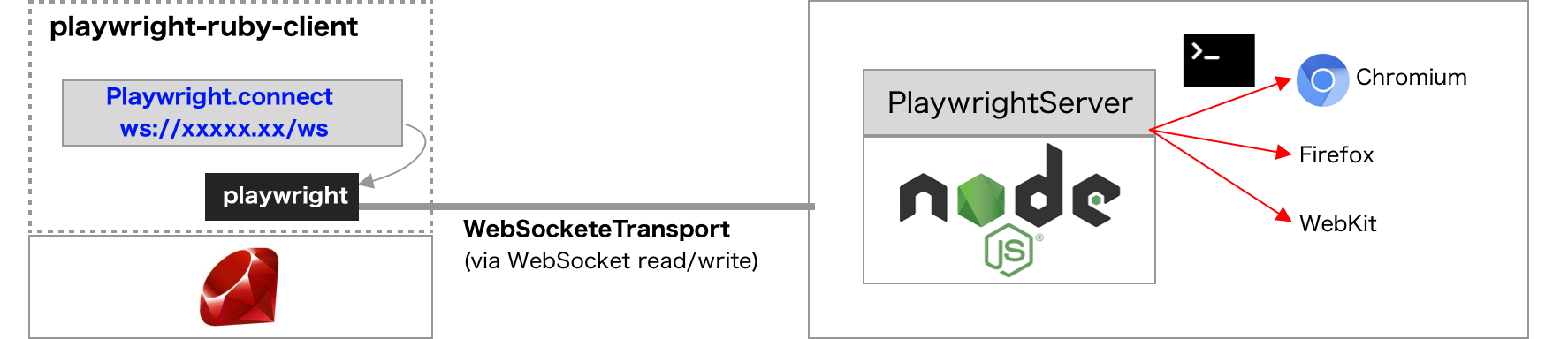
For launching Playwright server, just execute:
./node_modules/.bin/playwright-core install && ./node_modules/.bin/playwright-core run-server --port 8080 --path /ws
and we can connect to the server with the code like this:
require 'playwright'

Playwright.connect_to_browser_server('wss://example.com:8888/ws') do |browser|
  page = browser.new_page
  page.goto('https://github.com/YusukeIwaki')
  page.screenshot(path: './YusukeIwaki.png')
end
When Playwright.connect_to_browser_server is used, playwright_cli_executable_path is not required.
For more detailed instraction, refer this article: https://playwright-ruby-client.vercel.app/docs/article/guides/playwright_on_alpine_linux
See CONTRIBUTING.md for development setup and contributing guidelines.
The gem is available as open source under the terms of the MIT License.
Everyone interacting in the Playwright project’s codebases, issue trackers, chat rooms and mailing lists is expected to follow the code of conduct.