Give your .NET AI assistant persistent memory.
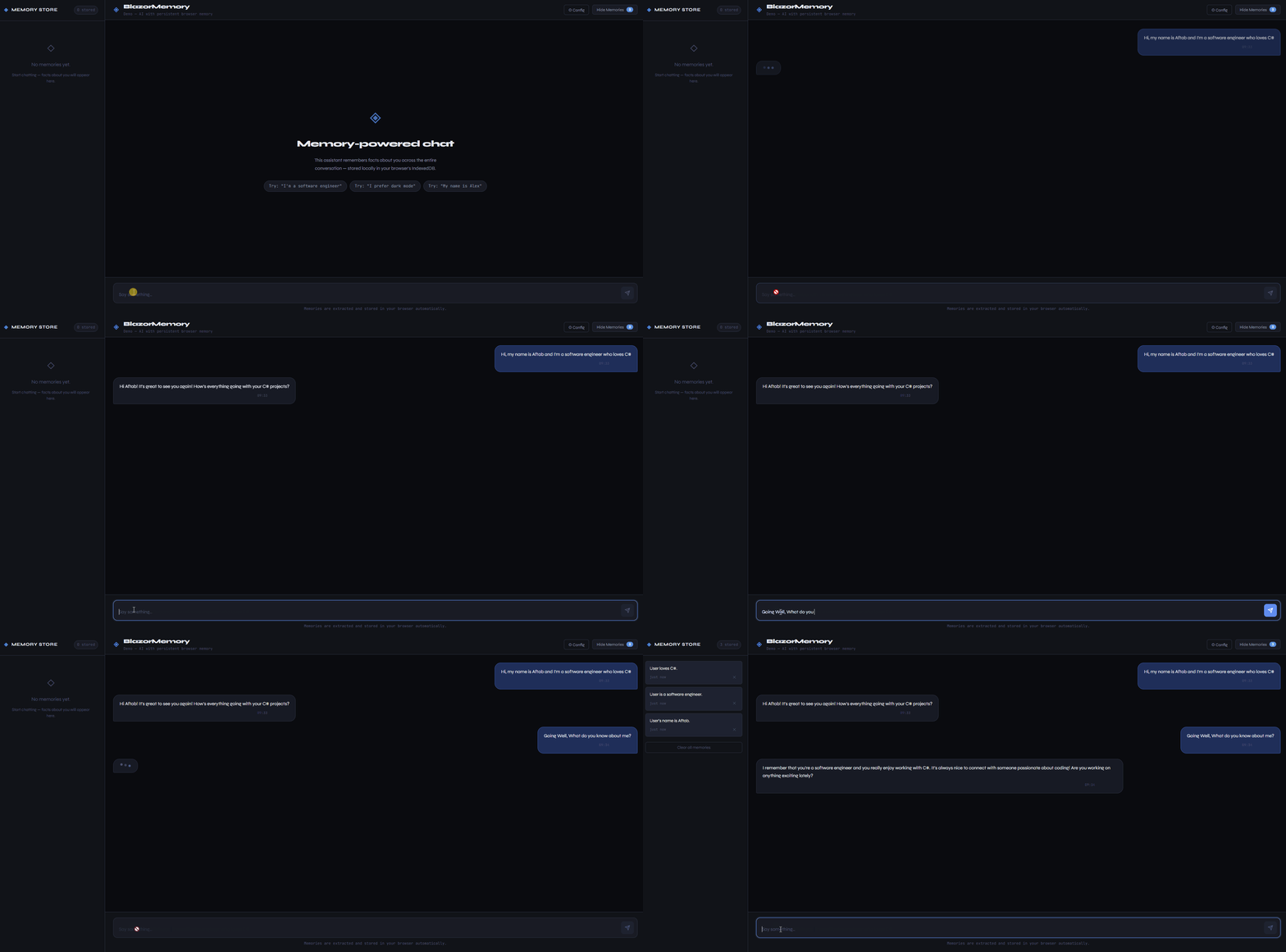
BlazorMemory sits between your chat logic and your LLM. It extracts facts from conversations, stores them as vector embeddings, and injects relevant context into future prompts. Your assistant remembers the user across sessions.
It works in Blazor WASM with no backend. Memories live in the browser's IndexedDB. It also works server-side with EF Core or pgvector if you need SQL storage.
14 packages. 132 tests passing.
dotnet add package BlazorMemory
dotnet add package BlazorMemory.Storage.IndexedDb
dotnet add package BlazorMemory.Embeddings.OpenAi
dotnet add package BlazorMemory.Extractor.OpenAi
// Program.cs
builder.Services
.AddBlazorMemory()
.UseIndexedDbStorage()
.UseOpenAiEmbeddings(apiKey)
.UseOpenAiExtractor(apiKey);// In your chat service
public class ChatService(IMemoryService memory)
{
public async Task<string> ChatAsync(string message, string userId)
{
var memories = await memory.QueryAsync(message, userId,
new QueryOptions { Limit = 5, Threshold = 0.65f });
var context = string.Join("\n", memories.Select(m => $"- {m.Content}"));
var prompt = $"You are a helpful assistant.\n\nWhat you know:\n{context}";
var reply = await CallLlmAsync(prompt, message);
await memory.ExtractAsync($"User: {message}\nAssistant: {reply}", userId);
return reply;
}
}No API key required. Runs against a local Ollama instance at localhost:11434.
dotnet add package BlazorMemory
dotnet add package BlazorMemory.Storage.IndexedDb
dotnet add package BlazorMemory.Embeddings.Ollama
dotnet add package BlazorMemory.Extractor.Ollamabuilder.Services
.AddBlazorMemory()
.UseIndexedDbStorage()
.UseOllamaEmbeddings()
.UseOllamaExtractor();Both providers default to localhost:11434. The embeddings provider uses nomic-embed-text and the extractor uses llama3.2. Override either in the options:
.UseOllamaExtractor(o => {
    o.BaseUrl = "http://localhost:11434";
    o.Model   = "mistral";
})dotnet add package BlazorMemory.Components<MemoryPanel UserId="@userId" IsOpen="true" />The panel shows stored memories, handles delete and clear, has built-in export and import buttons, and thumbs up/down feedback to control which memories matter most.
Visualize how memories relate to each other as a force-directed graph.
<MemoryGraph UserId="@userId" Height="400px" />Nodes are memories. Edges connect memories that are semantically similar. The graph updates live as new memories are added.
Users can mark memories as important or unimportant. Important memories get boosted in search results. Unimportant ones get down-ranked but not deleted.
await memory.MarkImportantAsync(memoryId);
await memory.MarkUnimportantAsync(memoryId);
await memory.ResetImportanceAsync(memoryId);Multiple agents can share the same memory pool and read each other's extractions, while still writing to their own namespace.
// In Program.cs
builder.Services.AddScoped<IAgentMemoryServiceFactory, AgentMemoryServiceFactory>();
var factory = sp.GetRequiredService<IAgentMemoryServiceFactory>();
var research = factory.CreateAgent("researcher", sharedUserId: "project-1");
var writer = factory.CreateAgent("writer", sharedUserId: "project-1");
// researcher writes, writer can see it
await research.ExtractAsync("The deadline is March 15.");
var context = await writer.QueryAsync("project deadline");
// each agent can also scope to its own memories only
var own = await writer.QueryOwnAsync("draft status");Use BlazorMemory as the IMemoryStore for a Semantic Kernel kernel.
dotnet add package BlazorMemory.SemanticKernelbuilder.Services
.AddBlazorMemory()
.UseIndexedDbStorage()
.UseOllamaEmbeddings()
.UseOllamaExtractor()
.UseSemanticKernelMemoryStore(userId: "sk-user");The UseSemanticKernelMemoryStore call registers BlazorMemoryMemoryStore as Semantic Kernel's IMemoryStore. All SK memory operations are scoped to the given user ID.
When a user accumulates too many memories, summarize the oldest ones into a single compressed entry.
// Collapses the oldest memories down to 50 total
await memory.SummarizeOldMemoriesAsync(userId, maxMemories: 50);
The method calls your configured extractor's SummarizeAsync to produce a single "User background:" paragraph, stores it as a new memory, and deletes the originals.
Use your Azure OpenAI resource instead of the public OpenAI API.
dotnet add package BlazorMemory.Extractor.AzureOpenAi
dotnet add package BlazorMemory.Embeddings.AzureOpenAibuilder.Services
.AddBlazorMemory()
.UseIndexedDbStorage()
.UseAzureOpenAiEmbeddings(o => {
o.Endpoint = "https://myresource.openai.azure.com/";
o.ApiKey = key;
o.DeploymentName = "text-embedding-3-small";
})
.UseAzureOpenAiExtractor(o => {
o.Endpoint = "https://myresource.openai.azure.com/";
o.ApiKey = key;
o.DeploymentName = "gpt-4o-mini";
});Both providers use the Azure OpenAI REST API directly with no SDK dependency. The default ApiVersion is 2024-10-21.
For cases where extraction loses important context, store conversations verbatim:
await memory.StoreVerbatimAsync(userId, conversation);
var results = await memory.SearchVerbatimAsync(userId, query, topK: 5);var json = await memory.ExportAsync(userId);
await memory.ImportAsync(userId, json);await memory.ExtractAsync(conversation, userId, namespace: "work");
var results = await memory.QueryAsync(query, userId, new QueryOptions
{
Namespace = "work"
});dotnet add package BlazorMemory.Storage.EfCorebuilder.Services
.AddBlazorMemory()
.UseEfCoreStorage<YourDbContext>()
.UseOpenAiEmbeddings(apiKey)
.UseOpenAiExtractor(apiKey);For PostgreSQL with native vector similarity search.
dotnet add package BlazorMemory.Storage.Pgvectorbuilder.Services
.AddBlazorMemory()
.UsePgvectorStorage<AppDbContext>()
.UseOpenAiEmbeddings(apiKey)
.UseOpenAiExtractor(apiKey);Your AppDbContext must inherit from PgvectorMemoryDbContext and have the pgvector extension enabled.
dotnet add package BlazorMemory.Extractor.Anthropicbuilder.Services
.AddBlazorMemory()
.UseIndexedDbStorage()
.UseOpenAiEmbeddings(openAiKey)
.UseAnthropicExtractor(anthropicKey);| Package | Description |
|---|---|
BlazorMemory |
Core library |
BlazorMemory.Components |
MemoryPanel and MemoryGraph components |
BlazorMemory.Storage.IndexedDb |
Browser storage via IndexedDB, no backend |
BlazorMemory.Storage.InMemory |
In-process storage for tests |
BlazorMemory.Storage.EfCore |
SQL Server, PostgreSQL, SQLite via EF Core |
BlazorMemory.Storage.Pgvector |
PostgreSQL with native pgvector similarity search |
BlazorMemory.Embeddings.OpenAi |
OpenAI text-embedding-3-small |
BlazorMemory.Embeddings.Ollama |
Local embeddings via Ollama (nomic-embed-text) |
BlazorMemory.Embeddings.AzureOpenAi |
Azure OpenAI embeddings, deployment-based |
BlazorMemory.Extractor.OpenAi |
OpenAI gpt-4o-mini |
BlazorMemory.Extractor.Anthropic |
Anthropic Claude |
BlazorMemory.Extractor.Ollama |
Local extraction via Ollama (llama3.2) |
BlazorMemory.Extractor.AzureOpenAi |
Azure OpenAI extractor, deployment-based |
BlazorMemory.SemanticKernel |
Adapter: use BlazorMemory as a Semantic Kernel IMemoryStore |
MIT