



A React Native bridge module: Document Viewer for files (pdf, png, jpg, xls, doc, ppt, xlsx, docx, pptx etc.)
- Download Progess Event Listener for big Files Android
- Android file without external Application
- Windows Phone Support
IMPORTANT INFORMATION: THIS IS A OPEN SOURCE PROJECT, SOMETIMES I HAVE NO TIME TO DEVELOP THIS PROJECT. THANK YOU FOR YOUR PULL REQUEST AND YOUR SUPPORT. I will continue to develop it as it is possible in time.
Changelog:
2.7.8 -   XLS Exmaple Local File IOS 97-2003
2.7.7 -   "react": "^16.3.0-alpha.1","react-native": "0.54.3"
2.7.5 -   Pull Request local file from LeMinh1995 + Pull Request podspec Form Linh1987
2.7.3 -   Example Local File
2.7.2 -   Progress Download Feedback in example and Done Button Callback IOS
2.7.1 -   Fix Progress IOS Download
2.6.9 -   Progress IOS DOWNLOAD Document Callback in Native Code
2.6.0 -   Android Openbase64
2.5.2 -   OpenDocAndroid
2.5.1 -   Cleanings
2.5.0  -  Update Project for React Native 0.50.3
$ npm install react-native-doc-viewer --save
$ react-native link react-native-doc-viewer
If your project uses CocoaPods to manage React installation (especially with Expo-detached project), most likely you will run into issue with header files not found as described here (https://docs.expo.io/versions/latest/guides/expokit.html#changing-native-dependencies "Changing Native Dependencies"). It will be helpful to follow these steps to have it compiled successfully:
-
npm install react-native-doc-viewer --save -
Add the plugin dependency to your Podfile, pointing at the path where NPM installed it:
pod 'RNReactNativeDocViewer', path: '../node_modules/react-native-doc-viewer'
- Run
pod install
-
In XCode, in the project navigator, right click
Libraries➜Add Files to [your project's name] -
Go to
node_modules➜react-native-doc-viewerand addRNDocViewer.xcodeproj -
In XCode, in the project navigator, select your project. Add
libRNDocViewer.ato your project'sBuild Phases➜Link Binary With Libraries -
Linked Frameworks and Libraries must have this 2 Libraries (AssetsLibrary.framework & QuickLook.framework). When not you have to add them.
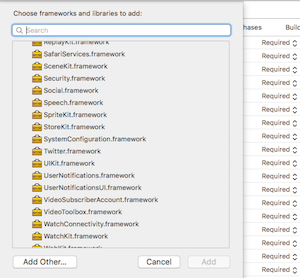

-
When you Show http Links don't forget to set APP Transport Security Settings -> Allow Arbitrary Loads to YES

- Run your project (
Cmd+R)<
- Open up
android/app/src/main/java/[...]/MainApplication.java
- Add
import com.philipphecht.RNDocViewerPackage;to the imports at the top of the file - Add
new RNDocViewerPackage()to the list returned by thegetPackages()method
- Append the following lines to
android/settings.gradle:include ':react-native-doc-viewer' project(':react-native-doc-viewer').projectDir = new File(rootProject.projectDir, '../node_modules/react-native-doc-viewer/android') - Insert the following lines inside the dependencies block in
android/app/build.gradle:compile project(':react-native-doc-viewer')
- In Visual Studio add the
RNReactNativeDocViewer.slninnode_modules/react-native-react-native-doc-viewer/windows/RNReactNativeDocViewer.slnfolder to their solution, reference from their app. - Open up your
MainPage.csapp
- Add
using com.Philipphecht.RNReactNativeDocViewer;to the usings at the top of the file - Add
new RNReactNativeDocViewerPackage()to theList<IReactPackage>returned by thePackagesmethod
| resource | description |
|---|---|
DoneButtonEvent |
return true |
RNDownloaderProgress |
return Progress Float |
| resource | description |
|---|---|
openDoc |
{url:String,fileNameOptional:String (optional)} |
openDocb64 |
{url:String,fileName:String,fileType:String } |
openDocBinaryinUrl |
{url:String,fileName:String,fileType:String } |
| resource | description |
|---|---|
openDoc |
{url:String,fileName:String, cache:boolean} |
openDocb64 |
{url:String,fileName:String,fileType:String, cache:boolean } |
openDocBinaryinUrl |
not implemented yet |
import React, { Component } from 'react';
import {
  AppRegistry,
  StyleSheet,
  Text,
  View,
  Platform,
  Button,
  Alert,
  ActivityIndicator,
  NativeAppEventEmitter,
  DeviceEventEmitter,
  NativeModules,
  NativeEventEmitter,
  TouchableHighlight
} from 'react-native';
import OpenFile from 'react-native-doc-viewer';
var RNFS = require('react-native-fs');
var SavePath = Platform.OS === 'ios' ? RNFS.MainBundlePath : RNFS.DocumentDirectoryPath;
export default class DocumentViewerExample extends Component {
 constructor(props) {
    super(props);
    this.state = {
      animating: false,
      progress: "",
      donebuttonclicked: false,
    }
    this.eventEmitter = new NativeEventEmitter(NativeModules.RNReactNativeDocViewer);
    this.eventEmitter.addListener('DoneButtonEvent', (data) => {
      /*
      *Done Button Clicked
      * return true
      */
      console.log(data.close);
      this.setState({donebuttonclicked: data.close});
    })
    this.didPressToObjcButton = this.didPressToObjcButton.bind(this);
  }

  componentDidMount(){
    // download progress
    this.eventEmitter.addListener(
      'RNDownloaderProgress',
      (Event) => {
        console.log("Progress - Download "+Event.progress  + " %")
        this.setState({progress: Event.progress + " %"});
      }

    );
  }

  componentWillUnmount (){
    this.eventEmitter.removeListener();
  }
  /*
  * Handle WWW File Method
  * fileType Default == "" you can use it, to set the File Extension (pdf,doc,xls,ppt etc) when in the Url the File Extension is missing.
  */
  handlePress = () => {
    this.setState({animating: true});
    if(Platform.OS === 'ios'){
      OpenFile.openDoc([{
        url:"https://calibre-ebook.com/downloads/demos/demo.docx",
        fileNameOptional:"test filename"
      }], (error, url) => {
         if (error) {
          this.setState({animating: false});
         } else {
          this.setState({animating: false});
           console.log(url)
         }
       })
    }else{
      //Android
      this.setState({animating: true});
      OpenFile.openDoc([{
        url:"https://www.huf-haus.com/fileadmin/Bilder/Header/ART_3/Header_HUF_Haus_ART_3___1_.jpg", // Local "file://" + filepath
        fileName:"sample",
        cache:false,
        fileType:"jpg"
      }], (error, url) => {
         if (error) {
          this.setState({animating: false});
           console.error(error);
         } else {
          this.setState({animating: false});
           console.log(url)
         }
       })
    }

  }


  /*
  * Handle Local File Method
  * fileType Default == "" you can use it, to set the File Extension (pdf,doc,xls,ppt etc) when in the Url the File Extension is missing.
  */
  handlePressLocal = () => {
    this.setState({animating: true});
    if(Platform.OS === 'ios'){
        OpenFile.openDoc([{url:SavePath+"/react-native-logo.jpg",
        fileNameOptional:"test filename"
      }], (error, url) => {
         if (error) {
          this.setState({animating: false});
         } else {
          this.setState({animating: false});
           console.log(url)
         }
       })
    }else{
      OpenFile.openDoc([{url:SavePath+"/demo.jpg",
        fileName:"sample",
        cache:false,
        fileType:"jpg"
      }], (error, url) => {
         if (error) {
          this.setState({animating: false});
         } else {
          this.setState({animating: false});
           console.log(url)
         }
       })

    }
  }

    handlePressLocalXLS = () => {
      this.setState({animating: true});
      if(Platform.OS === 'ios'){
          OpenFile.openDoc([{url:SavePath+"/SampleXLSFile_19kb.xls",
          fileNameOptional:"Sample XLS 94-2003"
        }], (error, url) => {
           if (error) {
            this.setState({animating: false});
           } else {
            this.setState({animating: false});
             console.log(url)
           }
         })
      }else{
        OpenFile.openDoc([{url:SavePath+"/demo.jpg",
          fileName:"sample",
          cache:false,
          fileType:"jpg"
        }], (error, url) => {
           if (error) {
            this.setState({animating: false});
           } else {
            this.setState({animating: false});
             console.log(url)
           }
         })

      }
    }


  /*
  * Binary in URL
  * Binary String in Url
  * fileType Default == "" you can use it, to set the File Extension (pdf,doc,xls,ppt etc) when in the Url you dont have an File Extensions
  */
  handlePressBinaryinUrl = () => {
    this.setState({animating: true});
    if(Platform.OS === 'ios'){
      OpenFile.openDocBinaryinUrl([{
        url:"https://storage.googleapis.com/need-sure/example",
        fileName:"sample",
        fileType:"xml"
      }], (error, url) => {
          if (error) {
            console.error(error);
            this.setState({animating: false});
          } else {
            console.log(url)
            this.setState({animating: false});
          }
        })
    }else{
      OpenFile.openDocBinaryinUrl([{
        url:"https://storage.googleapis.com/need-sure/example",
        fileName:"sample",
        fileType:"xml",
        cache:true
      }], (error, url) => {
          if (error) {
            console.error(error);
            this.setState({animating: false});
          } else {
            console.log(url)
            this.setState({animating: false});
          }
        })
    }
  }

  /*
  * Base64String
  * put only the base64 String without data:application/octet-stream;base64
  * fileType Default == "" you can use it, to set the File Extension (pdf,doc,xls,ppt etc) when in the Url you dont have an File Extensions
  */
  handlePressb64 = () => {
    if(Platform.OS === 'ios'){
      OpenFile.openDocb64([{
        base64:"{BASE64String}"
        fileName:"sample",
        fileType:"png"
      }], (error, url) => {
          if (error) {
            console.error(error);
          } else {
            console.log(url)
          }
        })
    }else{
      //Android
      OpenFile.openDocb64([{
        base64:"{BASE64String}"
        fileName:"sample",
        fileType:"png",
        cache:true /*Use Cache Folder Android*/
      }], (error, url) => {
          if (error) {
            console.error(error);
          } else {
            console.log(url)
          }
        })
    }

    /*
  * Video File
  */
  handlePressVideo = () => {
    if(Platform.OS === 'ios'){
      OpenFile.playMovie(video, (error, url) => {
                if (error) {
                    console.error(error);
                } else {
                    console.log(url)
                }
            })
    }else{
      Alert.alert("Android coming soon");
    }
  }


  <Button
          onPress={this.handlePress.bind(this)}
          title="Press Me Open Doc Url"
          accessibilityLabel="See a Document"
        />
        <Button
          onPress={this.handlePressBinaryinUrl.bind(this)}
          title="Press Me Open BinaryinUrl"
          accessibilityLabel="See a Document"
        />
         <Button
          onPress={this.handlePressLocal.bind(this)}
          title="Press Me Open Doc Path"
          accessibilityLabel="See a Document"
        />
        <Button
          onPress={this.handlePressLocalXLS.bind(this)}
          title="Press Me Open XLS DOC Path"
          accessibilityLabel="See a Document"
        />
        <Button
          onPress={this.handlePressb64.bind(this)}
          title="Press Me Open Base64 String"
          accessibilityLabel="See a Document"
        />
        <Button
          onPress={()=>this.handlePressVideo("http://www.sample-videos.com/video/mp4/720/big_buck_bunny_720p_1mb.mp4")}
          title="Press Me Open Video"
          accessibilityLabel="See a Document"
        />
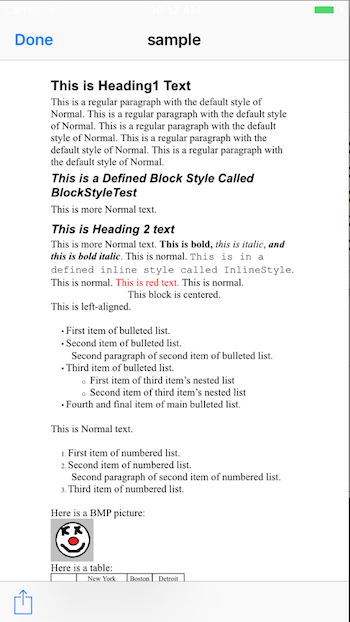
}
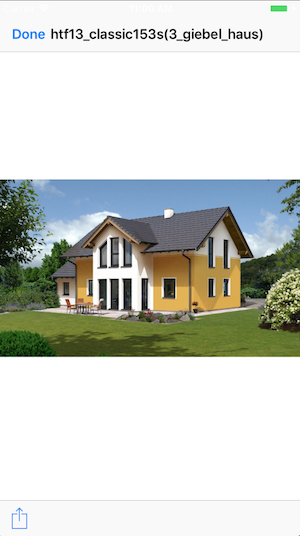
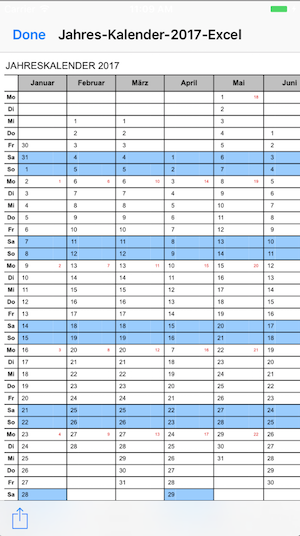
Copyright (c) 2017-present, Philipp Hecht philipp.hecht@icloud.com
If this project help you reduce time to develop, you can give me a cup of coffee :)
Etherum wallet: 0x124F99647a904240945d8B582eEf1E3CD6D00a8a