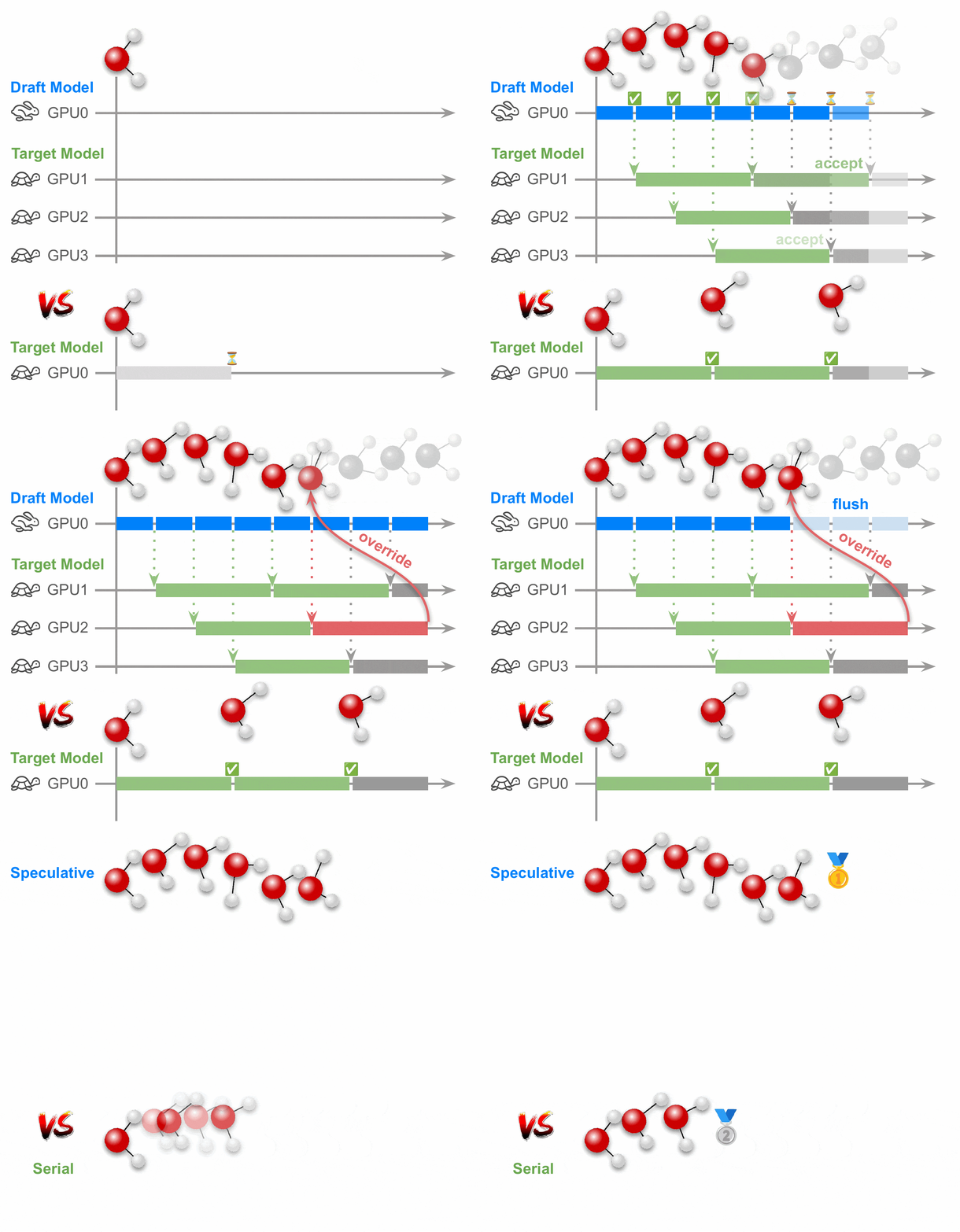
This repo implements Langevin Speculative Dynamics (LSD), a new parallelism method for molecular dynamics that pairs fast drafting with parallel verification.
To install only the core LSD package without any model backends, run:
pip install speculative-mdTo replicate the draft/target model combinations used in the copper demo.py script and the paper, instead install lsd with the corresponding optional dependency:
pip install "speculative-md[fairchem]"   # adds fairchem-core (UMA models)
pip install "speculative-md[orb]"        # adds orb-models (ORB models)
pip install "speculative-md[asap]"       # adds asap3 (EMT calculator)
pip install "speculative-md[all]"        # adds all three at once
You can also combine extras, e.g. pip install "speculative-md[fairchem,orb]".
Reproducibility note:
This repo tightens relevant dependency versions to the exact versions used in the paper experiments. Upgrading them to newer versions can result in different speedup measurements as both the orb-models and fairchem packages have optimized their model inference times in the meantime.
demo.py is a single-entry-point benchmark over a copper FCC crystal. It lets you pick a target model and (optionally) a draft model from the command line.
- If both
--targetand--draftare specified, it auto-starts a local Ray head node for you and allocates a pool of target model workers for verifying the draft model predictions based on the amount of GPUs detected on your compute node. - If only
--targetis specified, it defaults to the baseline of serial (non-speculative) Langevin MD with the target model if no draft is specified.
After the MD run finishes, the script outputs the measured inference rate and, if used speculatively, verifier statistics such as the draft acceptance rate.
python demo.py [--target TARGET] [--draft DRAFT] [--size N]
               [--warmup_steps N] [--steps N] [--timestep FS]
               [--temperature_K K] [--friction FS_INV]
[--print_interval N] [--seed SEED]We recommend trying orb-v3-direct-20-omat or emt as drafts.
Reproducibility note:
The paper used a custom, 20% faster version of orb-v3-direct-20-omat with all prediction heads except for the force head removed. Specifying orb-v3-direct-20-omat as a draft model will instead load the default model provided by the orb-models package (v0.5.5), resulting in slighly lower speedups.
| Argument | Default | Description |
|---|---|---|
--target |
uma-s-1p1 (when no draft) |
Target model. One of uma-s-1p1, uma-m-1p1, orb-v3-conservative-20-omat, orb-v3-conservative-inf-omat, orb-v3-direct-20-omat, orb-v3-direct-inf-omat. Required when --draft is set. |
--draft |
unset | Draft model. One of orb-v3-conservative-20-omat, orb-v3-conservative-inf-omat, orb-v3-direct-20-omat, orb-v3-direct-inf-omat, or emt (CPU-only). If omitted, no speculative MD is performed. |
--size |
5 |
FCC edge length N; the system has 4 * N^3 atoms (default 500). |
--warmup_steps |
5000 |
Warm-up steps before timed run (eliminates JIT/compile overhead). |
--steps |
5000 |
Timed MD steps. |
--timestep |
1.0 |
Timestep in fs. |
--temperature_K |
1500 |
Temperature in K. |
--friction |
0.001 |
Langevin friction in fs⁻¹. |
--print_interval |
--steps // 10 |
Energy print interval. |
--seed |
unset | RNG seed; if unset, defaults to non-deterministic. |
Plain MD with UMA-S (no speculation):
python demo.pySpeculative MD with UMA-S target and orb-v3-direct-20-omat draft:
python demo.py --target uma-s-1p1 --draft orb-v3-direct-20-omatLSD uses SpeculativeLangevin as a drop-in for ase.md.langevin.Langevin: it takes the same atoms, timestep, temperature_K and friction arguments, exposes the same attach(...)/run(steps=...) interface, and respects ASE observers. Any draft and target model that supports the ASE calculator interface can be directly used with LSD.
Unlike ase.md.langevin.Langevin, SpeculativeLangevin also consumes a Verifier, which owns the target model workers that run verification of the draft proposals out-of-process via Ray.
The integrator setup has three parts:
- Draft calculator: attach the (cheap) draft model directly to the
Atomsobject asatoms.calc, exactly as you would for plain ASE MD. - Target factory + verifier: wrap construction of the (expensive)
target model in a no-argument factory and hand it to a
Verifier. The factory is called once inside each Ray worker process, so the target model is materialized on the worker's GPU rather than in the driver. - Integrator: pass the verifier into
SpeculativeLangevinalongside the usual ASE arguments. Then use it like any other ASE integrator.
To test against a non-speculative ABOBA integrator baseline, swap SpeculativeLangevin for lsd.integrators.LangevinABOBA, drop the verifier argument, and attach the target calculator directly to atoms.calc. (In that case you also do not need to call init_head_node or set_driver_env_defaults).
# Apply driver-side env defaults BEFORE importing torch (or anything that
# transitively imports torch).
from lsd.ray_utils import init_head_node, set_driver_env_defaults

set_driver_env_defaults()
init_head_node(draft_needs_gpu=True)

import ray
from ase import units
from ase.lattice.cubic import FaceCenteredCubic

from lsd.integrators import SpeculativeLangevin
from lsd.verifiers import Verifier

# Your draft model — anything that exposes an ASE Calculator interface.
from my_models import make_draft_calculator, make_target_calculator

atoms = FaceCenteredCubic(symbol="Cu", size=(5, 5, 5), pbc=True)
atoms.calc = make_draft_calculator()              # 1) draft lives on the driver

def target_factory():                              # 2) target lives in workers
    return make_target_calculator()

verifier = Verifier(target_model_factory=target_factory)

dyn = SpeculativeLangevin(                         # 3) same shape as ASE Langevin
    atoms=atoms,
    verifier=verifier,
    timestep=1.0 * units.fs,
    temperature_K=1500,
    friction=0.001 / units.fs,
)
dyn.run(steps=5000)LSD ships with helpers in lsd.ray_utils that handle Ray head-node setup, GPU
masking, and per-process thread budgeting. Driver scripts only need to call
two functions:
-
set_driver_env_defaults()— setsCUDA_VISIBLE_DEVICES=0and capsOMP_NUM_THREADSetc. based on the SLURM-allocated CPU set (avoids accidental thread oversubscription in cases where the total CPU count on a node significantly exceeds the SLURM-allocated CPU count). All values are set viasetdefault, so explicit shell exports override them. Must be called before importing torch/numpy so the settings are picked up at library initialization. -
init_head_node(draft_needs_gpu)— auto-detects the GPUs on the node vianvidia-smi -L, validates the GPU/draft combination, starts a local Ray head node with the rightCUDA_VISIBLE_DEVICESmask, and connects the driver process to it viaray.init(address="auto"). If used withdraft_needs_gpu=True, it starts a Ray head node analogous to:CUDA_VISIBLE_DEVICES=1,2,...,N-1 ray start --head --num-gpus=N-1
The masking of GPU 0 ensures the draft model (which runs directly in the driver process to avoid extra IPC overhead in its hot path) gets its own GPU invisible to the target model pool handled by Ray. If
draft_needs_gpu=False, all GPUs (including GPU 0) are exposed to Ray.
If a Ray cluster is already running on the node, init_head_node checks
whether the head-node GPU count is consistent with the requested
draft_needs_gpu flag. If it matches, the existing cluster is reused; if it
doesn't (e.g. you ran with draft_needs_gpu=False previously and are now
calling with draft_needs_gpu=True), the cluster is stopped and restarted
with the correct mask. Worker nodes joined to the cluster get disconnected
when the cluster is restarted, so in multi-node setups, keep
draft_needs_gpu consistent across invocations on the head node.
If you have multiple nodes, call init_head_node on the head node as part
of your driver script and join the other nodes into the cluster via
init_worker_node (see below).
For multi-node clusters, lsd.ray_utils also provides
init_worker_node(address) — the worker-side counterpart to init_head_node.
Run it from inside each worker node's SLURM allocation, e.g.:
ssh worker-N
# ... obtain a SLURM allocation on this node ...
python -c "from lsd.ray_utils import init_worker_node; init_worker_node('<head-ip>:6379')"
init_worker_node does on the worker what init_head_node does on the head:
- Detects the worker's GPU count via
nvidia-smi -Land exposes all of them to Ray (unlike the head node, no draft model GPU slot is reserved — the worker nodes run only target models). - Passes
--num-cpus=<cgroup affinity count>so the worker raylet does not misreport the node's full hardware CPU count to the cluster (Ray's autodetect ignores cgroup limits; same fix as for the head node). - Sets per-process OpenMP/BLAS thread caps on the raylet environment via
set_thread_env_defaults. These propagate to all worker actors spawned by the raylet.
The <head-ip>:<port> string is what ray start --head printed when the
head node started (recoverable via ray status on the head node).
To visualize how the target model workers (GPUs) are utilized over wall time, construct the Verifier with profile=True (e.g. Verifier(target_model_factory=target_factory, profile=True)) so it records per-actor busy/idle timing data during the run. Once profiling is enabled, you can generate an actor-timeline plot in one of three ways: call verifier.export_timing_data("timing_data.json") during the simulation to dump the raw timing data, call verifier.plot_actor_timeline("actor_timeline.png") to render the plot directly, or, after the run, load a previously exported JSON and plot it with the provided visualize_actor_timeline.py script via python visualize_actor_timeline.py timing_data.json output_plot.png. These usage modes are also documented in the comment at the top of visualize_actor_timeline.py.
When running with profile=True, use a very small number of MD steps (e.g. 50) so that the resulting timeline plot stays well readable — long runs produce too many busy/idle periods to display clearly.
If you find this code in your research or projects, please consider citing our research paper:
@inproceedings{
  kosmala2026speculative,
  title={Speculative Sampling For Faster Molecular Dynamics},
  author={Arthur Kosmala and Stephan G{\"u}nnemann and Meng Gao and Brandon M. Wood},
  booktitle={Forty-third International Conference on Machine Learning},
  year={2026},
  url={https://openreview.net/forum?id=I3SK0WFmD0}
}
The LSD package is available under an MIT License. See LICENSE.md for details.