Product Area: Issues
Environment
SaaS (https://sentry.io/)
Steps to Reproduce
- Open any issue on sentry.io (Issues > pick an issue).
- Look at the event navigation bar above the event, next to the
< > arrows and the "View More Events" / "Copy as" buttons.
- Resize the window to any width. The result does not change.
Expected Result
The three event preset tabs are visible side by side, as they were until Sep 10:
First | Latest | Recommended
Actual Result
Only "First" is visible. "Latest" and "Recommended" are inside the overflow menu, and the overflow trigger ("...") is drawn on top of the "First" text. The tab list wrapper measures about 32px wide in DevTools, regardless of viewport width.
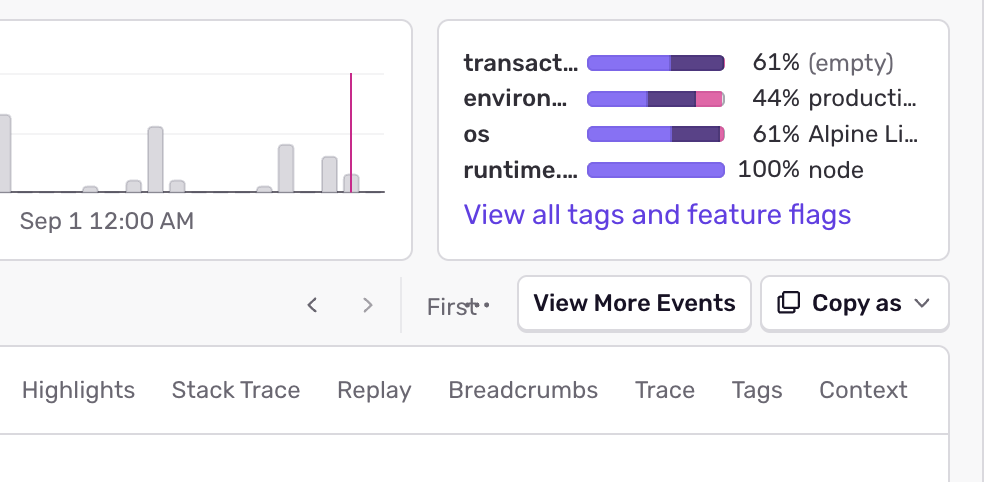
Jumping to the latest event is a one-click action I use many times a day. It now takes two clicks (open the overflow menu, then pick "Latest") even though there is plenty of room for all three tabs.
Regression
Started with #123879 (f06d9ec, merged Sep 10, 2026). That PR removed the disableOverflow prop from Tabs, which turned on the automatic overflow logic for this tab list.
Root Cause
useOverflowTabs in static/app/components/core/tabs/tabList.tsx compares two numbers that are measured differently:
available = outerWrap.clientWidth is rounded to a whole pixel.fullWidth is the sum of each tab's getBoundingClientRect().width, which is fractional.
On the issue details page the tab list sits inside a shrink-to-fit flex item (TourElement div > NavigationWrapper), so the wrapper is exactly as wide as the visible tabs. For example the tabs sum to 223.078px and clientWidth reports 223. 223.078 <= 223 is false, so the last tab is moved into the menu. Overflowing tabs render display: none, the shrink-to-fit wrapper shrinks around the remaining tabs, the ResizeObserver fires, and the check fails again. This repeats until only the first tab is left, because the first tab is always kept:
if (index === 0 || nextUsed <= budget) {At that point the wrapper is about as wide as one tab, the budget (available - 48) is negative, and the absolutely positioned overflow trigger (right: 0) lands on top of the first tab.
Before #123879 this tab list passed disableOverflow, so the measurement never ran. Restoring the old TabsWrap CSS (flex-basis: auto) does not fix it, so the flex-basis change in that PR is not the cause.
Reproduction outside Sentry
A static page with the same DOM and CSS (shrink-to-fit flex parent, TabsWrap, wrapper Container, ul grid, absolutely positioned trigger) and the overflow logic ported verbatim shows the same cascade in headless Chromium at every viewport width from 520px to 1440px:
223.000/223.078 -> hide [Recommended]
108.000/223.078 -> hide [Latest, Recommended]
 47.000/223.078 -> stable: only "First", trigger overlaps it
Proposed Fix
Measure the wrapper the same way the tabs are measured:
-    const available = outerWrap.clientWidth;
+    const available = outerWrap.getBoundingClientRect().width;
With that change the same page shows all three tabs at every width and the trigger never overlaps:
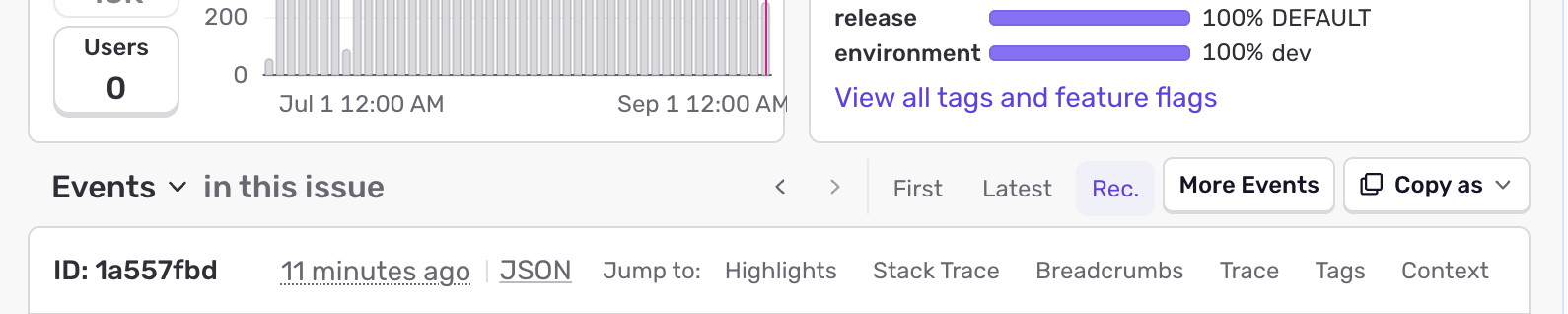
A possible follow-up hardening: when available is smaller than the 48px reserve, the forced first tab and the trigger will always overlap. Reserving the trigger's space in layout (padding on the wrapper while overflowing) would remove that case.
Product Area: Issues
Environment
SaaS (https://sentry.io/)
Steps to Reproduce
<>arrows and the "View More Events" / "Copy as" buttons.Expected Result
The three event preset tabs are visible side by side, as they were until Sep 10:
First | Latest | RecommendedActual Result
Only "First" is visible. "Latest" and "Recommended" are inside the overflow menu, and the overflow trigger ("...") is drawn on top of the "First" text. The tab list wrapper measures about 32px wide in DevTools, regardless of viewport width.
Jumping to the latest event is a one-click action I use many times a day. It now takes two clicks (open the overflow menu, then pick "Latest") even though there is plenty of room for all three tabs.
Regression
Started with #123879 (
f06d9ec, merged Sep 10, 2026). That PR removed thedisableOverflowprop fromTabs, which turned on the automatic overflow logic for this tab list.Root Cause
useOverflowTabsinstatic/app/components/core/tabs/tabList.tsxcompares two numbers that are measured differently:available = outerWrap.clientWidthis rounded to a whole pixel.fullWidthis the sum of each tab'sgetBoundingClientRect().width, which is fractional.On the issue details page the tab list sits inside a shrink-to-fit flex item (
TourElementdiv >NavigationWrapper), so the wrapper is exactly as wide as the visible tabs. For example the tabs sum to 223.078px andclientWidthreports 223.223.078 <= 223is false, so the last tab is moved into the menu. Overflowing tabs renderdisplay: none, the shrink-to-fit wrapper shrinks around the remaining tabs, theResizeObserverfires, and the check fails again. This repeats until only the first tab is left, because the first tab is always kept:At that point the wrapper is about as wide as one tab, the budget (
available - 48) is negative, and the absolutely positioned overflow trigger (right: 0) lands on top of the first tab.Before #123879 this tab list passed
disableOverflow, so the measurement never ran. Restoring the oldTabsWrapCSS (flex-basis: auto) does not fix it, so the flex-basis change in that PR is not the cause.Reproduction outside Sentry
A static page with the same DOM and CSS (shrink-to-fit flex parent,
TabsWrap, wrapperContainer,ulgrid, absolutely positioned trigger) and the overflow logic ported verbatim shows the same cascade in headless Chromium at every viewport width from 520px to 1440px:Proposed Fix
Measure the wrapper the same way the tabs are measured:
With that change the same page shows all three tabs at every width and the trigger never overlaps:
A possible follow-up hardening: when
availableis smaller than the 48px reserve, the forced first tab and the trigger will always overlap. Reserving the trigger's space in layout (padding on the wrapper while overflowing) would remove that case.