


🇮🇹 Leggi questa pagina in italiano
Brings the Vimar Elvox video intercom (2 Fili Plus / IP / 2FV2) into Home Assistant: the doorbell ring, the door and the gate, live video on demand, two-way audio in its own dashboard card, voicemail and do not disturb, and your plant's actuators as buttons.
It talks to the intercom the way the official Vimar VIEW app does: SIP, either directly to the Tab on your network or through the Vimar cloud. No RTSP, and no Vimar account needed.
| Tab | Art. | Plant | Connection | Status |
|---|---|---|---|---|
| Tab 7S 2F+ WiFi | 40507 | 2F | local UDP | Development plant: everything below |
| Tab 5S Up 2 Wire WiFi | 40515 | 2FV2 | cloud TLS | Working (ring, video, audio, door). On some plants the cloud does not deliver the status commands (#14) |
| Tab 7S Up | 40517 | 2FV2 | cloud TLS | Working, HomeKit included |
Other Vimar 2F / 2FV2 / IP Tabs should work too: the setup comes from the pairing QR code. Got it running, or not? Please open a compatibility report. What changes from one plant to another: Configuration.
Coming from the original noiseheroes-lab integration? Remove it first: Migration.
- Click the Open in HACS button above (or: HACS → ⋮ menu → Custom repositories → add
https://github.com/ha-vimar/ha-vimar-intercom, category Integration). - Install Vimar Intercom and restart Home Assistant.
- Settings → Devices & services → Add integration → Vimar Intercom, then paste the text of the pairing QR code from the VIEW app (or enter the SIP parameters by hand). On the local network the Tab often shows up by itself under Discovered.
- In Configure, get your plant's phonebook (from the intercom, from the Vimar cloud, or a
rubrica.dbfile): it sets the door, the actuators and the addresses the commands go to.
Requires Home Assistant 2025.10 or later and ffmpeg on the host. Manual installation, every option and the phonebook: Configuration.
- Doorbell: an event entity and ring sensors for your automations; optionally a photo and a short clip of every visitor, and webhooks for Alexa or Scrypted; a Test ring button to try your automations. → Entities, services and automations
- Door, gate and actuators: a lock, an Open Door button, and one button per actuator in your phonebook (F1/F2, stair lights, relays). → Configuration
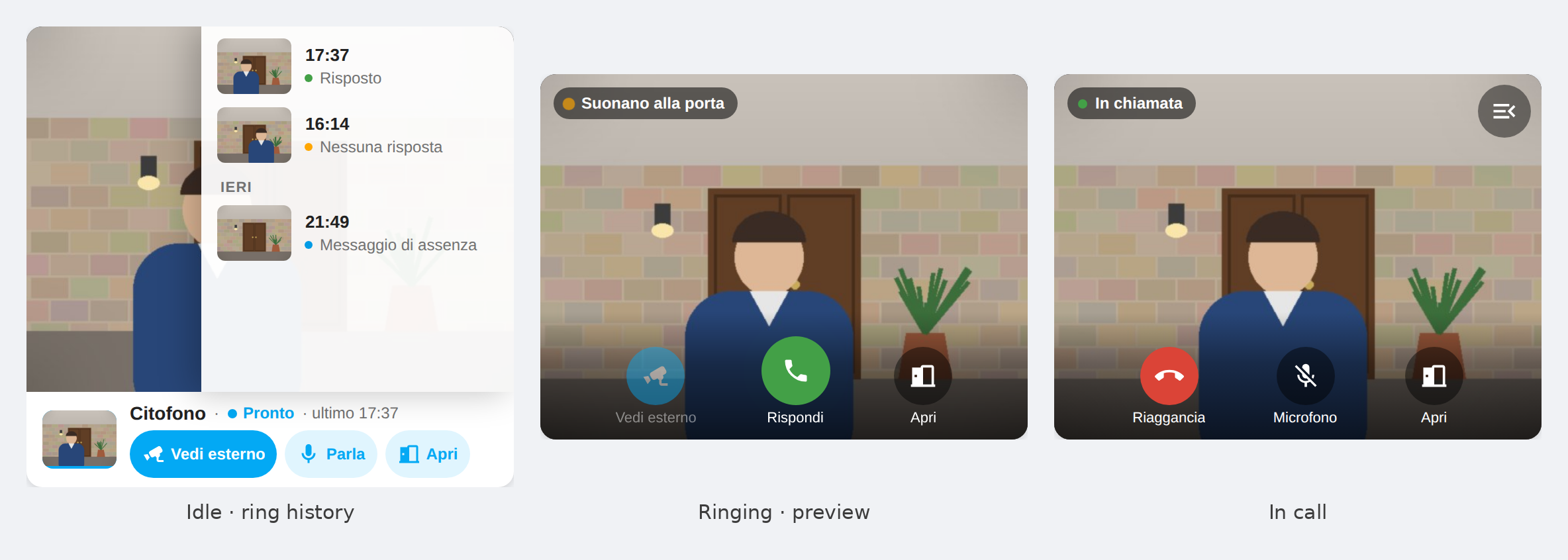
- Video and voice: the camera calls the panel only when you open it, and shows the visitor while it rings; the dashboard card talks both ways over HTTPS. → The intercom card
- Voicemail and do not disturb switches, and an away message (audio file or text-to-speech) when nobody answers. → Configuration
- Apple Home: an optional native HomeKit video doorbell. → HomeKit
- Scrypted, go2rtc, Frigate: a continuous stream that never rings the panel. → External systems
- Echo Show as an intercom: live view and two-way talk from Alexa, through Scrypted. → Echo Show (Scrypted)
| Page | What it covers |
|---|---|
| Configuration | Requirements, setup, every option, phonebook, SGA/PICG, voicemail, what differs between plants, security notes |
| Entities, services and automations | Every entity, the services, the bus events, example automations |
| The intercom card | Layouts, buttons, video and voice, ring history |
| HomeKit | The native Apple Home doorbell |
| External systems | Scrypted, Alexa, Echo Show, go2rtc, Frigate |
| Echo Show as an intercom | Step by step: Echo Show watches, calls and talks to the panel through Scrypted |
| Phonebook | Where rubrica.db comes from and what it contains |
| Troubleshooting | Known limitations and how to read the logs |
| Migration | Moving over from the original noiseheroes-lab integration |
| Changelog | What changed in each release |
Questions and bugs: issues. Security problems: privately, see SECURITY.md. Contributions are welcome, see CONTRIBUTING.md: never guess SIP commands (a wrong one can open a door), keep credentials out of the repo, and say which hardware you tested on.
This project is not affiliated with or endorsed by Vimar S.p.A.. "Vimar", "Elvox" and "VIEW" are trademarks of their respective owners. You supply your own credentials for your own plant.
MIT — © Noise Heroes (upstream project) and the fork's contributors.