
A collection of reusable Windows Forms utilities written in Visual Basic .NET. Each form or helper class demonstrates a common UI pattern or system feature that can be dropped into your own WinForms project.
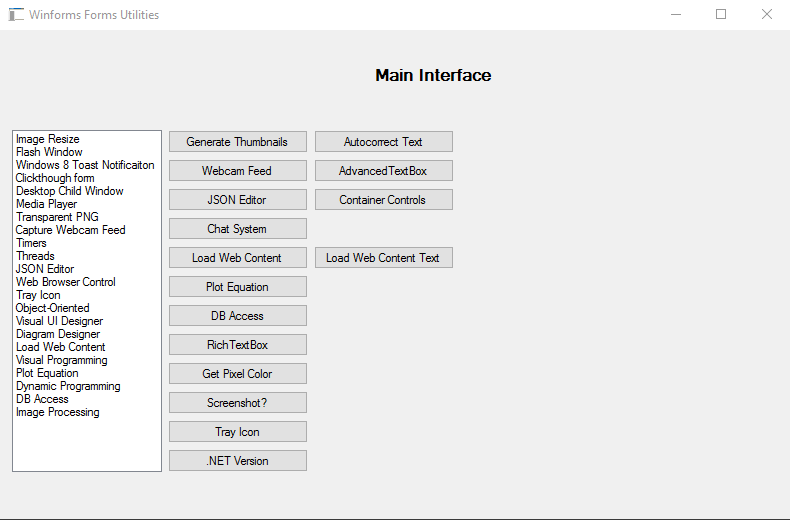
| Form | Description |
|---|---|
| TrayIconForm | Minimises the application to the system tray. Includes a context menu (Show / Hide / Exit), balloon-tip notifications with configurable title, message, icon type, and timeout, and double-click restore. |
| WebContent | Loads an image from a URL into a PictureBox. Supports both synchronous and asynchronous loading (via AsyncWebPhotoViewer), and maintains a bookmark list. |
| WebContentText | Downloads and displays raw text or HTML from any URL using WebClient. |
| AsyncWebPhotoViewer | User control that fetches an image from the web on a background thread so the UI stays responsive. |
| ScreenCapture | Captures the full primary screen and saves it as a timestamped PNG. Supports immediate capture, minimise-first capture, and a short timer-delayed capture. |
| AutocorrectForm | Real-time autocorrect for a RichTextBox. Ships with 20+ built-in rules (contractions, common typos, pronoun capitalisation). Rules can be added, edited, or removed at runtime. Supports whole-word matching and automatic capitalisation after a period. |
| GenerateThumbnailsForFolder | Batch-resizes every image in a chosen folder, writing 250 px-wide thumbnails to a thumbnails\ sub-folder and optional 1000 px-tall large versions to a large\ sub-folder. |
| PlotEquation | Interactive canvas backed by a PictureBox bitmap. Draws a horizontal/vertical axis, plots individual pixels on mouse-down, and draws arbitrary line segments. |
| RichTextBoxSamples | Demonstrates bold/italic formatting of selected text, inserting images from the clipboard, and loading/saving RTF files. |
| GetPixelExamples | Loads an image into a PictureBox and samples the pixel colour under the mouse cursor (on click or drag), showing it in a colour-preview box. |
| FormTextBoxWithSymbols | TextBox that replaces shortcodes such as !heart!, !star!, !bolt! with Unicode symbols as you type. Pressing the backtick key pops up a symbol picker. |
| NetVersion | Displays the current .NET runtime version and build number. |
| ChatForm | Skeleton chat form that loads a sample image in a BackgroundWorker. |
| JSONEditor | Placeholder for a future JSON editor. |
| ImageResize | Placeholder for a future image-resize UI. |
| WebcamFeed | Placeholder for a future webcam live-feed viewer. |
| DBAccess | Placeholder for future database-access helpers. |
| Class / Module | Description |
|---|---|
| RadFunctions | GetImageFromUrl(url) – downloads an image from a URL and returns it as a Drawing.Image. CreateFolderIfNotExists(path) / CreateFileIfNotExists(filename) – safe folder/file creation helpers. |
| FlashWindow | P/Invoke wrapper around FlashWindowEx (user32.dll). Flash a window caption and/or taskbar button a given number of times, continuously, or until the window receives focus. |
| FormExtensionMethods | Extension methods on System.Windows.Forms.Form: DrawEllipse and PSet for quick pixel-level drawing without managing a Graphics object. |
| MessageReceiver | Stub class reserved for Windows-message (WM_COPYDATA / custom messages) inter-process communication. |
| Control | Description |
|---|---|
| NewTextBox | Skeleton custom TextBox control ready for extended behaviour. |
| UserControl1 | Generic user-control scaffold. |
- Visual Studio 2019 or later (2022 recommended)
- .NET Framework 4.x or .NET 6/8 (Windows target)
- Windows — the project uses WinForms and Win32 APIs (P/Invoke) that are Windows-only
- Clone the repository:
git clone https://github.com/humayuns/WinformsUtils.git - Open
WinformsUtils.slnin Visual Studio. - Set WinformsUtils as the start-up project.
- Press F5 to build and run.
The main Form1 acts as a launcher — click any button to open the corresponding utility form.
WinformsUtils.sln
├── WinformsUtils/              # Main VB.NET WinForms project
│   ├── Code/                   # Reusable helper classes (RadFunctions, FlashWindow, …)
│   ├── *.vb / *.Designer.vb    # Individual utility forms
│   └── App.config
├── WindowsControlLibrary/      # Custom WinForms control library (VB.NET)
└── CSCode/                     # C# companion project scaffold
Pull requests and issue reports are welcome. When adding a new utility form, please:
- Add the form under
WinformsUtils/and wire it up fromForm1. - Update the table in this README.
- Keep each form self-contained so it can be copied into other projects with minimal friction.