

===== 基於著名的Rime輸入法框架, 旨在保護漢語各地方言, 音碼形碼通用輸入法平臺。
- [iRimeLib] (https://github.com/jimmy54/iRimeLib)
- OpenCC (Apache License 2.0)
- neolee/SCU (Apache License 2.0)
- stackia/XIME (GPL v3)
- RIME(BSD License)
- Boost C++ Libraries (Boost Software License)
- libiconv (LGPL License)
- darts-clone (New BSD License)
- marisa-trie (BSD License)
- UTF8-CPP (Boost Software License)
- yaml-cpp (MIT License)
- LevelDB (New BSD License)
- snappy(BSD License)
- [Rime]: 佛振
- 圖文教程:xiaoqun2016
- 在Issues、貼吧、QQ羣中反饋意見的網友
- 依賴的第三方庫等開源項目
The GNU General Public License v3.0 (GPL v3)
Copyright (C) 2014 Stackia
This program is free software: you can redistribute it and/or modify it under the terms of the GNU General Public License as published by the Free Software Foundation, either version 3 of the License, or (at your option) any later version.
This program is distributed in the hope that it will be useful, but WITHOUT ANY WARRANTY; without even the implied warranty of MERCHANTABILITY or FITNESS FOR A PARTICULAR PURPOSE. See the GNU General Public License for more details.
You should have received a copy of the GNU General Public License along with this program. If not, see http://www.gnu.org/licenses/.
LibAndResource 下载地址:
链接: http://pan.baidu.com/s/1mi0wt88 密码: ey9v
下载之后将解压出来的文件夹 LibAndResource 放置在 iRime 目录下, 具体位置可参考下图:
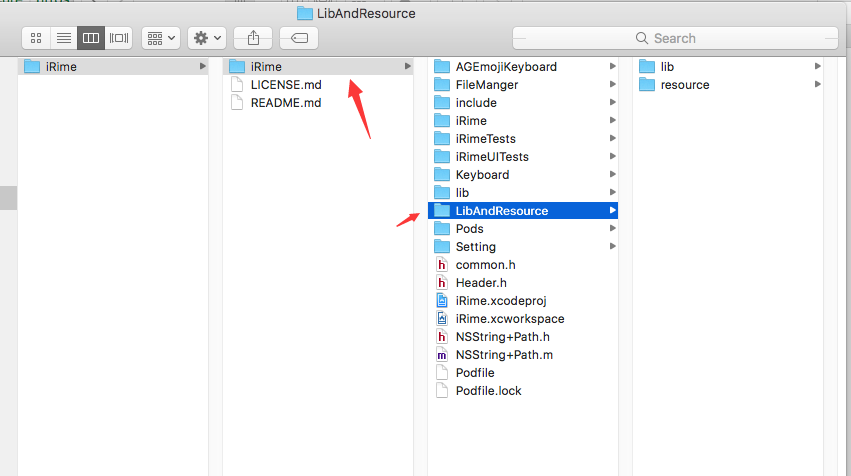
教程如下(网页中有相关工具下载地址): https://techsviewer.com/install-macos-sierra-vmware-windows/
VMWare的虚拟机文件, 百度盘下载地址: 链接:http://pan.baidu.com/s/1eR9L1KY 密码:qcm9
VMware Player请从 VMWare官网 直接下载(免费).
完成上面的操作之后, 用 XCode 打开 iRime 目录下的 iRime.xcworkspace 文件,
更新 项目中 所关联的 Apple Id 为您自己的账号及对应的group.
然后将手机连接至电脑上, 将目标选择为自己的手机,
然后按 Command+R 就可以编译代码并将编译后的程序安装到您的手机上了.