this.console
The this.console property provides a custom logging system built on top of the native console object. It enhances logging with features like color-coded class names, customizable message styles, and support for different log levels (log, info, warn, error, trace). This makes it easier to identify which class is generating the log, improving debugging and readability.
- Color-coded class names: Each class name is displayed in a unique color, making it easy to distinguish logs from different classes.
-
Log levels: Supports
log,info,warn,error, andtrace. - Customizable styles: Apply custom CSS styles to log messages.
- Random colors: Automatically assigns a unique color to each class for better visual distinction.
class MyApp extends JsBaseClass {
    async handle() {
        // Log messages with different levels
        this.console.log('This is a standard log message.');
        this.console.info('This is an informational message.');
        this.console.warn('This is a warning!');
        this.console.error('This is an error!');
        this.console.trace('This is a trace message.');
    }
}

// Initialize the app
const app = new MyApp();
app.init();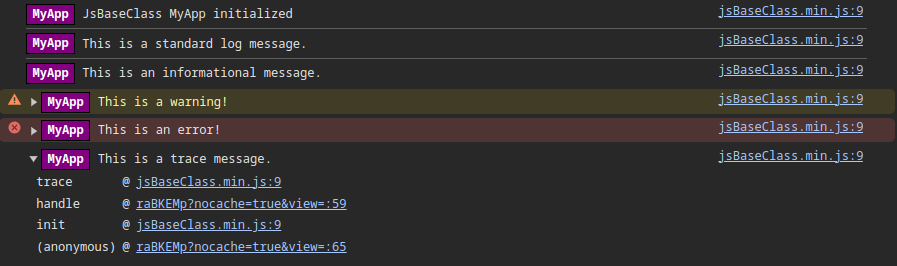
-
log(message, ...args): Logs a standard message. -
info(message, ...args): Logs an informational message. -
warn(message, ...args): Logs a warning message. -
error(message, ...args): Logs an error message. -
trace(message, ...args): Logs a trace message (useful for debugging).
- The class name is automatically prepended to each log message and displayed in a unique color.
- If no color is assigned to a class, a random color is automatically generated.
- The
this.consoleobject is designed to be a drop-in replacement for the nativeconsole, so you can use it in the same way.
You can manually set a color for a specific class using the setColor method:
class MyApp extends JsBaseClass {
    async handle() {
        // Set a custom color for this class's logs
        this.console.setColor('#3498db'); // Blue

        // Log messages
        this.console.log('This log will have the class name in blue.');
    }
}

// Initialize the app
const app = new MyApp();
app.init();
When multiple classes are used, each class name is displayed in a unique color:
class ClassA extends JsBaseClass {
    async handle() {
        this.console.log('Log from ClassA');
    }
}

class ClassB extends JsBaseClass {
    async handle() {
        this.console.log('Log from ClassB');
    }
}

// Initialize the classes
const classA = new ClassA();
classA.init();

const classB = new ClassB();
classB.init();