



See what your coding agents actually did — and whether you can trust it — across Claude Code, Codex, OpenCode, and Hermes, without any of it leaving your machine.
agentacct is local-first Agent Work Intelligence for coding agents. It reads the session logs your agents already write on disk — Claude Code, Codex, OpenCode, and Hermes — joins them with the work each session records as it goes, and turns the result into one honest Work Receipt per task: what it did (the commands it ran, the files it touched, the tools it used), what it cost, and how well that is actually proven. See it in the macOS app, a live terminal dashboard (agentacct tui), or over a local JSON API. No browser tab, no server, no account.
Private by design. Everything stays on your machine: state is plain local files, nothing binds a network port, and there is no phone-home telemetry, no account, no cloud sync. agentacct never stores or requests a provider API key.
Screenshots show a synthetic demo workspace; your own dashboard renders your machine's real local data.
The same Task-primary view of your agents' work in the macOS app, in agentacct tui (a live terminal dashboard), and over a local JSON API — everything at a glance across all four agents:
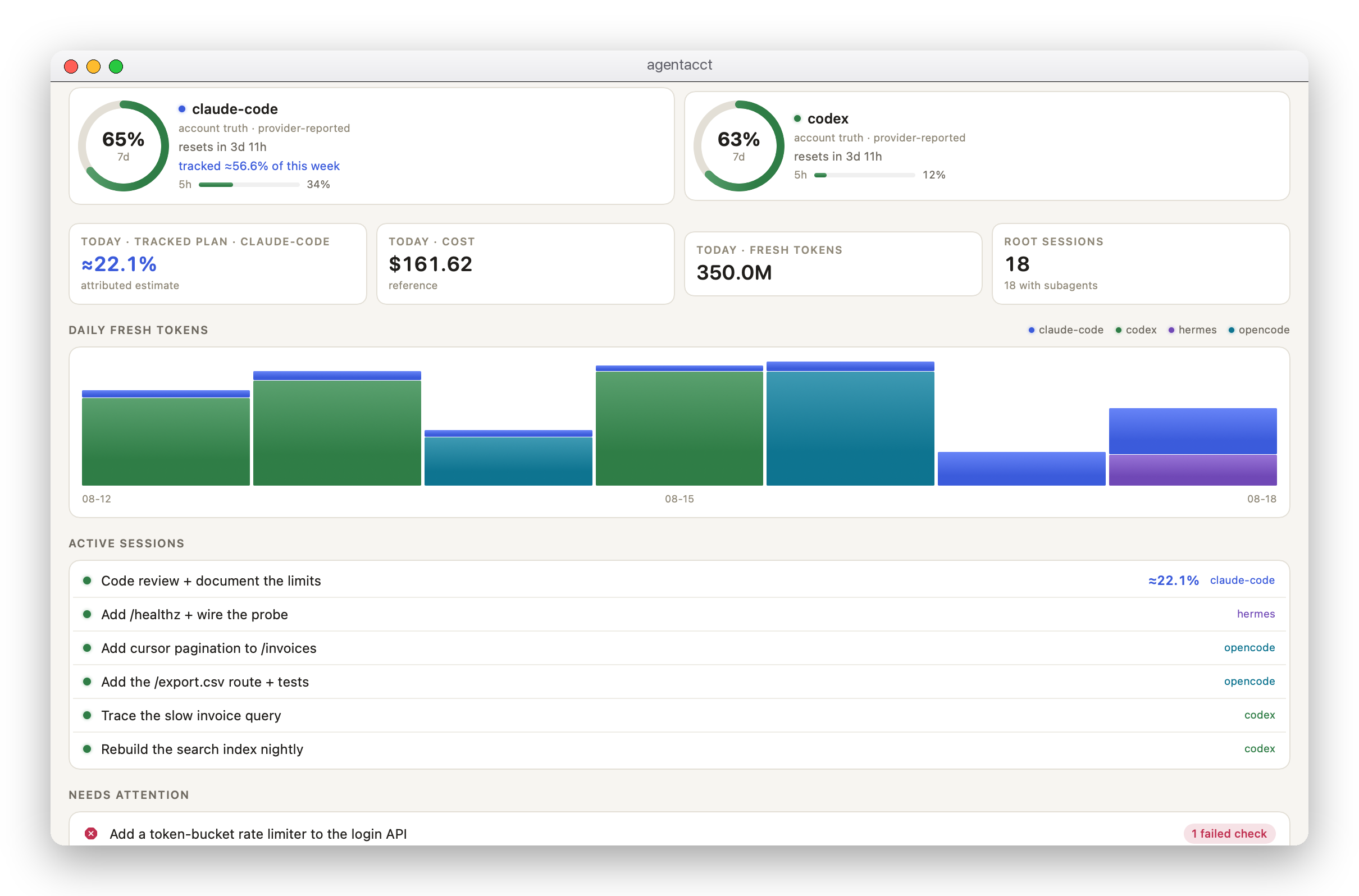
-
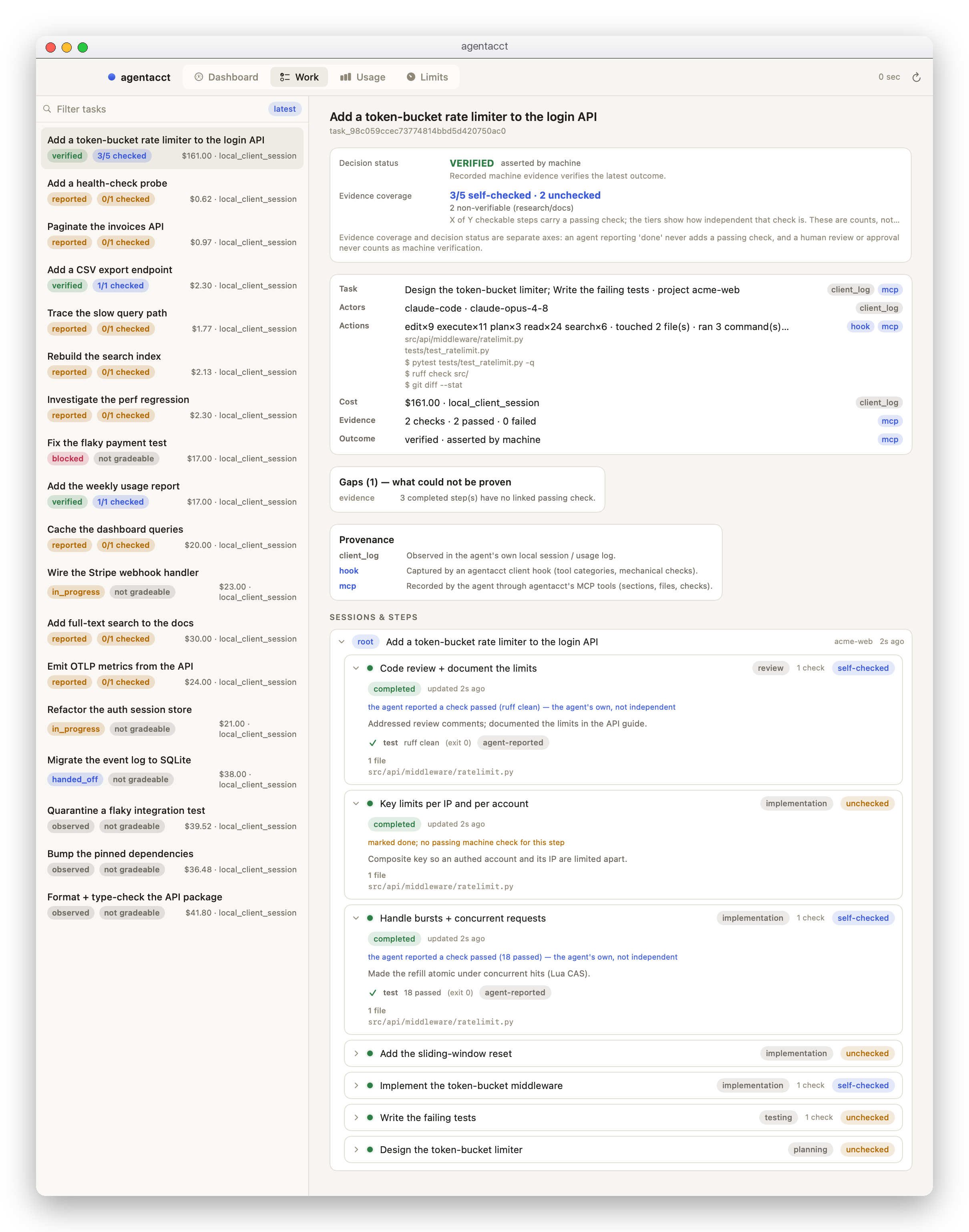
One Work Receipt per task — what it did, and whether you can trust it. Every task rolls up into eight questions a reviewer needs: what it was, who ran it, the actions it took (the commands it ran and the files it touched — read straight from each agent's own store), the cost, the evidence (how much of the work carries a real passing check), the outcome, the gaps, and per-field provenance — each fact labelled with where it came from (a client hook, a transcript scan, the agent's MCP records, CI). It keeps two things deliberately separate: what a human or agent says happened, and how well that is actually proven — an agent reporting "done" never raises the evidence bar. Read one in the app (above), or with
agentacct receipt <task>. -
Honest usage and cost — per agent, model, and day. Tokens read from the clients' own local session files and labeled
client_reported; costs are clearly marked pricing-table estimates, never invoices.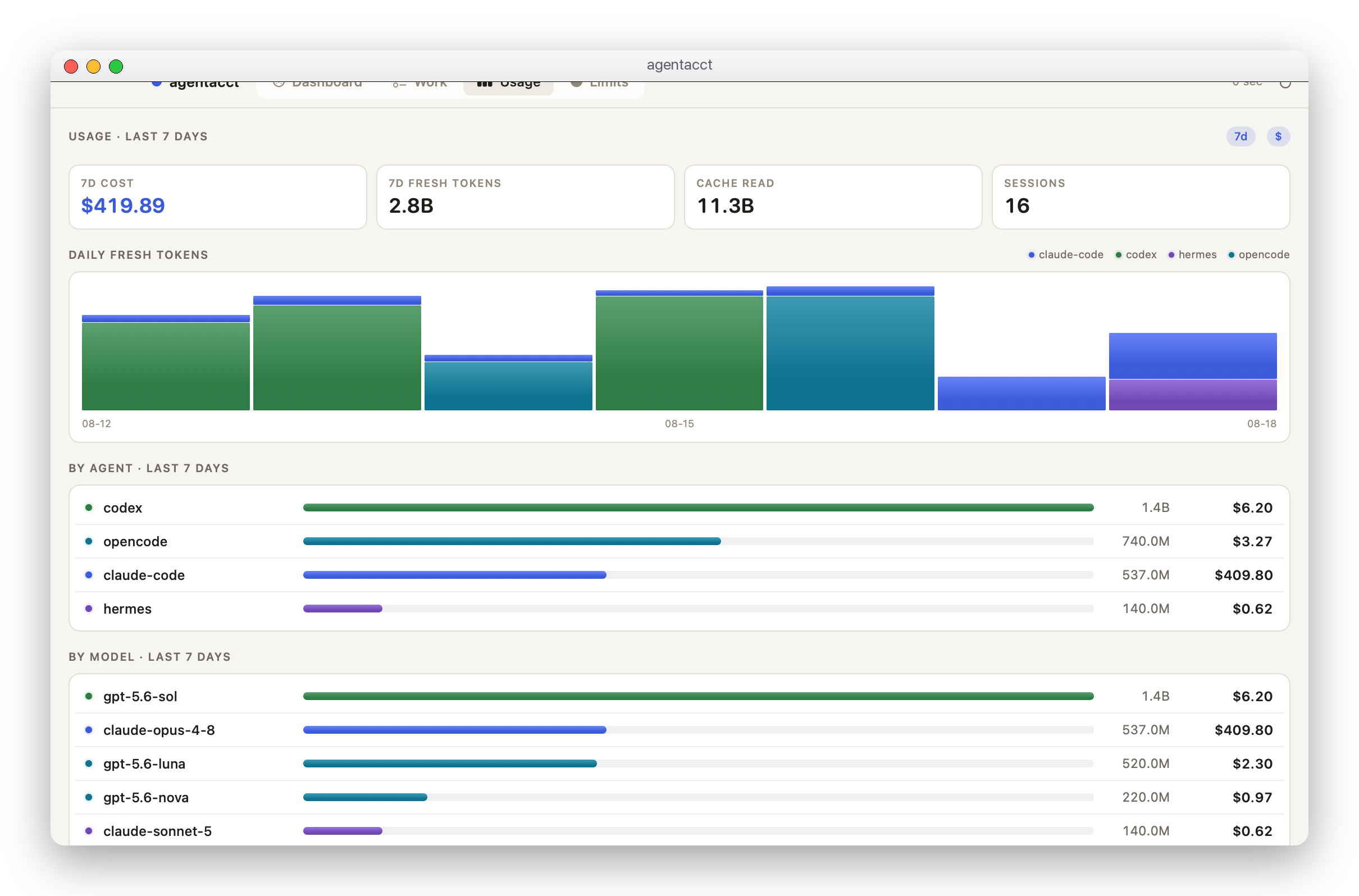
-
The work, not just the tokens. Every session rolls up its recorded work steps and machine checks — a passing test is
Verifiedevidence, an agent's own claim stays labeledAgent reported. Open a task to see each step, its status (in progress/handed off/done/blocked), and its check results with exit codes. -
Attribution you can trust. Every join between usage and recorded work carries a confidence label (
exact/high/medium/low). Missing attribution beats wrong attribution: when agentacct cannot prove a link, it shows the gap instead of a guess. -
What a task cost your plan (beta). agentacct estimates what fraction of your weekly Claude plan each task consumed — a
plancolumn on the home panel and the sessions list, and an≈ X% of your weekly planline on the session detail. This is the number the raw token count can't give you: different models burn the plan at very different rates, so agentacct learns the rate from your own recorded limit history and shows a figure only once it can calibrate to your account — until then it says it's still calibrating, rather than showing a guess. Always labeled an estimate.
The signed, notarized macOS app bundles everything. Download the .dmg from the latest release, drag agentacct to Applications, and open it — on first launch it installs the bundled CLI, instruments the coding agents it finds, and shows your Work Receipts in a native window. Requires macOS 14+.
Requires Python >= 3.11 on macOS or Linux; Windows is supported only via WSL.
pipx install agentacct
agentacct onboard   # once per machine (global by default)
agentacct tui       # the live terminal dashboard
No pipx yet? Install it first with brew install pipx (macOS) or python3 -m pip install --user pipx — or skip pipx entirely and use uv tool install agentacct. See INSTALL.md for a plain-venv fallback.
onboard installs agentacct once per machine (global by default, writing zero files into your repo): it detects your local coding-agent logs, sets up a global store, and runs a first usage sync. Then run agentacct tui for the live terminal dashboard (onboarding also starts the managed background sync plus a local JSON API on http://127.0.0.1:8765 — the machine-readable lane native shells and scripts poll). Open a new agent session in any repo — MCP servers and hooks bind at session start, so the session that ran onboarding cannot become the first recorded Task. (Prefer a per-repo install? Run agentacct onboard --scope project instead.)
Paste this into your coding agent:
Install and set up agentacct — a local-first tool that reads my
coding-agent logs read-only and shows honest token usage and cost.

Run `pipx install agentacct`
(or `pipx install git+https://github.com/mikehasa/agentacct`),
then `agentacct onboard` (installs once per machine, global by default, zero
files written into the repo), then tell me to run `agentacct tui`.

Observe-only: never store, request, or echo any API key; all state stays local
on this machine. Don't modify my global client config without showing the exact
command first.
The agent then follows INSTALL.md, the canonical runbook: the global install, the manual per-client setup, and the full per-client capability matrix. agentacct setup prompt --agent <client> prints the same prompt.
Want to look around before touching your real data? agentacct demo runs a safe local walkthrough in a throwaway temporary store — no provider keys, no paid API calls.
The managed runtime is controlled with agentacct start / status / stop / repair; all state lives in the global store (by default ~/.local/state/agentacct/state; older global stores under ~/.agent-sentinel-global/state are still recognized). A --scope project install keeps its state in the repo's .agent-sentinel/ directory instead (gitignored; the directory keeps its pre-rename spelling for data compatibility).
agentacct stop                 # stop the managed sync + local API (owned processes only)
agentacct uninstall-autostart  # only if you installed autostart
pipx uninstall agentacct
Then remove what onboarding added. For a global install (the default): delete the global store (~/.local/state/agentacct/state — keep it if you want the history) and the agentacct entries in your user config (~/.claude.json, the merged blocks in ~/.claude/settings.json, the ~/.claude/hooks/ wrapper, and ~/.codex/config.toml). For a --scope project install: delete that repo's .agent-sentinel/ directory (that project's local ledger) and the agentacct entries onboarding added to .mcp.json / .claude/settings.local.json / ~/.codex/config.toml. If you installed the standing instruction block, remove it first with agentacct setup instructions --agent <client> --user --remove.
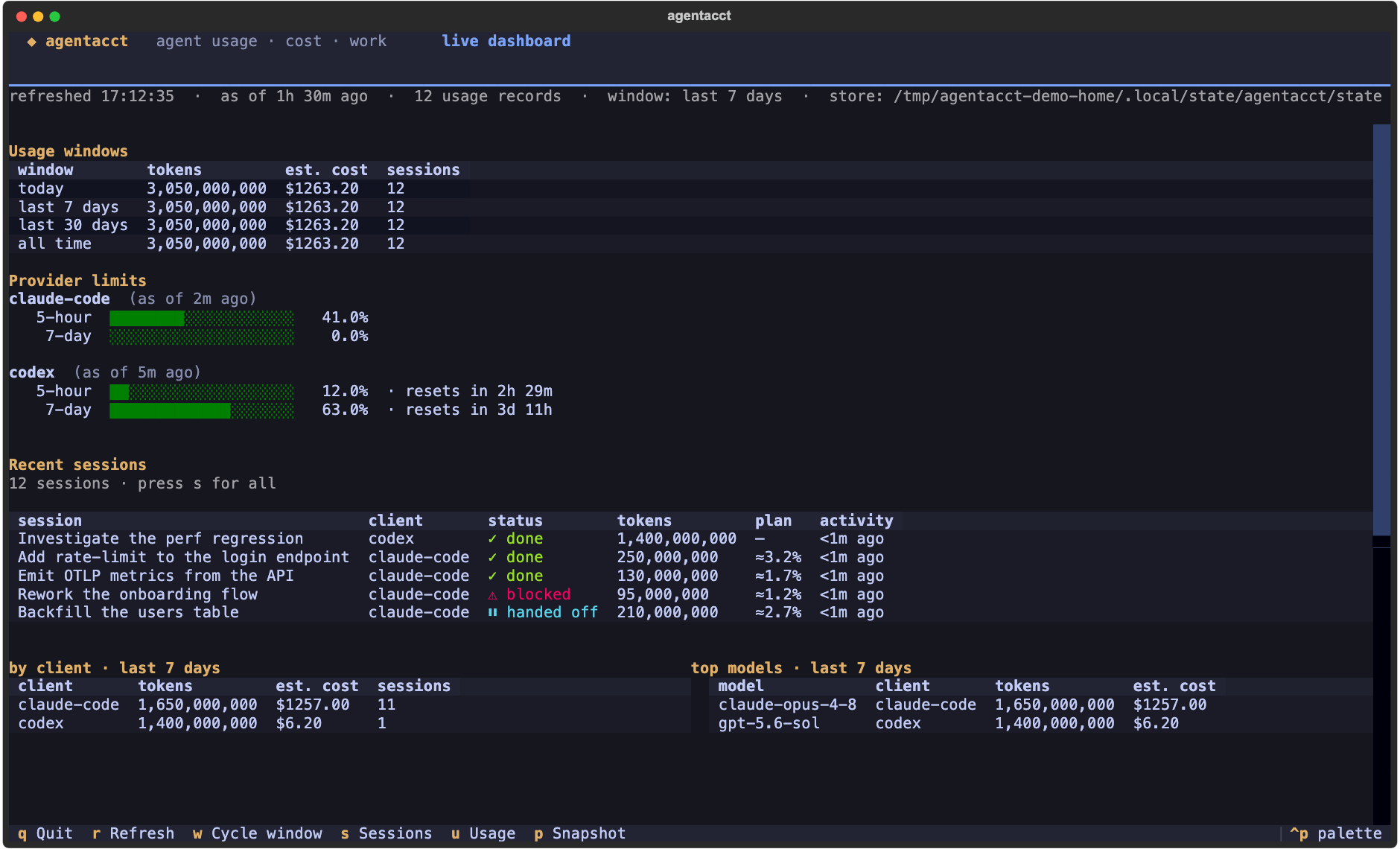
Prefer the terminal? agentacct tui is the full dashboard in your shell — usage windows, provider rate-limit bars with reset countdowns, and your recent sessions across every agent. Press s to drill into the sessions, u for the usage screen, t for a task's Work Receipt, p to save a shareable snapshot of the current view (an SVG that renders anywhere), q to quit.
agentacct is early alpha, and it would rather show you a gap than a guess:
- No hosted anything. No hosted dashboard, no phone-home telemetry, no automatic cloud account sync. agentacct can receive telemetry locally when you explicitly point an OTLP exporter at it.
- Estimates are labeled as estimates. There is no exact Claude Code/Codex subscription invoice access; costs come from a local pricing table and are labeled accordingly. See docs/usage-truth-table.md for what each path can and cannot prove.
- No silent monitoring. agentacct only reads the local session files of detected clients and never watches unrelated processes started outside agentacct/integrations. Hard stops apply only to runs agentacct itself launched or the opt-in proxy path.
- Support is per-capability, not per-logo. Claude Code, Codex, and OpenCode carry a full Work Receipt today — usage, cost, and the actions each session took (commands, edited files, tools); OpenCode also contributes independent exit-code checks. Hermes has a live usage path plus a narrower capture surface; OpenClaw and Cursor are usage-focused and explicitly scoped. How each fact is captured differs honestly — a live hook, or a scan of the client's own store — and the Receipt says which. Every per-client claim is pinned in the capability matrix in INSTALL.md and docs/reference.md, and
agentacct capabilities agentsprints the same truth for your machine.
Interfaces may change while agentacct is alpha.
agentacct keeps two evidence streams separate and joins them on real client ids instead of guessing:
- Usage truth comes from the client's own local session files: imported tokens are labeled
client_reported, and costs are pricing-table estimates — never provider invoices. - Work meaning comes from the sections and events the agent records over MCP while it works (
agentacct_record_section,agentacct_record_machine_check), plus machine checks like test runs. - The join links the two through session/transcript ids and labels every attribution
exact,high,medium, orlow. Claude Code binds real session/transcript ids through an installed hook bridge at session start and on every tool call; Codex, OpenCode, and Hermes are evidenced from each client's own session store at import time. Where a client's hook does not fire for its built-in tools, agentacct derives the same Actions — commands, edited files, tool categories and names — from that store directly, so the Receipt is populated with or without a live hook, and always says which.
The per-client join mechanics, confidence-label glossary, daily workflow, MCP tool list, and optional enforcement extras are in docs/reference.md.
- Reference — daily workflow, confidence labels, MCP tools, per-client capability matrix, verification evidence, enforcement extras, migration notes
- Install runbook — per-client setup, global install, capability matrix
- Usage and cost truth table
- Coding agent integrations
- Architecture
- Task Intelligence and the local control plane
- Multi-source Evidence v2 architecture
- Multi-source privacy threat model
- Safety boundaries
- Full flow demo
- Live smoke evidence
- Public alpha checklist
See CONTRIBUTING.md for contribution scope, safety principles, and PR expectations.
Run tests from a clone (the pipx install above ships no test tooling):
python3 -m venv .venv
.venv/bin/python -m pip install -e .
.venv/bin/python -m pip install pytest
.venv/bin/python -m pytest tests/ -q --tb=shortagentacct is early alpha. Useful feedback:
- Which agent or tool do you use?
- What runaway, cost, or observability issue did you hit?
- Which join/attribution result looked wrong or missing?
- What report would help you trust a run?
- Which integration should be supported next?
Open an issue with a bug report, feature request, or integration request. Please scrub any provider API keys or private paths from logs before sharing them.