
Stop guessing how fast your model is. Watch it.
One honest line for the session you are working in, drawn inside OpenCode's own composer: turns, steps, the average streaming tokens per second, and the average of the last ten responses beside it.
OpenCode V2 Desktop on Linux. The readout is drawn by the app's own window, so it is the desktop app and not the terminal that has to be running. macOS and Windows are not supported yet — see Platform support for exactly what is missing.





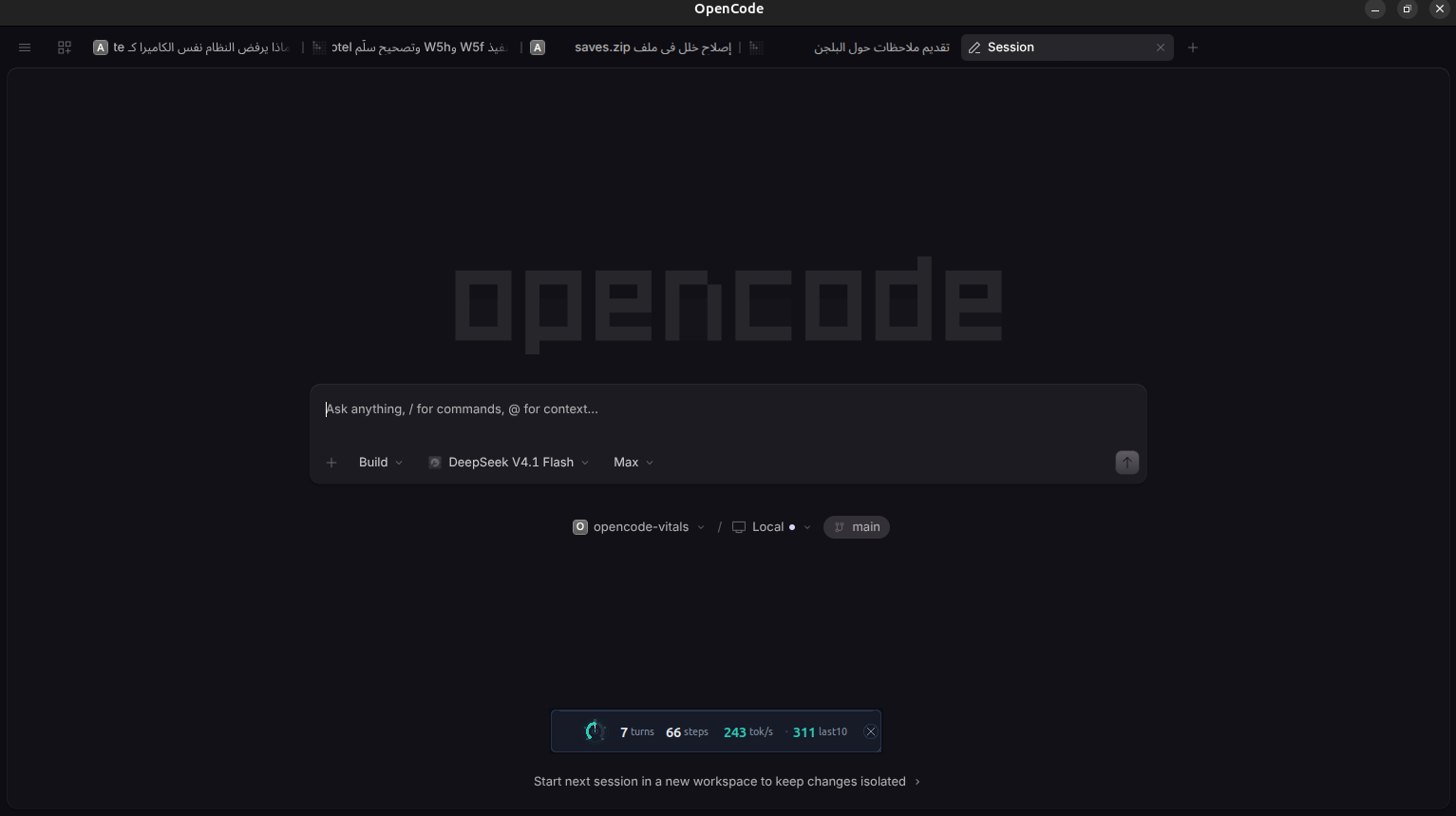
A live session on a real desktop, with the numbers where you already look: 1 turn · 1 step · 200 tok/s · 200 last10.
Three steps. The first needs nothing on your machine but Node — no clone, no editing a config file — so it is the one to start with.
1 — Check your machine first. It takes a second, writes nothing, and tells you whether this machine can show the readout at all:
npx opencode-vitals@latest selftest2 — Install it with one command:
npx opencode-vitals@latest installThat runs opencode plugin add opencode-vitals, which adds one line to your opencode.json:
{ "plugins": ["opencode-vitals"] }That line is the whole install. OpenCode fetches the package itself, in the background, the next time its server starts — and because there is no version on it, it checks for a newer release on every start after that. The install also asks OpenCode to fetch the current release, and prints the version it ended up with, so "installed" and "installed the right one" are two separate claims and you can see which happened.
3 — Restart OpenCode. The numbers appear in the composer the next time you open it.
Linux only, for now. The readout is drawn by OpenCode's own window, and getting the app to draw from a different copy of its interface means starting it with
ELECTRON_RENDERER_URLset. On Linux that is a.desktopentry, which is the piece this project writes — a format macOS and Windows do not have. Everything else here is portable: the measurement, the server, the injection, the update check, the uninstall. It is the launcher that is missing, not the rest. On those platforms the plugin still installs, still measures and still serves the numbers over HTTP, and the one thing it cannot do is make the application load them. That is what "coming soon" means: one file per platform, written the way.desktopis written here. See Platform support.
Instead of a command, add one line to opencode.json or opencode.jsonc. OpenCode then installs the
package and updates it itself at startup, and the install command above is never needed:
To pass options — a different history size, or the readout off — use the object form:
{
"$schema": "https://opencode.ai/config.json",
"plugins": [
{
"package": "opencode-vitals",
"options": {
"popup": true
}
}
]
}See Options for what the object takes.
Files in the plugin directory are loaded automatically, with no configuration and no command at all:
mkdir -p ~/.config/opencode/plugins
cp -r opencode-vitals ~/.config/opencode/plugins/opencode-vitalsThis works, and it is the shape for people who want the plugin to be exactly the code in front of
them. It is also the shape that can never update itself: a folder in the plugin directory is
invisible to opencode plugin list, plugin check and plugin update, so from then on you are
replacing it by hand. npx opencode-vitals@latest status will say so.
Working on the source instead? See For developers.
npx opencode-vitals@latest # register this package with OpenCode
npx opencode-vitals@latest install # the same, said out loud
npx opencode-vitals@latest selftest # can this machine draw the readout?
npx opencode-vitals@latest status # what is installed, and which version
npx opencode-vitals@latest uninstall # remove it again
npx opencode-vitals@latest install --no-update # never update itself
npx opencode-vitals@latest install --copy # copy files in, no package registration
npx opencode-vitals@latest install --dir PATH # use a plugin directory you choosenpx resolves package names, not the names of the files inside them, so the command has to be
npx opencode-vitals@latest <what>.
Keep the @latest. Without it, npx runs whatever the current directory already has rather
than fetching the named version — which works in an empty directory and fails in a checkout, where
node_modules/.bin/opencode-vitals may be stale or gone. The failure is
sh: 1: opencode-vitals: not found, which says nothing about the real cause. With @latest the
command works the same everywhere, which is what a command in a README has to do.
The two older names still exist for scripts that add the package to a project:
opencode-vitals-install and opencode-vitals-selftest (run them through npm as
npm exec --package=opencode-vitals -- opencode-vitals-install).
It runs opencode plugin add opencode-vitals, which adds one line to your opencode.json:
{ "plugins": ["opencode-vitals"] }That is the whole install. OpenCode fetches the package itself, in the background, the next time its server starts — and because there is no version on that line, it checks for a newer release on every start after that.
Do not run npm install opencode-vitals. OpenCode resolves and installs npm plugins itself; a
copy in a project's node_modules is not what gets loaded, so it only leaves a second, stale copy
behind.
If you install a copy instead (--copy, or a folder you put in plugins/ yourself), it works, but
nothing can ever update it: opencode plugin list cannot see it and opencode plugin update does
not know it exists. npx opencode-vitals@latest status says which shape you have.
When OpenCode finds a newer release, it does not apply it — swapping the code under a running process is not something a host should do quietly. This plugin does that half. A few seconds after OpenCode starts it looks for a newer version, and if there is one it hands the work to OpenCode's own updater and prints:
registered opencode-vitals with OpenCode (/home/you/.config/ai.opencode.desktop/cli/2.0.19/opencode-cli)
OpenCode has 0.1.11
OpenCode checks it for updates on every start.
This plugin applies an update it finds and tells you to restart.
Restart OpenCode. The numbers appear in the composer.
The second line is the one worth reading. It is the version OpenCode says it has, asked for rather than inferred: the updater's own exit code does not mean what it looks like it means, and on some builds it reports a failure for an update that succeeded. If that line names a version older than the one being installed, the install registered the plugin and did not move it, and it says so.
So you never run an update command, and you never get a new version silently either: the log says what changed and that a restart is what starts it. A restart is not optional and cannot be faked — Node has already loaded the current copy into the running process.
To turn it off, permanently, either way:
npx opencode-vitals@latest install --no-update # writes a marker file
OPENCODE_VITALS_NO_UPDATE=1 # or just for one processNothing here can stop the measurement. Every step is best-effort, a machine that is offline or opted out says nothing at all, and a failure is one log line rather than a broken editor.
The launcher entry and the copy of the app's renderer are made by the plugin itself on startup, not
by the installer — opencode plugin add runs none of this package's code, so the first thing to
execute after a package install is the plugin, and that is where it sets itself up.
You can feel that a session got slower. You cannot see it.
Every dashboard OpenCode ships answers a different question — cost, token count, context size — and none of them answer the one you actually have while you work: is this session fast, and is it getting slower? Model output arrives in a stream, so the number that matters is throughput while the model is generating, not the wall-clock time of a turn that also ran a build, a test, and three tool calls.
OpenCode Vitals puts that number on your screen, in the corner, all session long.
+ Build ▾ Space Bunny Free ▾ Max ▾ 1 turns 1 steps 200 tok/s 200 last10 [↑]
On the row you already look at, inside the app.
Every feature, in one place:
| Feature | What it does |
|---|---|
| Session average | Turns, steps and average streaming tok/s for the session you are looking at, so one fast reply cannot flatter a long session. |
| Last ten responses | · N last10 resp is the mean of the rates of the last ten completed responses, next to the session average. The session average is the whole session divided as one sum; this one moves as soon as a slow reply lands, which is what tells you the session just changed character. A response with no honest rate is skipped, not counted as a zero. It counts responses, not steps: the steps inside one reply are not ten separate answers, and averaging them would answer a question nobody asked. |
| Subagent work is counted | A subagent runs as a session of its own, so its steps and tokens are added to the session that delegated the work. Its own streaming time is not — the session's tok/s stays a speed that session actually ran at, and the subagent's own rate stays on its own session. |
| Inside your app | The numbers sit in OpenCode's own composer, in the row that already holds your agent and model. No window on top of your work, no taskbar entry, no focus steal. |
| It follows your tab | Switch sessions in the app and the numbers switch with them. The readout asks for the session the window says it is showing, so switching project switches the numbers with it — it can never show another project's totals. |
| Nothing to clean up | It is drawn by OpenCode's own window, so there is no second process, no lock, and nothing left on screen when you close the app. |
| It tells you when it updated | A new version announces itself once in the log, so you can tell the copy you are reading about from the one that is running. |
| You can check what is running | npx opencode-vitals@latest selftest checks whether this machine can show the readout: the app is installed, its renderer can be copied, the copy is current, and the readout is wired into it. |

No estimates, no invented numbers. Every value is read from OpenCode's own event stream.
| Number | What it is |
|---|---|
| turns | Responses completed in this session. |
| steps | Model steps across those responses, so a response that called tools five times is not mistaken for a fast one. |
| tok/s | generated tokens ÷ active stream time, where generated tokens are output plus reasoning tokens, and active stream time is the time the model was actually streaming. Tool executions between steps stay out of the denominator. |
How the denominator is chosen, and what each record says about it (rateSource):
rateSource |
The stream time used |
|---|---|
stream-span |
The real streaming span: from the first delta of a message to its last, summed over the messages of that response. |
first-to-last |
The reply arrived as one piece with no measurable span, so the time from its first token to its last is used. |
single-message-total |
The same, and the whole turn was that one message and one step: its own wall time is used. |
unavailable |
No honest denominator exists (a multi-message or multi-step response with no measurable stream, i.e. mostly tool time), so tok/s stays –. |
What counts as model time, and what does not:
| Measured as model time | Not measured |
|---|---|
Text deltas (session.text.delta) |
Running a tool (session.tool.called/success), however fast or slow |
Thinking deltas (session.reasoning.delta) |
Waiting in a queue, compaction, synthetic items |
The model writing a tool call's arguments (session.tool.input.delta) |
Anything the provider never reports |
That last row is what makes the number honest: a step's token count includes the tokens it spends
writing a tool call, so the time spent writing them has to be in the denominator too. Skipping it
used to print 4686 tok/s on a real turn whose only visible text was 80 characters.
A silence longer than 30 seconds under one message is a dropped connection coming back, not a slow model, so the span restarts there instead of counting the gap. Session totals are replaced as a whole snapshot rather than field by field: the tokens of one moment are never divided by the stream time of another.
Deliberately excluded, because including them would flatter the number:
- Compaction executions and synthetic inbox items — they are not your work.
- Duplicate completions, late deltas, and repeated plugin instances — deduplicated by event and response identity, so a reconnect cannot inflate a session.
- Wall-clock turn time — it mixes model thinking with your tools.
- Parallel and subagent executions — a second execution starting while one is open closes the first, so two answers running at once are two turns instead of one inflated one.
Events this plugin does not recognise are counted and reported on the record
(unknownEventTypes) rather than dropped in silence: a renamed or removed OpenCode event would
otherwise delete measurements with no error anywhere. Events that are known but not part of the
measurement — running tools, shells, skills, interface state — are listed as ignored and never
reported.
If the provider reports no token counts, tok/s shows – instead of guessing. Per-turn detail
(firstTokenMs, firstTextMs, firstCharMs, totalMs, activeStreamMs, toolArgCharacters,
rateSource, per-model and per-agent token counts) stays in the plugin's own storage, capped at 100
records, if you want to compute something else.
| Platform | Linux |
| App | OpenCode V2 Desktop — the terminal client is not enough |
| OpenCode version | V2 (developed against 2.0.14, 2.0.16, 2.0.18 and 2.0.19) |
| Node | 18 or newer, for the plugin |
| Python | not needed any more |
| Packages to install | none |
Two requirements, and both are load-bearing.
Linux is not a preference. The readout is drawn inside OpenCode's own window, and the app has to
be started pointed at a copy of its interface. On Linux that means a .desktop entry, which is a
Linux file format, and there is nothing to copy on macOS or Windows. Those two are not supported:
see Platform support.
OpenCode V2 Desktop is the other one. The numbers are drawn in the desktop app's composer, so
installing this and running only opencode in a terminal measures your sessions correctly and shows
you nothing. There is no terminal version of the readout, and the plugin API for one is a different
package with different capabilities.
Nothing has to be installed beyond this package. The readout is drawn by OpenCode's own window, so there is no interpreter to find, no display to check and nothing to build.
Being straight about this, because "works everywhere" is usually a claim nobody checked:
| Linux | macOS | Windows | |
|---|---|---|---|
| Measurement core | tested | same code, no OS calls | same code, no OS calls |
| Readout in the composer | tested — 2.0.19 on GNOME/Mutter, X11 | not written | not written |
| Finds the installed app | tested — /opt/OpenCode/resources/app.asar |
guessed — untested | guessed — untested |
| Launcher entry | tested — copied from the system .desktop |
not written | not written |
| Installs and measures | tested | will work, untested | will work, untested |
The honest state: macOS and Windows are unfinished, not untested-but-fine. The plugin installs and measures on any platform — that part is plain Node with no operating-system calls in it. What does not exist yet is the file that starts OpenCode pointed at the readout.
That file is the whole of the difference. Getting the app to draw from a copy of
its own interface means starting it with ELECTRON_RENDERER_URL set, and on
Linux that is a .desktop entry, which is what readout.mjs writes: a copy of
the system's own entry with Exec changed. macOS has no such convention and
Windows has a different one, so there is nothing to copy on either. Everything
downstream of that file — the copy of the renderer, the injection, the local
server, the update check, the uninstall — is written and tested here and has no
platform assumption in it.
So the work to do is one launcher per platform, and until it exists, on macOS and Windows this plugin will measure your sessions correctly and show you nothing.
Nothing above is a guess about behaviour; it is a statement about what has been run. The paths in the app-discovery row are real guesses: the app is packaged differently everywhere, and a wrong one is reported rather than worked around. Run the selftest on your own machine and you will know in a second — it writes nothing:
npx opencode-vitals@latest selftest # after installing from npm
node selftest.mjs # from a cloneopencode-vitals 0.1.11
ok the desktop app is installed /opt/OpenCode/resources/app.asar
ok the app has a launcher entry ai.opencode.desktop.desktop → /opt/OpenCode/ai.opencode.desktop %U
ok the launcher binary is where the entry says /opt/OpenCode/ai.opencode.desktop
ok the app's renderer can be found fae2fe5ccfc6602c63fe25ddabae6351
ok the readout can be injected beside the app's bundle the page loads a module bundle
a copy of the renderer is in place, and it matches this build
the readout is served by the plugin, not by this command
this check does not start OpenCode and does not open a window
open the app and the numbers appear in the composer's action row
this machine can show the readout
It writes nothing. It used to prove it could copy the app's renderer by copying it, which left 43MB on a machine that was only being asked a question.
| Option | Default | What it does |
|---|---|---|
popup |
true |
Show the readout. false keeps measuring and serves nothing to the app. |
historyLimit |
20 |
Measurements kept in storage, 1–100. |
log |
false |
Log one line per measurement through OpenCode's logger. Errors and version changes are printed either way. |
enabled |
true |
Master switch. |
{
"plugins": [
{
"package": "opencode-vitals",
"options": { "historyLimit": 50, "log": true, "popup": true, "enabled": true }
}
]
}Environment variables, for the curious:
| Variable | Default | What it does |
|---|---|---|
OPENCODE_VITALS_PORT |
8971 |
Port the readout is served on. Also written into the launcher entry, so the two always agree. |
OPENCODE_VITALS_DIR |
~/.local/share/opencode-vitals |
Where the copy of the app's renderer is kept. |
OPENCODE_DESKTOP_APP |
detected | Point this at a specific app.asar when the app is somewhere unusual. An explicit value is the whole answer, not the first of several guesses. |
The status directory itself follows TMPDIR, which is how the test suite runs against an isolated one
rather than the real /tmp.
There is no analytics and no telemetry, and nothing you type is ever sent anywhere. It reads OpenCode's own event stream and writes a handful of small JSON files under your system temporary directory.
It does make one network call, and it is new. Since 0.1.9 the plugin checks whether a newer
version of itself has been published, and if there is one it applies it — so that a plugin which draws
numbers inside your editor does not quietly rot for months. That means one HTTPS GET to
registry.npmjs.org a few seconds after OpenCode starts, at most once every six hours, and it is the
only host it ever contacts. Nothing about you is in the request: it asks for a package name and gets a
version number back.
You can turn it off for good:
npx opencode-vitals@latest install --no-update # writes a marker file
OPENCODE_VITALS_NO_UPDATE=1 # or just for one processWith it off the plugin makes no network calls at all, which is what this section said before the updater existed.
- Prompts and responses are never stored. Only counts, timings, model and agent names, and session/message identifiers. The last-ten reading is a list of numbers and nothing else.
- The readout asks the window which session it is showing, and the answer comes from the app's own titlebar. Nothing is read out of the app's state database any more, and no draft text is read at any point.
- One file outside your home directory is read: the app's own
app.asar, to copy its renderer out so the readout can be wired in. It is opened read-only and never written to. - One launcher entry is written, a copy of the desktop entry with
Execchanged to start the app pointed at the local server. It is only ever written while that server has something to serve, and removed when it does not, so a plugin that cannot serve cannot leave the app unable to start. Uninstalling removes it. - Nothing survives a restart except the numbers. The status directory is plain files in
/tmp-style temporary storage, and stale response markers are swept on a timer rather than waiting for your next message.
Normally you do not. OpenCode checks unpinned packages for updates when its server starts, and this plugin does the half OpenCode deliberately leaves alone: a few seconds after launch it looks for a newer release and, if there is one, hands the work to OpenCode's own updater and says:
opencode-vitals 0.1.10 → 0.1.11: installed. Restart OpenCode to run it.
So you never run an update command, and you never get new code silently either: the log says what changed and that a restart is what starts it. The restart is not optional and cannot be faked — Node has already loaded the current copy into the running process, so a new version on disk is not a new version running.
| How you installed it | How to update |
|---|---|
npx opencode-vitals@latest install |
Nothing. It is registered unpinned, so it updates itself. |
"plugins": ["opencode-vitals"] by hand |
Nothing, and the same. This is what the install command writes. |
npx opencode-vitals@latest install --no-update |
npx opencode-vitals@latest install again, without the flag. |
npx opencode-vitals@latest install --link |
git pull in the checkout; the link picks it up. |
npx opencode-vitals@latest install --copy |
By hand, by replacing the files. A copy is invisible to opencode plugin update, which is why it cannot update itself. |
To turn the automatic update off permanently, or back on:
npx opencode-vitals@latest install --no-update
npx opencode-vitals@latest install
OPENCODE_VITALS_NO_UPDATE=1 # just for one processDo not assume an update landed. Two things answer it:
npx opencode-vitals@latest status # what is registered, and whether updates are automatic
opencode plugin list # which version OpenCode holdsstatus says which of the two shapes you have:
registered with OpenCode in ~/.config/opencode/opencode.json
updates automatic
or, for a copy:
installed as a copy at ~/.config/opencode/plugins/opencode-vitals
updates manual: a copy is not a package OpenCode can update
opencode plugin add writes the config line and stops there. On its own that is not enough, and the
reason is in OpenCode's documentation: it checks unpinned packages for updates on startup and
deliberately does not swap the installed one — the cached copy loads immediately and the check
happens in the background. So a machine that resolved this package while an older version was the
latest keeps that version indefinitely.
That state is unrecoverable from inside, which is the part that matters: the code that would fix it is
the code that is not running. A version from before the update check cannot check, so it stays where
it is, and there is no symptom to report. Installing therefore runs opencode plugin update after
plugin add, and prints the version it ended up with — because a command that exits non-zero while
having succeeded is not a thing to read a version off, and this one does exactly that.
The launcher entry points the app at the local server, so if that server has nothing to serve the window comes up empty. Three things prevent it, and one command undoes it if it happens anyway:
rm -f ~/.local/share/applications/ai.opencode.desktop.desktopThat is the whole recovery: OpenCode starts itself, without the readout, and the plugin puts the entry back the next time it can serve something. The server rebuilds the copy it needs on the first request that misses, and the entry is only written while there is a copy, so the failure is meant to be temporary by construction rather than by luck.
git clone https://github.com/moutazideal/opencode-vitals.git
cd opencode-vitals
npm install
npx opencode-vitals@latest install --linkThat symlinks the checkout into the plugin directory instead of copying it, so edits reach the running plugin within five seconds and no restart is needed. Keep the link under the folder name OpenCode already discovered, or the running instance will be left pointing at nothing.
npx opencode-vitals@latest status then reports link rather than copy, and npx opencode-vitals@latest uninstall removes the link without touching your checkout.
To install a copy of the checkout instead, drop the --link. To put it somewhere else, add
--dir PATH.
npm test # 215 checks
node selftest.mjs # can this machine show the readout?
npm pack # build the publishable tarball
npm run prepublishOnly # what publish runs firstopencode-vitals/
├── index.js the plugin: events, accounting, storage
├── readout.mjs the readout: reads the app's bundle, serves the copy
├── renderer/vitals.js the readout as it appears in the composer
├── cli.mjs npx opencode-vitals@latest (install, selftest, status, uninstall)
├── install.mjs the installer itself
├── selftest.mjs can this machine show the readout?
└── tests/vitals.test.mjs
Releases are cut by .github/workflows/release.yml: bump the version in package.json, add the
changelog section, commit. The workflow reads the version, runs the suite, tags and publishes, and
skips a version that is already tagged. A missing changelog entry fails the run rather than
publishing a release with no notes.
The test suite includes the mistakes worth catching twice: zombie holders in the singleton lock, a session with no totals yet (which must say it has nothing to show rather than borrow another session's numbers), two projects sharing one status directory, a subagent's tokens reaching its parent's rate without its stream time, a WAL write that leaves the database timestamp untouched, process checks on macOS and Windows driven by a fake process list so their logic is verified even though their hardware was not, a turn whose tokens were counted while the time spent writing its tool call was not, and a window that covers OpenCode while focus never left it.
MIT. See LICENSE.
{
  "$schema": "https://opencode.ai/config.json",
  "plugins": ["opencode-vitals"]
}