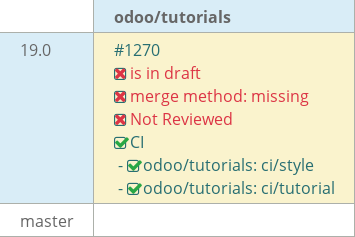
19.0 second uom adpaw#1270
Draft
adpaw-odoo wants to merge 26 commits into
Draft
Conversation


Initial setup completed for creating a new estate module.
Created the base estate module and installed it.
Initialized model and model fields which generates tables using odoo ORM.
Fixed issues and errors raised by the first push.
Defined access rights by creating security/ir.model.access.csv file in estate.
Defined the csv file in manifest.
Added actions and menus in the module.
Created estate_property_views.xml for the window action.
Added estate_property_menus.xml to define the 3-level menu structure.
Registered new XML files in the manifest data list.
Implemented  fields, attributes and views.
Configure field attributes: 'readonly' for selling_price and 'copy=False'
where needed.
set default value for bedrooms and dynamic default for availability date.
Implement reserved fields: 'active' and 'state'
Fixed issues in the previous commit.
Created new model called estate_property_type.py.
Added actions and menus.
Implemented list, form and search views in estate_property_types.xml
Implemented Many2many and One2many relations.
Added estate.property.tag model with Many2many relation to estate.property
Added offer_ids One2many field to display offers on property form
Created corresponding views, menus, actions and access to above models and files
Understood the concept of computed and relational fields.
Imported api from odoo to supports depends decorator.
Calculated total area by adding living area and garden area.
And best price by selecting the highest offer price using mapped method.
Implemented inverse function on validity_date to compute deadline from
date_availability and vice versa.
Added @api.onchange on garden field to auto-set area (10) and
orientation (North) when enabled.
When garden is disabled, garden area and orientation are cleared automatically.
Implement action_sold and action_cancel logic with UserError guards
Add Accept/Refuse buttons to property offers using fa-icons
Link offer acceptance to property selling_price and buyer_id
Update UI with statusbar widget and button visibility rules
Enforce strictly positive expected and offer prices via SQL constraints
Set non-negative selling price constraint
Added UNIQUE constraints on property type and property tag names.
Added Python constraint using float_compare to prevent selling price from being
lower than 90% of expected price
Added inline list view for properties within property types
Implemented statusbar widget for property state management
Set deterministic model ordering for properties, offers, and tags
Enable manual reordering for property types using sequence handle
Add ondelete constraint to prevent deletion of non-new/cancelled properties
Set property state to 'offer_received' on offer creation and blocked offers
lower than existing best offer
Add property_ids field to res.users via model inheritance
Add Real Estate Properties tab to user form view via view inheritance
Added estate_property_issues so we can report any issues in the property
Added computed SLA deadline and overdue logic based on issue priority.
Implemented restriction in action_sold to prevent selling properties with
unresolved high-priority issues.
Completed ch 13.
Created a new module called estate_account that depends on estate and account.
Inherited estate.property to override action_sold.
Used the inherited model to create customer invoice as a property gets sold.
Implemented kanban view
Added additional fields and attributes to improve the view.
Added default group by so the properties are grouped in kanban view according to
their property type.
Polished the code according to coding guidelines.
Improved the readability of the code.
Added a new bridge module called estate_crm which depends on both estate and crm
Inherited crm.lead to borrow methods and fields from crm module
Every offer made in the estate module will create a lead in crm
Marked lead won/lost on offer accept/refuse by extending the action accept and
refuse.
Also added the 2 tasks from review i.e adding a chatter and mail template when
the user clicks sold button
Successfully initialized the awesome_owl module by updating the Playground file
Defined the component class in JS and linked it to a basic XML template
Managed data flow by passing read-only Props from parents to children.
Used usestate for reactivity, that re renders the ui whenever state changes.
Successfully initialized the awesome_owl module by updating the Playground file
Defined the component class in JS and linked it to a basic XML template
Managed data flow by passing read-only Props from parents to children.
Used usestate for reactivity, that re renders the ui whenever state changes.
Registered client action to link XML menu with Owl logic.
Built custom service with rpc and memoize for data caching.
Used useState and onWillStart for reactive data fetching.
Created modular DashboardItem using generic slots.
Integrated Chart.js to optimize asset loading.
Used useRef and onMounted for imperative chart rendering.
Used onWillUnmount to destroy charts and prevent memory leak
Added three groups in admin i.e user, agent and manager
Added this data via security.xml file in data folder and adding module category
The user has all the basic access rights like creating, updating properties,
offers but cannot delete anything. The agent can read, write the properties
offers but cannot accept or refuse.
The manager has full property rights but cannot add/delete.

|
|
-Added  Many2one field on product template, ensruing the
second uom is of the same category and of ratio=1
-Overrode  so that the new field will be loaded in pos.
-Added onchange to auto-clear second UOM if primary UOM group changes.
-Added OWL button in ControlButtons that appears only when product has
a second UOM configured.
-Implemented quantity conversion popup with formula:
(entered × secondUom.factor) / mainUom.factor.
 adpaw-odoo
force-pushed
the
19.0-second-uom-adpaw
branch
from
adpaw-odoo
force-pushed
the
19.0-second-uom-adpaw
branch
from
f94a656 to
cc13eb6
Compare
This file contains hidden or bidirectional Unicode text that may be interpreted or compiled differently than what appears below. To review, open the file in an editor that reveals hidden Unicode characters.
Learn more about bidirectional Unicode characters
Sign up for free
to join this conversation on GitHub.
Already have an account?
Sign in to comment
2 participants


Add this suggestion to a batch that can be applied as a single commit.This suggestion is invalid because no changes were made to the code.Suggestions cannot be applied while the pull request is closed.Suggestions cannot be applied while viewing a subset of changes.Only one suggestion per line can be applied in a batch.Add this suggestion to a batch that can be applied as a single commit.Applying suggestions on deleted lines is not supported.You must change the existing code in this line in order to create a valid suggestion.Outdated suggestions cannot be applied.This suggestion has been applied or marked resolved.Suggestions cannot be applied from pending reviews.Suggestions cannot be applied on multi-line comments.Suggestions cannot be applied while the pull request is queued to merge.Suggestion cannot be applied right now. Please check back later.
Introduce a new feature in the Point of Sale that allows cashiers to input quantities using a secondary Unit of Measure (UoM). This is specifically designed for products sold in larger units (e.g., Dozens) where the cashier needs a quick shortcut to enter sub-units (e.g., individual Units) without manually calculating decimals.
Currently, if a product is configured in a large UoM like "Dozens or kgs" a cashier wanting to sell 6 individual pieces or half kg etc, must manually calculate and type "0.5". This is prone to human error and slows down the checkout process. This module introduces a dedicated conversion shortcut to automate that calculation while maintaining the primary UoM on the order line.
Technical Decisions: