For Stencyl 3.4 and above
Stencyl extension for “ReplayKit” for iOS . This extension allows you to easily integrate ReplayKit on your Stencyl game / application. (http://www.stencyl.com)
ReplayKit is only available on the following devices running iOS 9 or above; iPad Air 2, iPad Mini 2, iPad Mini 3, iPad 5 Air, iPhone 5s, iPhone 6 and iPhone 6 Plus.
On Android is ReplayKit only available on devices running Android 5.0 (Lollipop) or above.
For Android make sure you selected API 21 or higher in Mobile settings->version->Android Target version
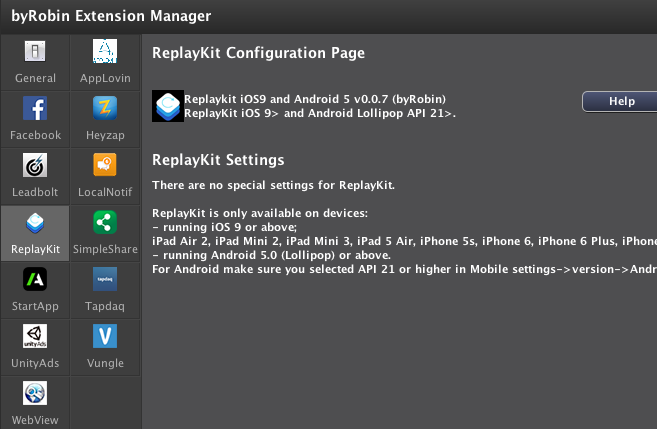
- Recording video and share
For Android make sure you selected API 21 or higher in Mobile settings->version->Android Target version
1)Use the Initialize ReplayKit block in your first (loading)scene in “when created” Event.
Use this block only once a session. If you want to ask the user to view the video or discard the video select YES, else select NO. If No the video will been viewed automatically after stop recording.
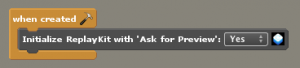
- EXAMPLE: Create an Actor “Start/Stop Record button”
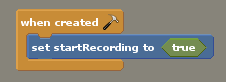
3)EXAMPLE: In the Events tab of the Actor create an boolean Attribute and set this to true when Actor is created.
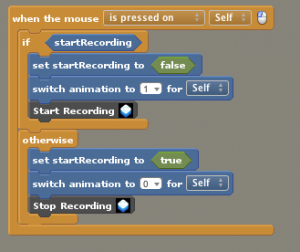
4)EXAMPLE: In the Events tab of the actor add an when the mouse is pressed on Self Event.
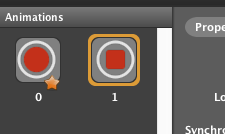
- Setup the Actor animation like example below.
- Put the Start Recording block between the if startRecording statement, when startRecording is true then set startRecording to false and switch to animation 1 (stop button) and Start Recoding.
- Put the Stop Recording in the otherwise block, set the startRecording to true again and switch back to animation 0 (start button) and Stop Recording.
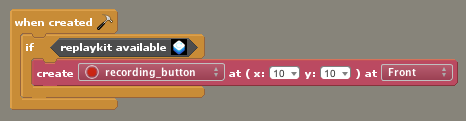
5)EXAMPLE: Create an scene where you want to create the Actor (Start/Stop button). In the Events tab add an when created event.
- Put the replaykit available block in an if statement and put the create actor between it.
Because ReplayKit works only on iOS9 or above and Android 5.0 or above and because it is not available on all devices, you only want to show the Recording button on devices where the Replaykit is available.
If the ReplayKit is not available it will return false and the Actor will never be created.
- Test it and play with it. You can share the video when you preview the video. Apple has set an standard share message that cannot be modified.
Standard message when you testing is:
[app store app name] from [developer]
http://www.apple.com
This message will be set to your game when you publish you game.
7)isRecoding block.
This boolean block turns true when recording start and turns to false when recording stops.
If the ReplayKit is not available it will return false and the Actor will never be created.


Author: Robin Schaafsma
The MIT License (MIT)
Copyright (c) 2014 byRobinGames http://www.byrobin.nl
Permission is hereby granted, free of charge, to any person obtaining a copy of this software and associated documentation files (the "Software"), to deal in the Software without restriction, including without limitation the rights to use, copy, modify, merge, publish, distribute, sublicense, and/or sell copies of the Software, and to permit persons to whom the Software is furnished to do so, subject to the following conditions:
The above copyright notice and this permission notice shall be included in all copies or substantial portions of the Software.
THE SOFTWARE IS PROVIDED "AS IS", WITHOUT WARRANTY OF ANY KIND, EXPRESS OR IMPLIED, INCLUDING BUT NOT LIMITED TO THE WARRANTIES OF MERCHANTABILITY, FITNESS FOR A PARTICULAR PURPOSE AND NONINFRINGEMENT. IN NO EVENT SHALL THE AUTHORS OR COPYRIGHT HOLDERS BE LIABLE FOR ANY CLAIM, DAMAGES OR OTHER LIABILITY, WHETHER IN AN ACTION OF CONTRACT, TORT OR OTHERWISE, ARISING FROM, OUT OF OR IN CONNECTION WITH THE SOFTWARE OR THE USE OR OTHER DEALINGS IN THE SOFTWARE.