This project is a quick start framework to develop automation test project. especially for REST and Selenium Tests. More design please check this article https://github.com/rioliu/easytest/wiki/Common-Design-of-Automation-Test
- com.rioliu.test.config.TestContext.java
This class can help you to load test properties from Env/System and Property files.
e.g.
    TestContext tc = TestContext.get();
    try {
        PropertiesConfiguration pc =
                tc.loadPropertiesFromFile(
                        "src/test/resources/test.properties");

        System.out.println(pc.getString("version"));
    } catch (ConfigurationException e) {
        e.printStackTrace();
    }
- com.rio.liu.test.base.AbstractTestBase.java
This is a testNG base class, you can develop your test case base on it. it is inherited from org.testng.TestListenerAdapter, help you to do logging for test events like start/stop/skip/failure. Also it can help to initialize Selenium WebDrivers (firefox/chrome) with default/customized Options. you don't need to care about the WebDriver destory, all the drivers will be closed/quit when the test is finished, and when the WebUI test is failed, screenshot will be taken automatically.
    WebDriver firefox = firefox();
    WebDriver chrome = chrome();

    firefox.get("https://www.whatsmybrowser.org/");
    chrome.get("https://www.whatsmybrowser.org/");

    takeScreenshot(firefox, "home_page_ff.png", "open home page");
    takeScreenshot(chrome, "home_page_chrome.png", "open home page");
- com.rioliu.test.selenium
this package contains few Selenium Utitlites.
~ BasePageObject : if you develop your WebUI test with POM model, you can use this base class to create your PageObject, it provides some basic methods to implement your test case quickly
public class GoogleHomePage extends BasePageObject {

    private String homePageUrl;

    public GoogleHomePage(WebDriver driver, String url) {
        super(driver);
        homePageUrl = url;
    }

    public void search(String keyword) {

        navigate(homePageUrl);

        clearAndType(By.name("q"), keyword);
        pressEnterKey(By.name("q"));

        sleep(5, ChronoUnit.SECONDS);

    }

    public boolean verifyResultPageContains(String expectedString) {
        return driver.getPageSource().contains(expectedString);
    }

}
- com.rioliu.test.logging
this package provides advanced logging functionalities. Common logging requirement in test is: add log entry in 'Console', 'Report' or 'Both'
All the loggers implemeented same Logger interface, you can use LoggerFactory.java to create ConsoleLogger and CompositeLogger (logging message in both Report and Console)
    private static Logger logger = LoggerFactory.getCompositeLogger(RESTAPITest.class);

    logger.info("Hello World");
- com.rioliu.test.reporting
this package provides a way to integrate your test with popular Reporting Framework ExtentReports. it can proivde a beautiful web based report.
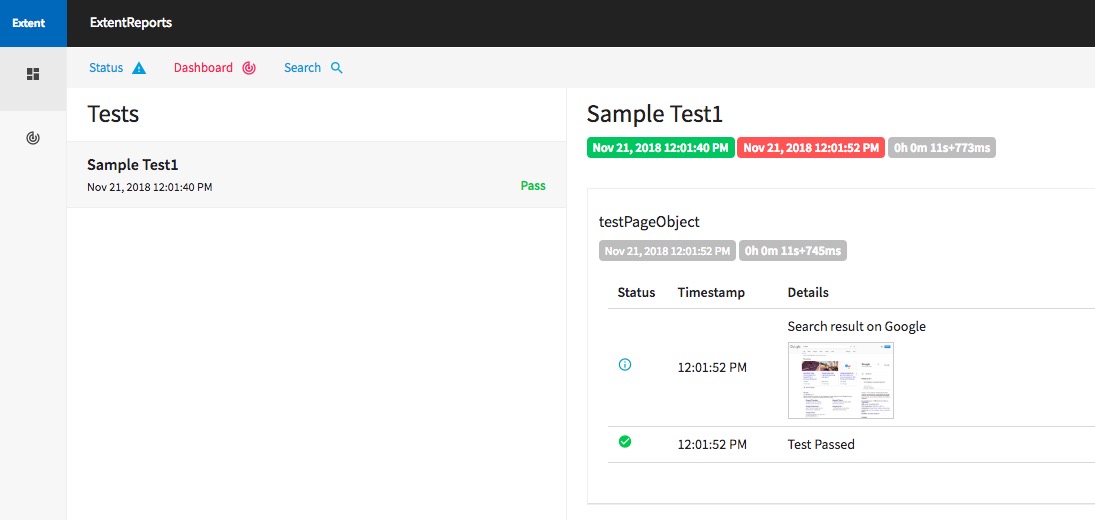
- com.rioliu.test.rest
this package has a helper class to help you do some configuration for RestAssured Framework.
RestClientConfigHelper.get().useRelaxedHTTPSValidation("TLSv1.2");
- Verify Simple REST API TEST
    given().get("https://api.publicapis.org/entries?category=animals&https=true").then()
            .body("entries.API", hasItem("Cats"));
- Deploy project to local Nexus repository
Start Nexus server with default setting.
podman run -d -p 8081:8081 --name nexus sonatype/nexus:oss
Now you can access the nexus server with url http://localhost:8081/nexus with admin:admin123
Clone this repo to your local disk
git clone https://github.com/rioliu/easytest/
Build this project
    cd easytest
    mvn clean install
Upload artifact to Nexus server
    curl -v -u 'admin:admin123' --upload-file pom.xml http://localhost:8081/nexus/content/repositories/releases/com/rioliu/test/1.0/test-1.0.pom
    curl -v -u 'admin:admin123' --upload-file target/test-1.0.jar http://localhost:8081/nexus/content/repositories/releases/com/rioliu/test/1.0/test-1.0.jar
Now you can add local nexus repository and dependency to your project's pom.xml
    <repositories>
	<repository>
		<id>nexus</id>
		<url>http://localhost:8081/nexus/content/repositories/releases</url>
	</repository>
    </repositories>
    <dependencies>
	<groupId>com.rioliu</groupId>
	<artifactId>test</artifactId>
	<version>1.0</version>
    </dependencies>
- Container image
Get image from a container registry and trigger the test
podman run -it --name easytest rioliu/easytest:v2
Another option, you can clone this project to your local and change package name to your org/com then start to develop, That's fine.
No local JDK/Maven required — builds can run inside a container via Podman. See the
Makefileformake build,make test, andmake cleantargets.