
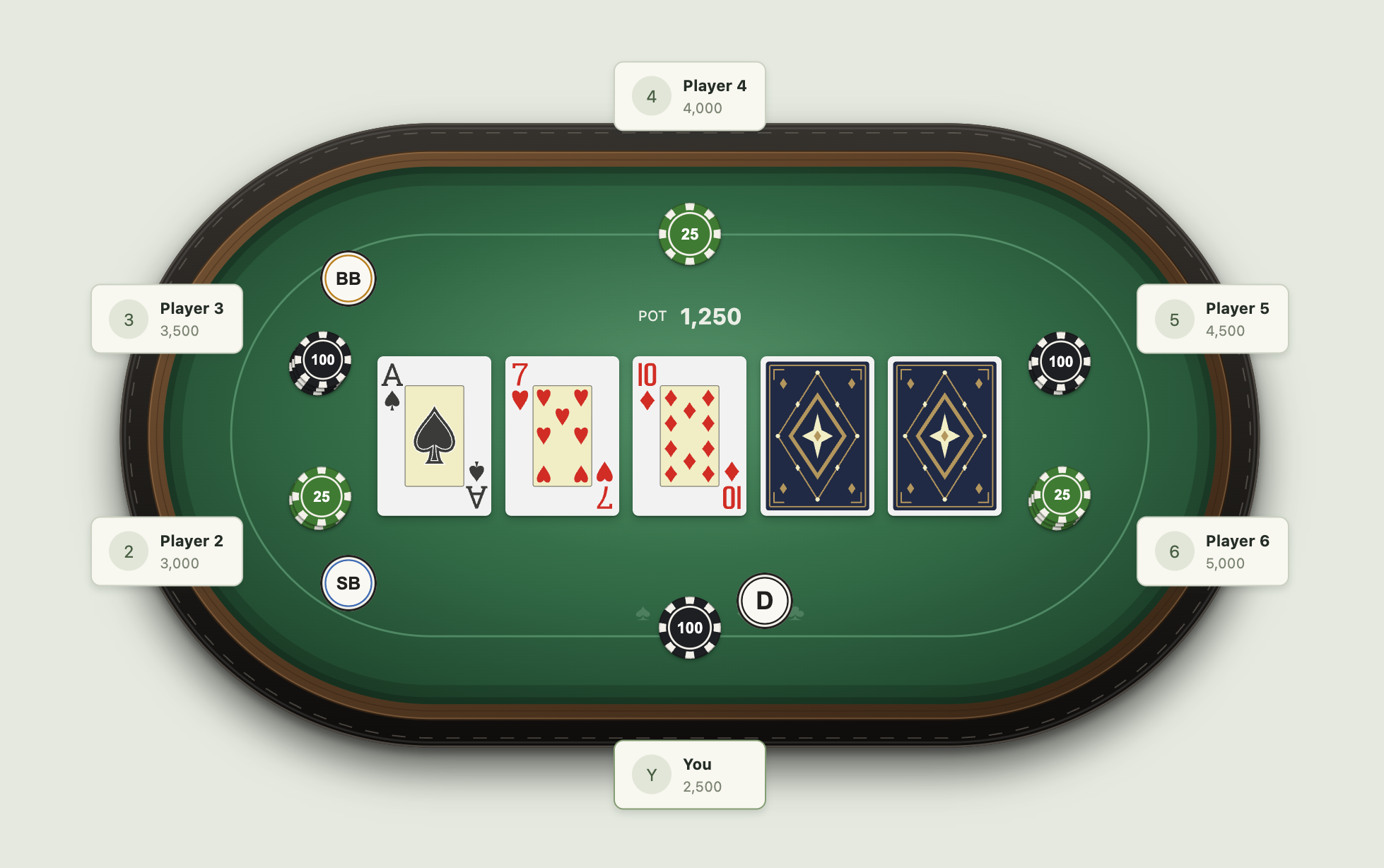
Composable, accessible React primitives for playing cards and poker interfaces. Standard and compact mobile cards, three court collections, two Jokers, customizable card and chip shadows, crisp chips and six proportionally scaled table themes, built from a Penpot design system.
Try the playground · Source and release notes. No game rules, betting engine, network service or real-money logic are included.
npm install feltforgeImport only the artwork collections you need; number cards, chips and core geometry work independently.
Requires Node 22.12+ and the pinned pnpm version (pnpm@11.24.0).
git clone https://github.com/saeedet/feltforge.git
cd feltforge
pnpm install --frozen-lockfile
pnpm build
pnpm dev
The playground lets you explore all 52 ordinary cards, court collections, Jokers, backs, custom chips, bounded stacks, markers and six table themes in 2/6/8/9-seat layouts. The Poker table tab includes a theme picker and a gallery of all six designs. In the Cards tab, the “Give it a spin” preview supports click flips, drag/flick rotation, hover tilt and keyboard controls, with reduced-motion support.
The hosted playground is deployed from main after CI passes. Its source stays in apps/playground and is not included in the npm package.
pnpm check
pnpm package:check
pnpm package:pack
# In a consumer app, install the resulting dist/package/feltforge-<version>.tgz.
React 18.2+ or 19 is a peer dependency. The framework-independent feltforge/core entry can be used without React. The package is ESM, includes TypeScript declarations and requires no CSS framework.
import { Card, CardBack, Chip, ChipStack, PokerMarker } from 'feltforge';
import { western } from 'feltforge/courts/western';
import { joker1 } from 'feltforge/jokers/1';

<Card rank="7" suit="clubs" width={125} />;
<Card rank="K" suit="hearts" court={western} width={125} />;
<Card rank="joker" artwork={joker1} width={125} />;
<CardBack width={125} />;
<Chip value={25} />;
<Chip value={250} label="250" color="#0C7A7C" />;
<ChipStack value={100} count={25} maxVisible={5} />;
<PokerMarker type="dealer" />;
Court artwork is explicitly imported. Number cards and Aces do not pull any court, Joker or back artwork into their bundle. court={persian}, court={western} and court={eastern} select the corresponding collection; Persian is the playground's default. The explicit object replaces a global default style to keep artwork loading predictable. style remains ordinary React CSS. Jokers have no suit; number cards reject court props at compile time.
Card ranks are vector artwork. Chips and markers use live text; applications can set --chip-font to match their interface.
Use compact cards for mobile tables and small boards. They show a bold rank, a small suit below it, and a large suit at the bottom right. All 52 ordinary cards are supported, including J, Q and K without a court collection import. Ranks and suits are vector paths; no font files or runtime font dependency are included.
import { Card } from 'feltforge';

<Card variant="compact" rank="10" suit="clubs" />;
<Card variant="compact" size="hero" rank="K" suit="spades" />;| Size | Dimensions | Use |
|---|---|---|
community (default) |
38 × 53 | Community cards; use a 7px gap |
hero |
50 × 70 | Player hands; pairs use a 13px overlap and −7° / +3° rotation |
These are two distinct layouts. Numeric width or height scales the selected layout proportionally. Compact cards have no pip layouts, court illustrations, decorative Ace or bottom index. Jokers and the Classic back retain their standard design. The focused feltforge/compact-card entry exports CompactCard with the same rank, suit and size props.
Standard cards, compact cards, Jokers and card backs use a box shadow instead of the old outer border. The shadow combines two soft black layers with a subtle white inset edge. At a 100px standard card width, or either compact preset's natural size, the default is:
box-shadow:
  0 1px 1px rgba(0, 0, 0, 0.25),
  0 2px 8px rgba(0, 0, 0, 0.25),
  inset 0 0 0 1px rgba(255, 255, 255, 0.1);
Shadow lengths scale with numeric width or height props. Override a single card with style, or set the inherited --card-shadow property for a group. The override replaces the complete shadow, including the inset edge.
<Card rank="7" suit="hearts" style={{ boxShadow: 'none' }} />;
<CardBack style={{ '--card-shadow': '0 4px 12px rgba(0, 0, 0, .2)' }} />;
<Card
  variant="compact"
  rank="Q"
  suit="hearts"
  style={{ '--card-shadow': 'none' }}
/>;.my-table {
--card-shadow: 0 2px 6px rgba(0, 0, 0, 0.2);
}For sizing driven entirely by application CSS, use a shadow value suited to that layout. The standard card's inner panel and the back's decorative frame retain their design strokes. The retired --card-border token no longer controls the outer edge.
Every chip has a continuous black inner border at 28% opacity, painted above all eight edge inserts. The border is 1px at the 64px design size and scales with the chip geometry. It applies to all denominations, custom chips and every visible stack layer, including when shadows are disabled.
Chip and ChipStack use the Contact shadow by default. At the 64px design size, it combines two independent black layers: offset 0 1, blur 1, opacity 35%; and offset 0 2, blur 4, opacity 25%. The shadow follows the circular artwork and scales with the chip geometry. Each visible chip in a stack gets its own shadow, so overlapping layers remain distinct.
Use shadow={false} to remove it, or replace it with style.filter or the inherited --chip-shadow property. These overrides apply to each chip, including every visible chip inside a stack. shadow={false} takes precedence; otherwise style.filter takes precedence over the CSS property.
<Chip value={25} shadow={false} />;
<ChipStack value={100} count={5} shadow={false} />;
<Chip
  value={25}
  style={{ filter: 'drop-shadow(0 2px 3px rgba(0, 0, 0, .3))' }}
/>;
<ChipStack value={100} count={5} style={{ '--chip-shadow': 'none' }} />;.my-table {
--chip-shadow: drop-shadow(0 2px 3px rgba(0, 0, 0, 0.3));
}Custom filter lengths use the same 64-unit coordinate system as the chip and scale with its size. Use CSS filter functions such as drop-shadow(...), or none; --chip-shadow accepts a filter value, while --card-shadow accepts a box-shadow value. No font files or static chip assets are imported: denominations remain configurable live text.
import { PokerTable, ChipStack, PokerMarker } from 'feltforge';

<PokerTable
  layout={6}
  theme="midnight-racetrack"
  renderSeat={({ index }) => <button>Player {index + 1}</button>}
  renderBet={() => <ChipStack value={25} count={3} size={40} />}
  renderMarker={({ index }) =>
    index === 0 ? <PokerMarker type="dealer" /> : null
  }
  pot={<strong>Pot: 750</strong>}
/>;
Choose from the updated Classic, Midnight Racetrack, Royal Burgundy, Neon Night, Emerald Art Deco, and Ocean Slate designs. Omit theme for Classic. Every theme includes its Penpot rail, felt, lighting and decorative details; lettering and symbols are SVG paths with no font dependency.
| Theme | theme value |
|---|---|
| Classic | classic |
| Midnight Racetrack | midnight-racetrack |
| Royal Burgundy | royal-burgundy |
| Neon Night | neon-night |
| Emerald Art Deco | emerald-art-deco |
| Ocean Slate | ocean-slate |
TABLE_THEMES, TABLE_THEME_LABELS and the TableTheme type are exported from feltforge, feltforge/table and feltforge/core for building your own picker.
Override a theme's rail, inner rail, outline, felt or betting line with the existing CSS tokens. Overrides replace that material's paint with your color while retaining the design's shading and details:
<PokerTable
  layout={6}
  theme="ocean-slate"
  style={{ '--table-felt': '#155e63', '--table-line': '#f5e9c9' }}
/>
Tables include SVG shadows and, in Neon Night, glow. Set style={{ '--table-shadow': 'none' }} to disable these effects, or replace them with a CSS filter such as drop-shadow(0 3px 6px rgba(0,0,0,.3)). Filter lengths use the 1000 × 600 table coordinate system and scale with the table. This token applies to each shadowed layer, including brass studs and neon lines.
The table retains a 5:3 aspect ratio. Seat, bet, marker and pot overlays use normalized anchors and retain their own dimensions. TableAnchor supports custom overlays; getTableLayout() exposes the same geometry independently of React. Seat 0 is bottom centre, then clockwise. Markers use the approved 125px inward / 55px tangent formula and stored signs.
800px or wider is recommended for a complete table interface. Narrow applications should adapt or scroll their overlays; the library does not shrink an entire interface as one SVG scene.
Use TableSurface when your application owns player positions and screen composition. It renders the same six themes without seats, cards or gameplay content. width and height describe the outer rail, without the desktop canvas margins. They are numeric design units, not viewport dimensions.
import { TableSurface } from 'feltforge/table';

<div style={{ position: 'relative', width: 334 }}>
  <TableSurface
    theme="classic"
    width={334}
    height={486}
    detailScale={0.57}
    decorative
    style={{ width: '100%', height: 'auto' }}
  />
  <div style={{ position: 'absolute', left: '50%', top: '50%' }}>
    {/* Your independently positioned players, cards, chips and controls. */}
  </div>
</div>;

// Other examples; any valid dimensions are supported:
<TableSurface width={559.64} height={262.66} detailScale={0.571} />;
<TableSurface width={480} height={480} theme="royal-burgundy" />;
<TableSurface width={720} height={380} theme="neon-night" />;
The surface recomputes stadium curvature and layer insets rather than stretching a desktop SVG. detailScale controls rail thickness, strokes, stitching, shadows and ornament size together. It defaults to Math.min(width, height) / 460; use an explicit value when your design specifies material sizing independently of the outer dimensions. It must be positive and no greater than the shorter edge divided by 280, leaving room for the betting line and ornaments.
All themes support portrait, landscape and intermediate proportions. Studs follow the perimeter, textures tile, and lettering and decorative shapes retain their proportions. Color tokens and --table-shadow work as above. The SVG bounds exclude shadows; leave room around the surface and avoid clipping its parent.
CSS sizing scales the chosen shape uniformly. To change its proportions, update the numeric width/height props. TableSurface uses no viewport observer or breakpoints and does not reposition your content. Existing PokerTable props, its 1000 × 600 canvas and overlay geometry remain unchanged; existing consumers need no migration. See the integration guide for a complete mobile replacement example.
Visuals have meaningful default accessible labels, accept aria-label overrides, and support decorative. Interactive examples use native buttons around cards so keyboard activation and focus work naturally. Table overlays remain accessible HTML.
<button type="button" aria-label="Choose seven of hearts">
  <Card rank="7" suit="hearts" decorative width={100} />
</button>;

<Card
  rank="A"
  suit="spades"
  style={{ '--card-background': '#ffffff', '--card-black': '#17251d' }}
/>;
See API and theme tokens, architecture, and design discrepancies.
pnpm generate:ranks       # Check pinned fonts and reproduce outline paths
pnpm prepare:assets      # Validate, normalize, optimize and generate modules
pnpm generate:tables     # Reproduce table skins and outlined lettering
pnpm check               # Format, lint, type contracts, unit tests and build
pnpm test:visual         # Compare SVG assets with authoritative sources
pnpm package:check       # Inspect exports, consumer bundles and npm dry run
pnpm package:pack        # Create a local tarball; does not publish
pnpm test:consumers      # Install tarball into fresh React 18 / Next.js fixtures
pnpm test:e2e            # Playwright interaction checks; install Chromium and WebKit first
CI runs the workspace and browser checks and retains screenshots. Asset references and checksums are committed; generated output is reproducible. The 31-file standalone asset contract excludes full-deck exports, static chips and static tables. Large court illustrations remain detailed vector artwork: import only the collections you need.
For releases, see publishing. A matching vX.Y.Z tag runs the release checks and publishes that version to npm through a trusted GitHub Actions publisher.
See the 0.1.0 release-readiness report for measurements, validation, known limits and the final package exports.
MIT for FeltForge library code and artwork.
The court, Joker, and card-back artwork included in FeltForge is original artwork created for this project and is distributed under the MIT License.
The playground's adapted React Bits FlipCard retains its separate MIT + Commons Clause notice; it and Motion are excluded from the npm library.