
Drag-and-drop email editor for modern apps — source-available, MIT after two years




Playground · Documentation · Changelog · Website · Discussions
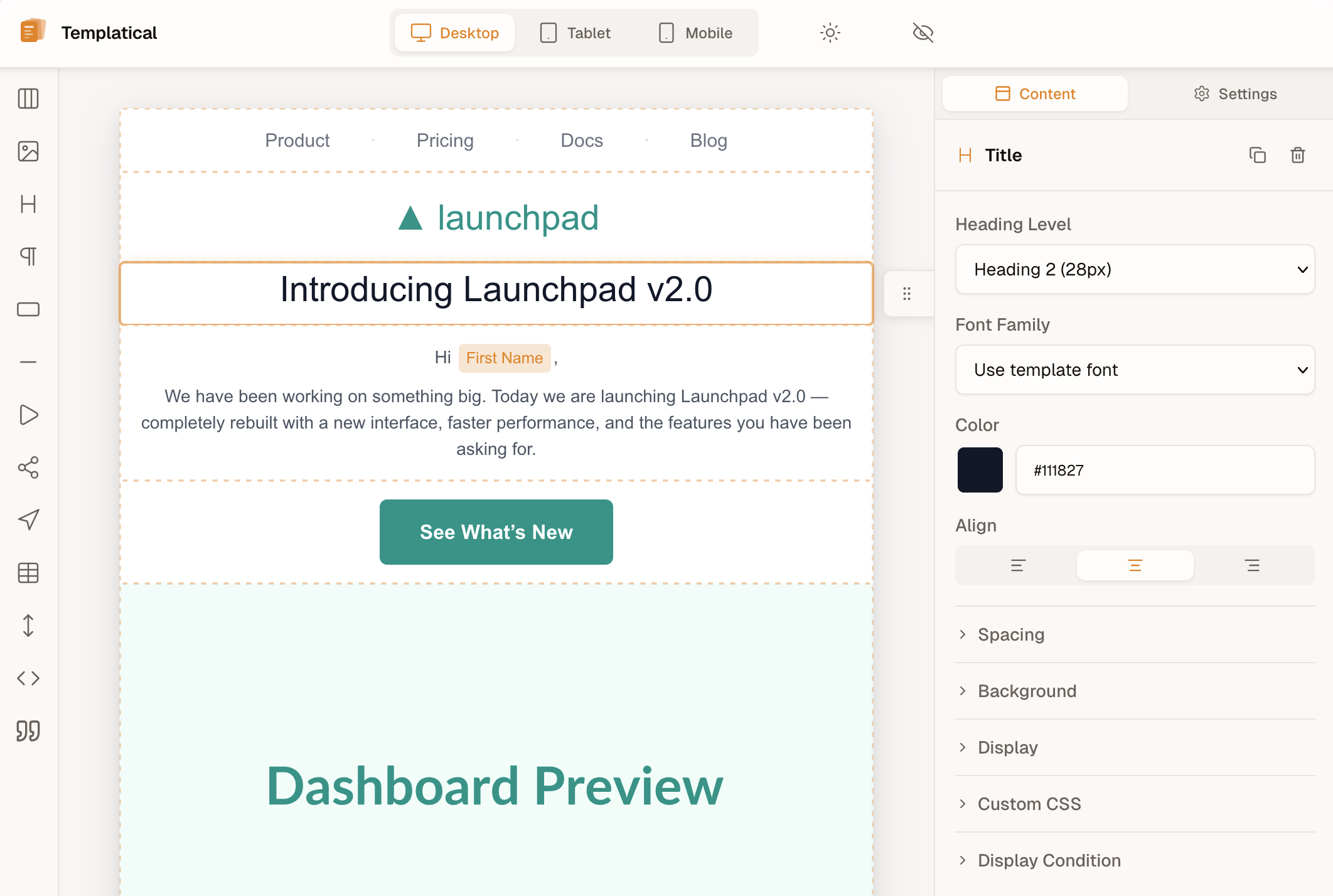
▶ Try it live in the playground
Templatical is a production-ready drag-and-drop email editor you can drop into any web app with a single function call. Templates are portable JSON, output is MJML (so they render correctly in every email client), and the editor itself is framework-agnostic — Vue under the hood, but you embed it in React, Svelte, Angular, or vanilla JS the same way. Comments, saved blocks, version history, test email, and media are OSS — you pass providers to init(). An optional Cloud tier adds AI rewrite, real-time collaboration, and hosted/managed storage.
Describe the email you want and your AI coding agent builds it — then preview it in the real editor, hand-edit anything, and export send-ready MJML/HTML. Free, open-source, no backend, no API key — your agent is the inference, and nothing is sent to us. Ship a one-off campaign, or generate branded starter templates for your @templatical/editor integration: if you have a coding agent, you have a complete email tool.
The templatical Agent Skill is an Agent Skills folder — Claude Code, Codex CLI, Cursor, Gemini CLI, GitHub Copilot and others all read SKILL.md. The email it exports sends through any provider — Amazon SES, Postmark, Resend, Mailchimp, anything.
One command and you're done:
npx skills add templatical/sdkThat detects which supported agents you have and installs into the directory each one reads.
You can also preview it live: ask to "show it live" and the skill opens your template in the real Templatical editor in a browser, updating as you prompt and reconciling any edits you make by hand. It's local and installs nothing into your project (a small CLI fetched on demand via npx; the editor loads from the CDN).
Want a hosted, managed experience instead — AI chat inside the editor, tuned prompts, an MCP server we run? That's the Templatical Cloud tier.
The same skill covers the other half: installing, mounting, configuring, theming and troubleshooting @templatical/editor in your own app — just ask it, no separate install. It routes each request on its own: authoring or editing a template stays on the email side, embedding the SDK moves to the integration side, and a request that needs both ("build a welcome email and wire it into my app") gets both, template first.
The same skill guide → covers it all.
Things that are usually paid features in commercial editors — free in Templatical:
- Custom blocks with API-backed data sources — register your own block types whose content is rendered from a static template or fetched live from your API at preview time. Typically a paid-tier feature in commercial editors.
- Merge tags in your ESP's syntax —
{{handlebars}},{liquid},${js}, or your own — with automatic human-readable label replacement directly in the editor canvas. Build your CRM-aware tag picker in minutes. - Display conditions — show/hide blocks based on recipient attributes, with live preview in the editor.
- Reusable saved blocks — let users save a group of blocks and re-insert it across templates, with search, preview, rename and delete. You supply storage via a small provider interface (or use the bundled browser-local one); the editor owns the whole UI.
- Version history — browse, preview and restore a template's past versions from the header. Storage is a four-method provider you implement; the editor owns the control, the preview and the restore flow.
- Full theming via design tokens — color tokens, custom fonts, dark mode, complete theme overrides. No CSS hacking, no paid tier.
- Template & block defaults — define your brand once. New templates and new blocks pick up your brand automatically.
- Drop-in mount — one
init()call, oneunmount(). No framework lock-in. - Style-isolated, both directions — Shadow DOM by default keeps host CSS out of the editor;
tpl:Tailwind prefix and no preflight reset keep editor styles out of your app. Drops into any page, any framework, any CMS — no resets, no conflicts. Learn more → - Built-in blocks — Title, Paragraph, Image, Button, Section, Divider, Spacer, Social Icons, Menu, Table, HTML, Video, Countdown, Custom.
- JSON templates — portable, versionable, store anywhere, render anywhere.
- MJML output — works with any email provider (Postmark, Resend, SES, Mailgun, anything).
- Framework-agnostic — first-class examples for React, Vue, Svelte, Angular, vanilla.
- Multilingual — English, German, Portuguese, Spanish, Catalan, French & Dutch built in, easy to add more locales.
- TypeScript strict — full types for blocks, config, and callbacks.
- Battle-tested — ~3,900 unit tests + Playwright E2E coverage.
npm install @templatical/editor @templatical/rendererimport { init } from "@templatical/editor";
import "@templatical/editor/style.css";
const editor = await init({
container: "#editor",
onChange(content) {
// content is JSON — store it, version it, send it anywhere
console.log("Template updated:", content);
},
});
// Render to MJML when you're ready to send
const mjml = await editor.toMjml();<div id="editor" style="height: 100vh"></div>Read the full guide → · React, Svelte, Angular examples →
| Package | Description | License |
|---|---|---|
@templatical/editor |
Visual drag-and-drop editor | FSL-1.1-MIT |
@templatical/core |
Framework-agnostic editor logic, state, history | FSL-1.1-MIT |
@templatical/media-library |
Media library — composable, components, standalone SDK | FSL-1.1-MIT |
@templatical/types |
Shared TypeScript types and block factories | MIT |
@templatical/renderer |
JSON → MJML renderer (browser + Node) | MIT |
@templatical/quality |
Template quality linter — accessibility, structure, and link rules (browser + Node) | MIT |
@templatical/template-tools |
CLI and library: validate, render (MJML/HTML), edit, import, live-preview templates | MIT |
@templatical/import-beefree |
Convert BeeFree templates to Templatical format | MIT |
@templatical/import-unlayer |
Convert Unlayer templates to Templatical format | MIT |
@templatical/import-html |
Convert HTML email templates (table-based) to Templatical format | MIT |
@templatical/import-mjml |
Convert MJML email templates to Templatical format | MIT |
@templatical/import-topol |
Convert Topol.io email templates to Templatical format | MIT |
@templatical/import-stripo |
Convert Stripo email templates to Templatical format | MIT |
@templatical/import-chamaileon |
Convert Chamaileon getDocument() JSON to Templatical format |
MIT |
@templatical/import-easy-email-pro |
Convert Easy Email Pro persist JSON to Templatical format | MIT |
Editor packages (@templatical/editor, @templatical/core, @templatical/media-library) are licensed under Functional Source License 1.1, which automatically converts to MIT after 2 years per release. You can:
- ✅ Embed it in your SaaS, CRM, marketing tool, or transactional product
- ✅ Self-host, modify, fork for internal use
- ✅ Use it commercially without paying anything
The only restriction: don't repackage Templatical itself as a directly competing email-editor product. Embedding is granted explicitly in the license text — the canonical FSL-1.1-MIT template, unmodified, plus an Additional Permission covering products that include the editor as one feature among others. The other packages — types, renderer, quality and the import-* converters — are pure MIT.
- Getting Started — install, mount, render
- Block Reference — every built-in block
- Theming — design tokens, dark mode, custom fonts
- Custom Blocks — extend with your own
- Saving & Loading — the template lifecycle over your own storage
- Saved Blocks — reusable block groups over your own storage
- Version History — browse, preview and restore past versions over your own storage
- AI Agent Skills — generate emails from a prompt, or get integration help, in your own agent
- Migrating from Unlayer
- Migrating from BeeFree
- Migrating from Stripo
- Migrating from Topol
- Migrating from Chamaileon
- Migrating from Easy Email Pro
- Migrating from MJML
- Migrating from HTML
- Changelog — every release, all packages, one page
Full docs: docs.templatical.com (English + Deutsch).
Releases are also published as GitHub Releases — one per version. Subscribe via the Atom feed or Watch → Custom → Releases.
Contributions, bug reports, and feature requests are welcome.
git clone https://github.com/templatical/sdk.git
cd sdk
pnpm install
pnpm run build
pnpm run test
See CONTRIBUTING.md for the full guide.
Templatical is built and maintained by a solo developer. If your company uses it in production, consider sponsoring on GitHub — it directly funds new features, faster releases, and continued open development.
- Editor packages (
@templatical/editor,@templatical/core,@templatical/media-library) — FSL-1.1-MIT - Types, renderer, quality, importers — MIT