

TUI that connects to a list of host:port targets over TLS and ranks them by
days until their certificate expires — like top, but for certificate
expiry.
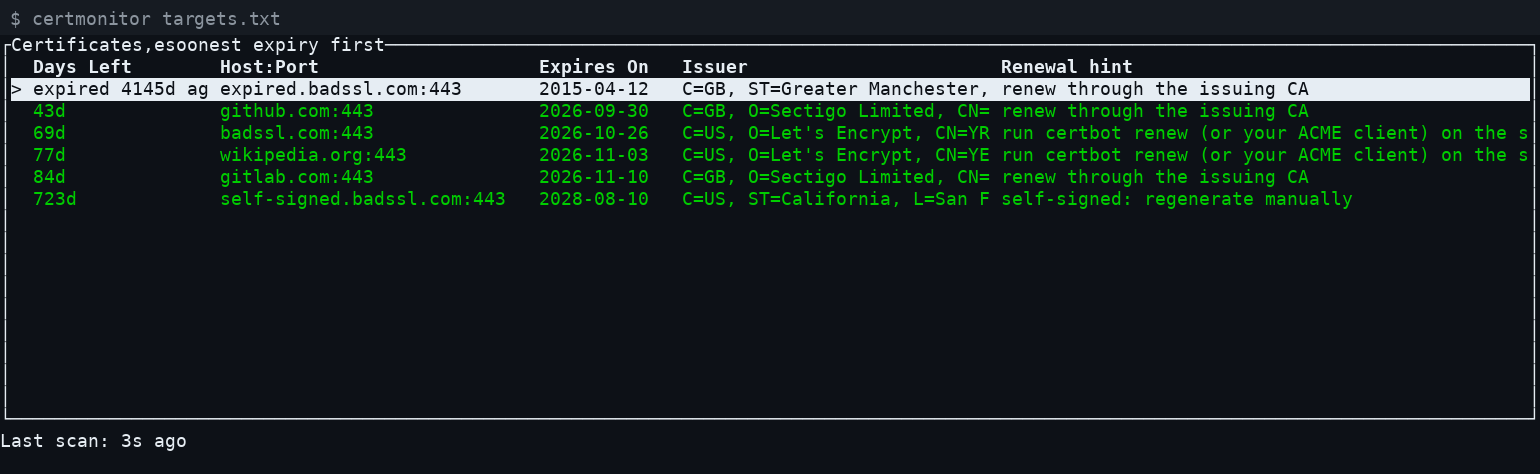
$ certmonitor targets.txt                        # interactive TUI
$ certmonitor --once targets.txt                 # one-shot report for cron/systemd
$ certmonitor --interval 300 targets.txt         # auto-rescan every 5 minutes
$ certmonitor --serve 0.0.0.0:8080 targets.txt   # auto-refreshing web page instead of the TUI
targets.txt is a plain text file, one target per line, as host or
host:port (bare hosts default to 443). Blank lines and lines starting
with # are ignored:
example.com
example.com:8443
internal-app.local:443
# a comment
Since it's a plain TLS client connecting outward, certmonitor can check
any host it can reach over the network — a public website just as easily as
an internal server — no SSH or agent installed on the target required.
Each row is colored by days-left: green (OK), yellow (--warn-days,
default 30), red (--critical-days, default 7, or already expired, or the
check itself failed — e.g. connection refused, DNS failure, TLS handshake
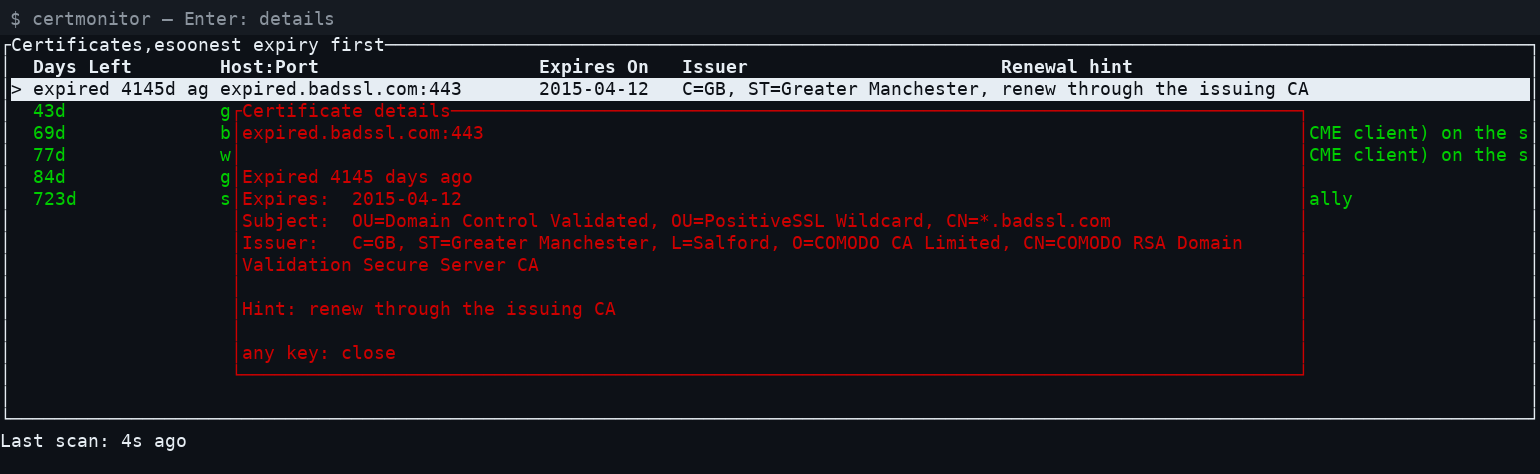
error). Select a row with ↑/↓ and press Enter for a detail popup with
the full subject, issuer, and a short renewal hint guessed from who issued
the cert (e.g. Let's Encrypt certs suggest certbot renew). The hint is a
guess based only on what the TLS handshake reveals, not real knowledge of
how the target server manages its certs — a starting point, not a command
to run blindly.
Keys:
↑/↓: move the selectionEnter: show details for the selected certificater: rescan nowq/Esc: quit
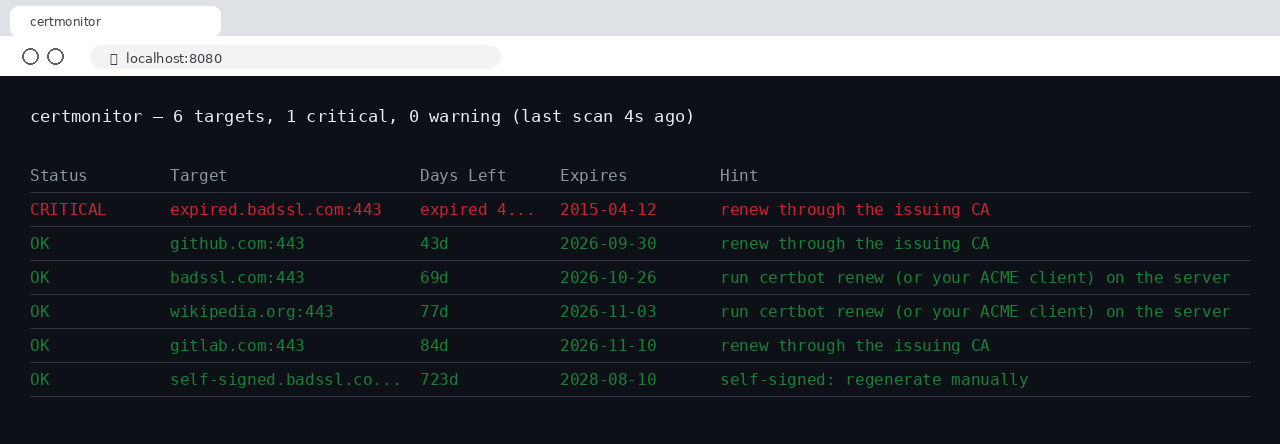
--serve <addr> (e.g. --serve 0.0.0.0:8080) skips the TUI and instead
serves the same ranked table as a plain HTML page at /, auto-refreshing
via <meta http-equiv="refresh"> every --interval seconds (default 300
in this mode). A background thread rescans on that schedule; requests are
always answered instantly from whatever the last scan left behind, never
blocked on a live check.
$ docker build -t certmonitor .
$ docker run -d -p 8080:8080 \
    -v /path/to/targets.txt:/etc/certmonitor/targets.txt:ro \
    certmonitor
The image's default command is --serve 0.0.0.0:8080 /etc/certmonitor/targets.txt, so mounting a targets file at that path and
publishing port 8080 is all that's needed. Override the command to change
the interval or thresholds, e.g.:
$ docker run -d -p 8080:8080 \
    -v /path/to/targets.txt:/etc/certmonitor/targets.txt:ro \
    certmonitor --serve 0.0.0.0:8080 --interval 60 --warn-days 14 \
    /etc/certmonitor/targets.txt
Repeating --warn-days, --critical-days, etc. on every invocation gets
old fast, especially for a scheduled job. Put them in
~/.config/certmonitor/config.toml instead:
warn_days = 30
critical_days = 7
timeout = 5
interval = 300
A --config <path> flag points at a different file. Any flag passed on the
command line overrides the same setting in the config file.
--once runs a single scan, prints a plain aligned report (colored when
run in a real terminal, plain when piped/logged), and exits with a
Nagios-style code: 0 if everything is OK, 1 if anything is in warning
range, 2 if anything is critical, expired, or unreachable. That exit code
is the hook for alerting — wire up the actual notification (email, Slack,
PagerDuty, ...) through whatever your scheduler already uses for failed-job
alerts, rather than certmonitor reinventing it.
# /etc/systemd/system/certmonitor.service
[Unit]
Description=certmonitor daily certificate check
OnFailure=certmonitor-alert.service   # your own notification unit

[Service]
Type=oneshot
ExecStart=/usr/local/bin/certmonitor --once /etc/certmonitor/targets.txt
# /etc/systemd/system/certmonitor.timer
[Unit]
Description=Run certmonitor daily
[Timer]
OnCalendar=daily
Persistent=true
[Install]
WantedBy=timers.target$ sudo systemctl enable --now certmonitor.timer
OnFailure= fires whenever the service exits non-zero (exit code 1 or 2
above) — point it at your own unit that sends the actual notification.
No need to register it as a Windows service — a daily scheduled task
calling --once is the direct equivalent of the systemd timer above:
schtasks /create /tn "certmonitor" /sc daily /st 09:00 ^
  /tr "C:\path\to\certmonitor.exe --once C:\path\to\targets.txt"
Check the exit code from whatever wraps the task (a follow-up action, a monitoring agent, or a small wrapper script) to trigger a real alert.
<!-- ~/Library/LaunchAgents/com.wabuntu.certmonitor.plist -->
<?xml version="1.0" encoding="UTF-8"?>
<!DOCTYPE plist PUBLIC "-//Apple//DTD PLIST 1.0//EN"
  "http://www.apple.com/DTDs/PropertyList-1.0.dtd">
<plist version="1.0">
<dict>
  <key>Label</key><string>com.wabuntu.certmonitor</string>
  <key>ProgramArguments</key>
  <array>
    <string>/usr/local/bin/certmonitor</string>
    <string>--once</string>
    <string>/usr/local/etc/certmonitor/targets.txt</string>
  </array>
  <key>StartCalendarInterval</key>
  <dict>
    <key>Hour</key><integer>9</integer>
    <key>Minute</key><integer>0</integer>
  </dict>
</dict>
</plist>
$ launchctl load ~/Library/LaunchAgents/com.wabuntu.certmonitor.plist
All of the following are in https://github.com/wabuntu/certmonitor/tree/main/binaries:
- Linux:
.deb,.rpm, or the rawcertmonitor-<version>-linux-x86_64binary — built locally via./build-linux.sh(needscargo-debandrpmbuild) - Windows:
certmonitor-<version>-windows-x86_64.exe/.zip— cross-built locally via./build-windows.sh(mingw-w64, no CI) - macOS (Intel + Apple Silicon): built once via a throwaway private GitHub Actions repo (no local macOS cross-toolchain exists on Linux)